ElevenLabs vs Murf (2026): Best AI Voice for Faceless YouTube Channels
We ran the same 491-character script through ElevenLabs Free and Murf Free on October 23, 2026. ElevenLabs let us download an MP3. Murf blocked every audio download. Neither free plan allows commercial use. Prices and a verdict inside.
The short answer
ElevenLabs for a faceless channel that earns money. Starter is $6 a month with a commercial license, and the free plan let us download an MP3. Murf's cheapest commercial plan is $19 a month billed yearly.
Prices checked on the vendor's own page. Some links are affiliate links (disclosure).
Quick verdict: For a faceless YouTube channel that earns money, start with ElevenLabs. Its Starter plan is $6 a month ($5 billed yearly) and includes a commercial license. Murf’s cheapest plan with commercial rights is $19 a month billed yearly ($228). On the free plans, ElevenLabs let us download an MP3 and Murf let us download no audio at all. Neither free plan allows commercial use. Pick Murf only if you want an all-in-one editor for slides and video and you will pay from day one.
At a glance
| ElevenLabs | Murf AI | |
|---|---|---|
| Free plan | 10,000 credits a month, 3 Studio projects | 10 minutes of voice generation, 10 projects, 1 editor |
| Audio download on Free | Yes: MP3, 44.1 kHz, 128 kbps (tested) | No (tested): only the script can be downloaded |
| Commercial use on Free | No (Terms of Service, section 1(c)) | No (“No Commercial Rights” on the pricing page) |
| Cheapest plan with commercial rights | Starter, $6/mo ($5/mo billed yearly) | Creator, $19/mo billed yearly ($228/yr) |
| Voices (vendor claims) | 17,500+ | 200+ |
| Languages (vendor claims) | 90+ on Eleven v4 | 30+ |
| Editor | Text box with “Add speaker” for dialogue | Block editor: voice, style, pitch, speed and pauses per block |
| Mobile app | iOS and Android apps listed by ElevenLabs, not tested | Not checked |
| Best for | Cheap commercial license, free MP3 samples | Slide and video narration in one editor |
What we tested
YOKI ran both free plans on October 23, 2026, with one script. It was 491 characters long, about 110 words, and read like the opening of a how-to video. Both accounts were on the free plan.
- Opened a free account on each tool. Murf’s studio showed “00:10:00 of 10 mins available”, 10 projects and 1 editor.
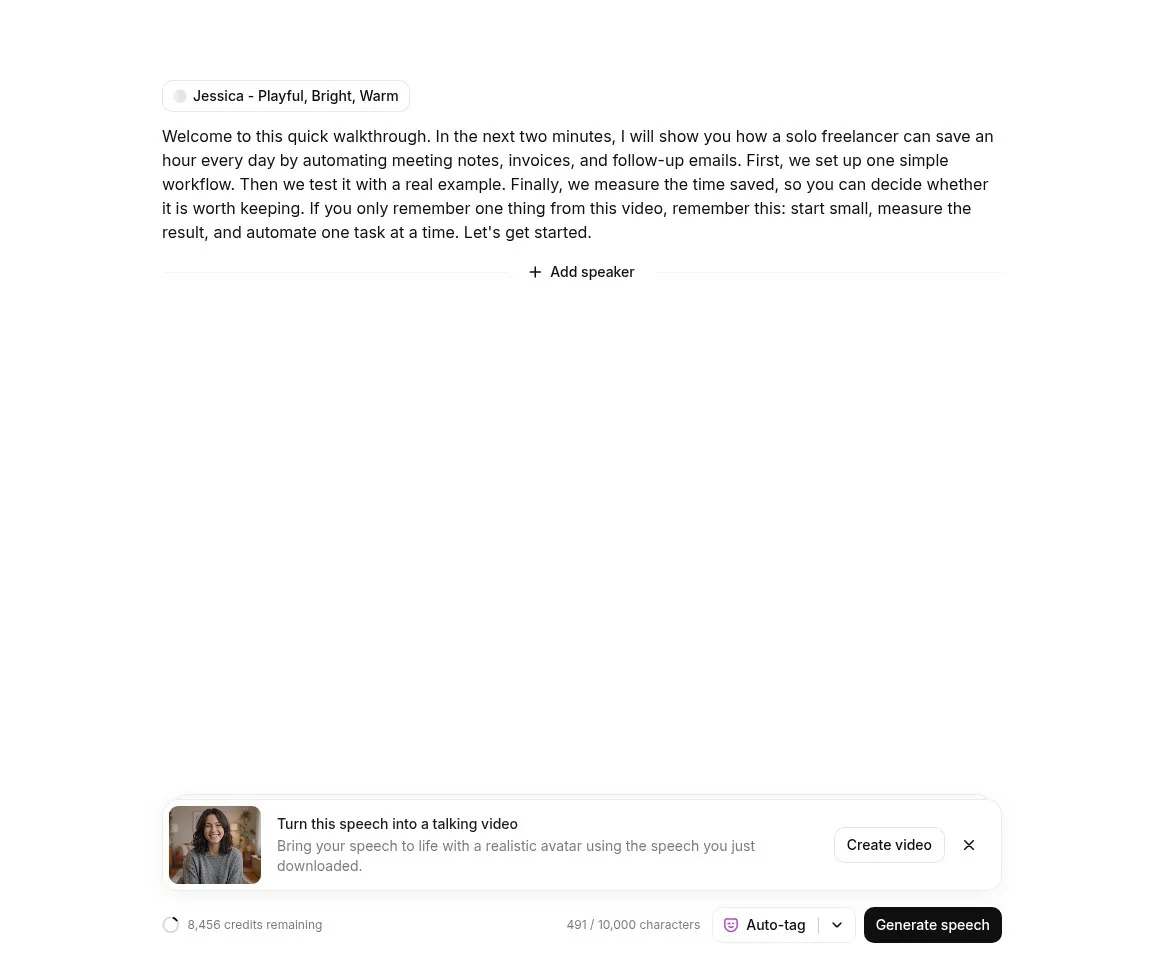
- Pasted the script into ElevenLabs. The editor counted 491 of 10,000 characters, with the default voice Jessica on the Eleven v4 model.
- Generated it. ElevenLabs took roughly 7 to 15 seconds, returned 32.13 seconds of audio and charged 491 credits (8,947 down to 8,456).
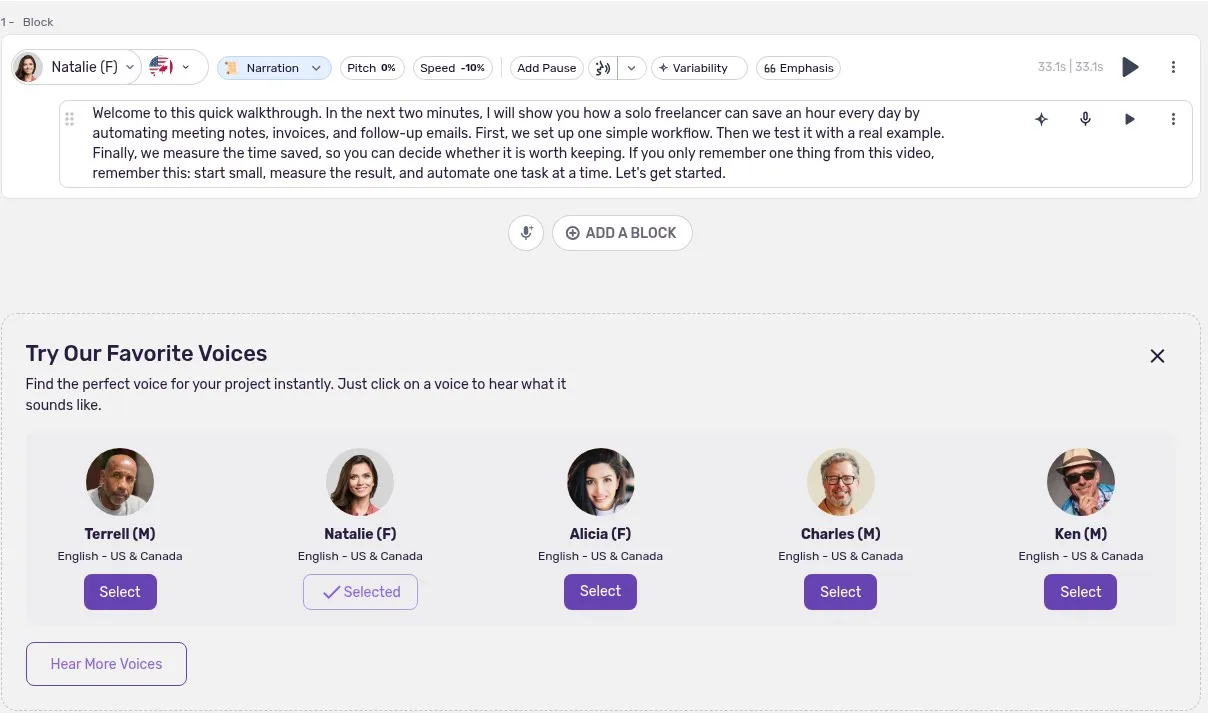
- Pasted the script into Murf with the voice Natalie (English, US and Canada). We switched her style from the default Angry to Narration and left speed at the -10% shown. Generation took about 20 to 30 seconds and the block read 33.1 seconds.
- Opened both export dialogs and downloaded the ElevenLabs file (519 KB). Murf’s dialog had no download button for audio.
- Read both pricing pages, ElevenLabs’s Terms of Service (updated October 9, 2026) and its help center article on publishing generated audio, and Murf’s help center and Terms of Service.
- Looked for a total voice count in both libraries. Neither page showed one.
We did not check the App Store or Google Play, and we did not compare the two clips by ear.
Try ElevenLabs free first →Voice quality: what we can and cannot say
We will not tell you which voice sounds better, because we did not judge the audio. A written opinion from us would be a guess.
The facts are these. Both clips came from the same 491-character script. ElevenLabs used Jessica on Eleven v4 and returned 32.13 seconds. Murf used Natalie in the Narration style and returned a 33.1-second block. ElevenLabs gave us an MP3 at 44.1 kHz and 128 kbps. Murf played the result in the browser only, so we could not save or inspect a file.
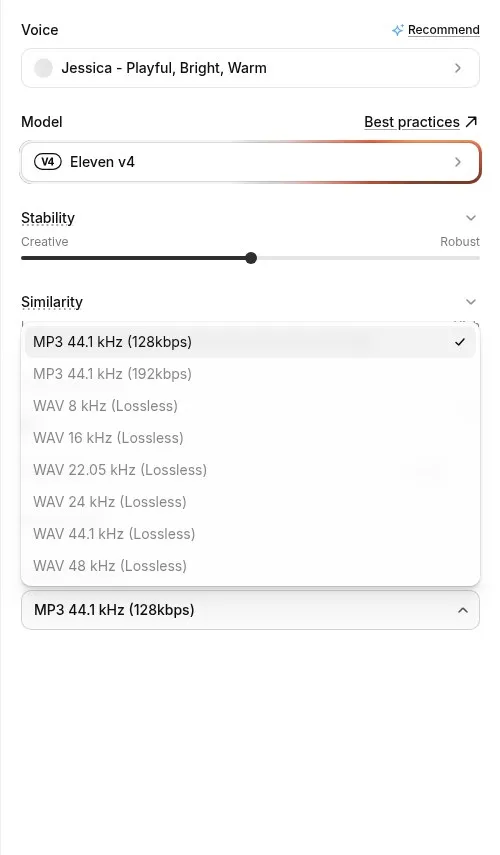
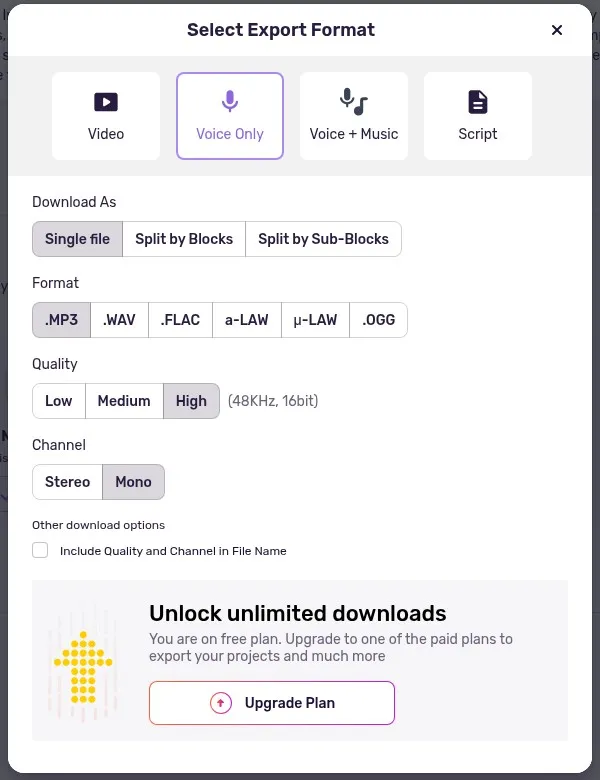
ElevenLabs lists MP3 at 192 kbps and WAV from 8 to 48 kHz, both greyed out on Free. Murf’s dialog lists MP3, WAV, FLAC, a-law, mu-law and OGG, a High setting labeled 48 kHz 16-bit, and Stereo or Mono. A banner above the upgrade button says free users cannot export projects.
Opinions come from other people. Users on Reddit report that Murf sounds robotic. One r/NewTubers commenter said Murf gives 10 free minutes but “the voices sound super robotic” (thread, April 2025). An r/LocalLLaMA poster who tried Murf and Play.ht found them “too robotic or corporate” (thread, January 2026). A July 2026 r/TextToSpeech thread compares ElevenLabs, Cartesia and Murf for a voice agent (thread).
These are individual views that we did not verify, and Murf may have changed since the older posts. Audition both with your own script. ElevenLabs lets you download free MP3 samples, and Murf lets you preview in the browser.
Commercial rights: what each plan actually allows
Both free plans block commercial use. For a channel in the YouTube Partner Program, that settles it, since ad revenue counts as commercial.
ElevenLabs’s Terms of Service (elevenlabs.io/terms-of-use, updated October 9, 2026) say in section 1(c) that free users may use the services only for non-commercial purposes. The help center article “Can I publish the content I generate on the platform?” adds two rules. Free-plan audio you publish must carry “elevenlabs.io” or “11.ai” in the title. And audio made outside a paid subscription stays non-commercial even if you upgrade later, so make your final audio after you subscribe. We saw no watermark or attribution notice inside the app, so the attribution duty comes from the help center text.
Murf is just as direct. Its pricing page says “No Commercial Rights” under Free and lists “Commercial Rights” under Creator. Section 5.1 of its Terms of Service (dated December 19, 2024) lets you use Murf-created voices commercially. Free cannot download audio anyway, so there is nothing to publish.
For a monetized channel, the legal route is a paid plan on either tool, and ElevenLabs Starter costs less. Our ElevenLabs Free vs Starter guide covers the upgrade decision in detail.
Credits and output: how far each plan goes
ElevenLabs charges one credit per character on Eleven v4. Our 491-character script cost 491 credits, so the 10,000 free credits cover about 20 clips of that length a month. Starter has 30,000 credits, which is about 60 such clips. ElevenLabs says roughly 1,000 credits make a minute of audio. Our run came out near 920 credits per minute.
Murf counts time. Free has 10 minutes of voice generation, Creator lists 24 hours a year and Business 96 hours a year.
One oddity needs a flag. After our 33-second clip, Murf’s counter moved from 10:00 to 9:59, about one second. We cannot explain that, so we do not know how fast the free minutes drain. Treat it as unverified.
Per minute of audio, the paid entry plans land close together. Starter billed yearly is about $0.17 a minute ($60 for roughly 360 minutes). Murf Creator is about $0.16 a minute ($228 for 1,440 minutes). Both use vendor figures. The real difference is the up-front cost and how much volume you get.
Set up ElevenLabs in ten minutes
- Open ElevenLabs' signup page and create a free account.
- Open Text to Speech or Studio from the sidebar and pick a voice. We kept Jessica on Eleven v4.
- Paste your script. A counter shows characters used out of 10,000.
- Click Generate speech and watch the credits counter.
- Download the clip. On Free, MP3 at 128 kbps is selected and the other formats are greyed out.
- Subscribe to Starter before you make audio for a monetized video.
Set up Murf in ten minutes
- Go to Murf AI's signup page and create a free account. The pricing page says no credit card is required.
- Create a project. The studio opens a block editor.
- Pick a voice from the suggestions or the full library. We used Natalie.
- Check the style dropdown. Natalie started on Angry for us, so we switched to Narration.
- Paste your script into the block and generate. Ours took about 20 to 30 seconds.
- Click Export. On Free, Voice Only shows formats and quality options but no download button. Only the Script tab downloads, as TXT, DOCX, SRT or VTT.
- Upgrade to Creator before you plan to publish audio.

Integrations
Murf lists a Canva integration on Creator and a PowerPoint integration on Business, and its site promotes voice-over for Google Slides. We tested none of them.
Murf sells API access separately. The free API trial gives $10 of credit, then text to speech costs $0.03 per 1,000 characters on Gen2 and $0.01 per 1,000 on Falcon 2.1, per Murf’s API pricing page on October 23, 2026.
ElevenLabs shows Creative, Agents and API tabs on its pricing page. Its plan table lists 44.1 kHz PCM over the API and 192 kbps audio on paid tiers, and a Dubbing Studio from Starter. We did not call either API.
Pricing (verified October 23, 2026)
ElevenLabs
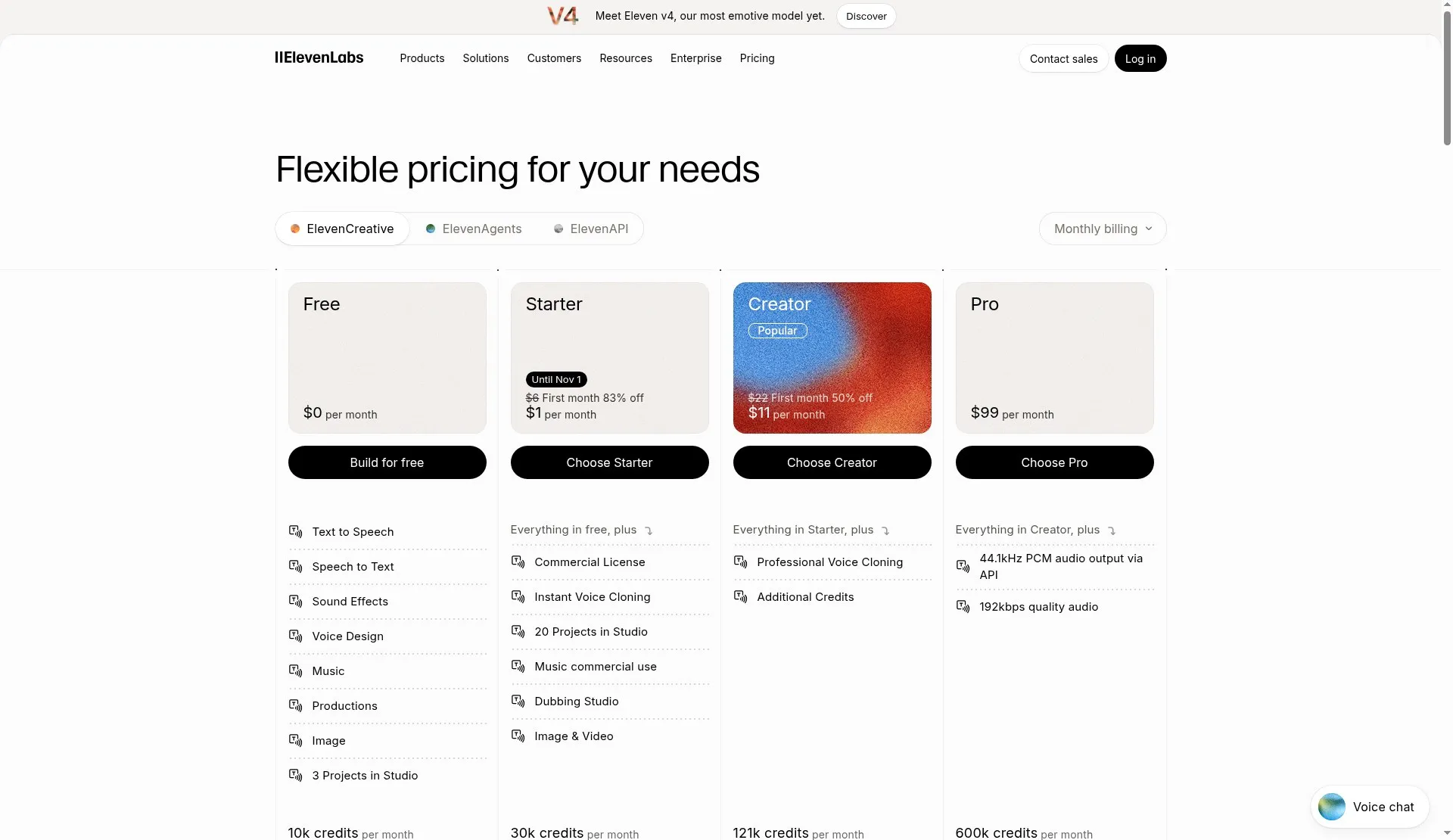
Prices come from the ElevenLabs pricing page in monthly view. The page’s FAQ says annual billing costs ten months of the monthly price, so the yearly totals are our arithmetic.
| Plan | Monthly billing | Billed yearly | Credits per month |
|---|---|---|---|
| Free | $0 | $0 | 10,000 |
| Starter | $6 ($1 first month until Nov 1) | $60/yr ($5/mo) | 30,000 |
| Creator | $22 ($11 first month) | $220/yr ($18.33/mo) | 121,000 |
| Pro | $99 | $990/yr ($82.50/mo) | 600,000 |
| Scale | $299 | $2,990/yr ($249.17/mo) | 1,800,000 |
| Business | $990 | $9,900/yr ($825/mo) | 6,000,000 |
Starter adds the commercial license, Instant Voice Cloning and 20 Studio projects. Creator adds Professional Voice Cloning. Promotions change, so check the page before you pay.
Murf AI
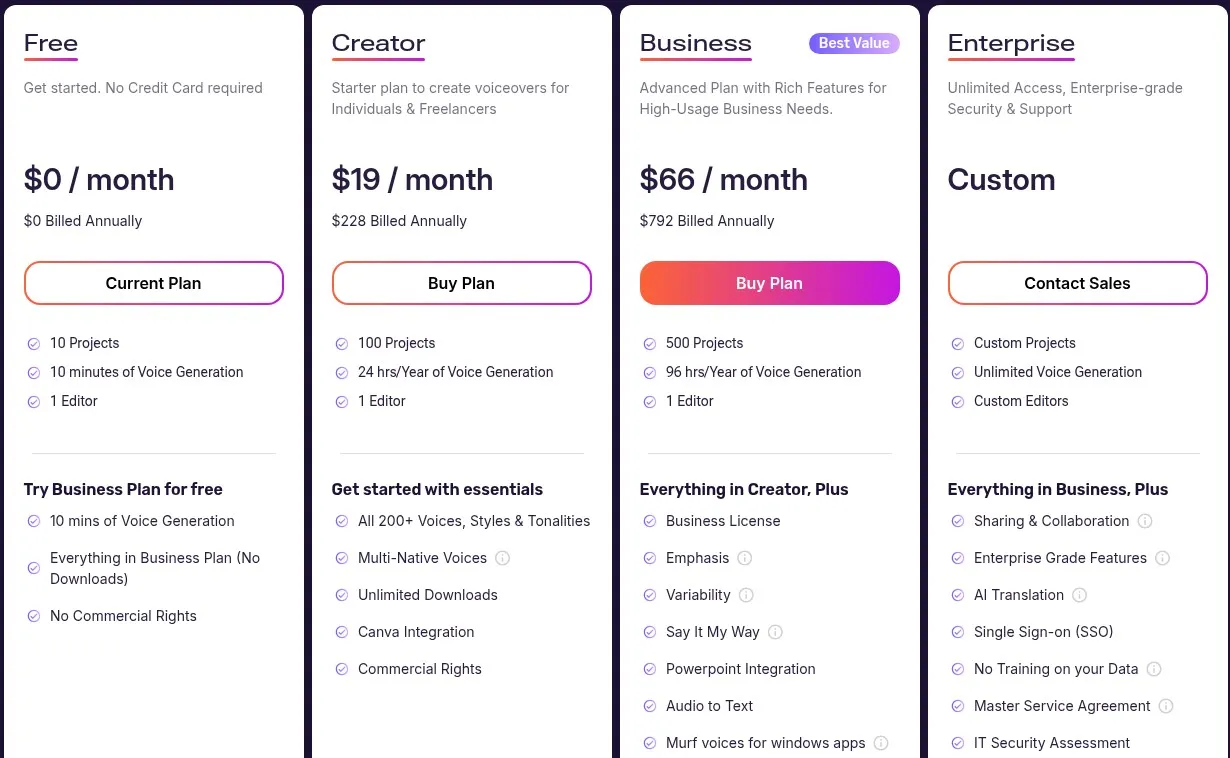
Prices come from Murf’s pricing page in its annual view on October 23, 2026.
| Plan | Price | Voice generation | Projects |
|---|---|---|---|
| Free | $0 | 10 minutes | 10 |
| Creator | $19/mo billed yearly ($228/yr) | 24 hours a year | 100 |
| Business | $66/mo billed yearly ($792/yr) | 96 hours a year | 500 |
| Enterprise | Custom | Unlimited | Custom |
Creator lists all 200+ voices, 30+ languages, multi-native voices, unlimited downloads, the Canva integration and commercial rights. Business adds a business license, emphasis, variability, the PowerPoint integration and audio to text. Murf says monthly plans exist, but the view we recorded showed annual billing only, so we have no monthly price. Murf’s own pages also disagree on voice counts (150+, 200+ and 300+) and language counts (30+ to 35+).
If you want to try Murf’s editor, its free plan is the place to start, but plan on paying before you export anything. If you need a commercial license at the lowest cost, take Starter.
Start on ElevenLabs Starter →Where ElevenLabs wins
ElevenLabs lets you leave the free plan with a file. We downloaded a 519 KB MP3 and could play it anywhere, which helps when you are auditioning voices.
The entry price is lower. Starter is $6 a month, or $5 billed yearly, against $228 a year for Murf Creator. If you are not earning yet, that gap matters.
ElevenLabs also claims the bigger catalog. Its text-to-speech page says 17,500+ voices and 90+ languages on Eleven v4, while Murf claims 200+ voices and 30+ languages. Those are vendor numbers, and ElevenLabs quotes 10,000+ and 17,500+ on different pages. Our library page showed no total.
The editor has an “Add speaker” button, and the v4 model is listed with multi-speaker dialogue. We did not test it.
Where Murf wins
Murf is built like a small production studio. Each block carries a voice picker, a style dropdown, Pitch and Speed controls and an Add Pause button. You can give every block its own voice, which suits a narrator plus a quoted customer.
The export dialog is wider. It has Video, Voice Only, Voice + Music and Script tabs, six audio formats and a split-by-block option. We could not export audio, so we cannot rate the files. The Script tab worked on Free and gives you TXT, DOCX, SRT and VTT.
Murf also lists slide and design integrations: Canva on Creator, PowerPoint on Business, and Google Slides narration on its site. If you build presentations or training videos, those matter more than a voice catalog. All of it is vendor-stated.
Creator lists 24 hours of generation a year, against roughly 6 hours on ElevenLabs Starter by its own rule of thumb. That helps if you publish a lot.
What we didn’t like about ElevenLabs
The free plan’s commercial ban catches people late. If you audition for a week on Free and then decide to monetize, the help center says those clips stay non-commercial, so you regenerate everything.
Credits are hard to budget. You think in videos, and the plan counts characters.
The pricing pages disagree with each other. One lists 192 kbps as a Pro feature and the comparison table puts it on Creator.
What we didn’t like about Murf
The free plan cannot export audio. You can build a project, pick a voice and hear the result, then hit a wall at export. That is a fair trial of the editor and a poor trial of the product you would pay for.
The page crashed once with a “Something went wrong” message, and we had to reload it. One crash is an anecdote, but it cost us a minute.
Natalie’s style opened on Angry, which is odd for narration, and the minutes counter dropped by about one second for 33 seconds of audio. We could not explain either.
Which one fits your channel
You post two or three monetized videos a week with one narrator. ElevenLabs Starter fits, and its 30,000 credits cover about 60 clips of our test length a month.
You are still testing a format and earn nothing yet. Use ElevenLabs Free to download samples for non-monetized uploads, and remember the attribution rule if you publish them.
You make slide decks, courses or explainer videos and want the narration inside the same tool. Murf fits, and Creator is the plan to price out.
Your script has two voices. Both tools can do it, with a voice per block in Murf and an Add speaker control in ElevenLabs. We tested neither with two voices, so audition both.
Who should skip both
If your channel is not monetized and you only need a rough voice-over for a draft, a free tool inside your video editor may do. Our CapCut vs Descript comparison covers that route.
If you need deep emotional acting across a long fiction series, a human voice actor still does things text-to-speech does not promise.
If you need a specific regional accent, test it on both libraries before paying. Neither library showed us a total count.
Support, cancellation and refunds
ElevenLabs lets you cancel any time from your account. The subscription runs to the end of the paid period, and section 6(a) of its Terms says fees already paid are not refunded. Section 6(e) says all sales are final and refunds are at its discretion. The pricing page adds that unused paid credits expire when you cancel or downgrade. Support runs through help.elevenlabs.io and team@elevenlabs.io.
Murf auto-renews paid plans. You cancel in Workspace Settings, under Subscription, and it takes effect at the end of the billing period. Section 2.5.3 of Murf’s Terms (December 19, 2024) allows a refund request only if you bought within the last 24 hours and used under 10 minutes of voice generation. You write to support@murf.ai.
Privacy and account safety
ElevenLabs’s Terms give it a license to use your content to provide and improve its services and develop new ones. You can opt out of training use in the Data use menu of your account. We did not read the full privacy policy.
Murf’s API pricing page lists SOC 2 Type II, ISO 27001, GDPR and HIPAA badges, which are vendor claims. We did not read Murf’s privacy policy, so check it before you upload client scripts.
If you clone a voice, make sure you hold the rights to the source audio. We did not test cloning on either tool.
Alternatives worth a look
Descript and CapCut put voice features inside a video editor, a different kind of tool. See our CapCut vs Descript article.
Reddit users also name Fish Audio, Cartesia, Kokoro (an open-source model you run on your own machine) and TTSMaker. We have not tested them.
Who should choose ElevenLabs
You publish monetized videos and want a commercial license at the lowest monthly cost. Start with ElevenLabs' free plan to download a sample or two, then move to Starter before your first monetized upload.
Who should choose Murf
You build presentations, training videos or explainers, and you want the voice, pacing controls and export options in one studio. You are happy to pay $228 a year. Try Murf's free plan to check the editor, then price Creator against your upload schedule.
FAQ
Does the ElevenLabs free plan allow YouTube monetization?
No. ElevenLabs’s Terms of Service limit free users to non-commercial use, and ad revenue is commercial. The cheapest paid plan is Starter at $6 a month.
Can I use Murf free for monetized videos?
No. Murf’s pricing page lists “No Commercial Rights” on Free, and the free plan has no audio download. Murf starts commercial rights at Creator.
Which is cheaper for a faceless YouTube channel?
ElevenLabs, at $6 a month for Starter or $5 billed yearly, against Murf Creator at $19 a month billed yearly. Per minute of audio they come out close, so the gap is the up-front cost.
Which sounds better?
We did not judge. Reddit users report that Murf sounds robotic, but those posts date from 2025 and early 2026. Audition both with your own script.
Does ElevenLabs or Murf have a mobile app?
ElevenLabs’s text-to-speech page lists iOS and Android apps. We did not test them, and we did not check Murf’s app status.
What happens to ElevenLabs credits if I cancel?
Per the pricing page, unused paid credits expire when you cancel or downgrade, and rollover does not apply to Free. ElevenLabs says content made during a paid subscription keeps its commercial license afterward.
Scorecard
Scores are out of 5. They rest on the free-plan test and the pages we read on October 23, 2026. We did not rate how the voices sound, so there is no voice-quality row.
| ElevenLabs | Murf AI | |
|---|---|---|
| Free plan: can you get a file out | 4 | 1 |
| Price of the cheapest commercial plan | 5 | 3 |
| Editor and production tools | 3 | 4 |
| Voice and language range (vendor claims) | 5 | 3 |
| Pricing clarity | 4 | 3 |
| Overall | 4.2 | 2.8 |
ElevenLabs loses a point on the free plan because 192 kbps and WAV sat behind the paywall. Murf gets a 4 on tools for its block editor and export tabs, which we saw but could not use for audio. See ElevenLabs' current plans
How we tested
YOKI tested on October 23, 2026, with free accounts on both tools and one script of 491 characters. We ran each tool once, so timings are single runs.
We read the ElevenLabs pricing page, text-to-speech page, Terms of Service (updated October 9, 2026) and help center article on publishing generated audio. We read Murf’s pricing page, its help center pages on the free trial and cancellation, its Terms of Service dated December 19, 2024, and its API pricing page. The Reddit threads come from our research notes, and we have not verified what they say.
We did not test paid plans, cloning, the APIs, dubbing, any integration, the mobile apps or two-voice scripts. We did not compare the audio by ear. Anything in those areas is the vendor’s claim or left out.
Final verdict
ElevenLabs is the better starting point for a faceless YouTube channel. Its free plan hands you a downloadable MP3 to audition, and Starter at $6 a month is the cheapest route to a commercial license in this comparison. Murf’s free plan could not export any audio in our test, and its commercial plan costs $228 a year.
Murf has a real case for people who build slides and videos, because its studio puts per-block voices, pitch and speed controls and export tabs in one place. If that is you, plan on paying for Creator.
Audition on ElevenLabs Free, then upgrade before your first monetized upload.
Try ElevenLabs free →