OpusClip Review (2026): What the Free Plan Gives You and When Paying Makes Sense
We tested OpusClip's Pro trial on a new account: 90 credits, 21 clips from one video, watermark on every export. See every free-plan limit and when to upgrade.
The short answer
New accounts get a 7-day Pro trial with 90 credits and no card. After that, Free drops to 60 credits a month, watermarked and non-commercial. Starter at $15 a month is the minimum for clean exports.
Prices checked on the vendor's own page. Some links are affiliate links (disclosure).
Quick verdict: OpusClip clips long videos into shorts with AI. New accounts start on a 7-day Pro trial: 90 credits, no credit card, full editor access. We clipped a 15-minute video and got 21 shorts in about 8 minutes. Exports during the trial still carry an OpusClip watermark. After the trial, the free plan drops you to 60 credits a month, 3-day media storage, and a non-commercial-use restriction. If you need clean exports and the right to post commercially, Starter at $15 a month is the minimum.
What OpusClip’s free plan includes
OpusClip watches a long video and picks moments it predicts will work as standalone shorts. Paste a YouTube link or upload a file. One credit equals one minute of source video. Our test confirmed that ratio.
| Feature | Free | Starter ($15/mo) | Pro ($29/mo) |
|---|---|---|---|
| Credits per month | 60 | 150 | 300 |
| Media storage | 3-day expiry | 30 days | 100 GB fixed |
| Export resolution | Up to 1080p | Up to 1080p | Up to 4K |
| Captions | With watermark | No watermark | No watermark |
| Virality score | No | Yes | Yes |
| AI clipping | Spoken words | + visual, sound, emotion | + custom reframing |
| Aspect ratios | 9:16 only | 9:16 | 9:16, 1:1, 16:9, 4:5 |
| Social posting | No | YouTube Shorts, TikTok, Instagram | All platforms |
| Commercial use (per ToS) | No | Yes | Yes |
Pricing page, October 22, 2026. New accounts receive a 7-day Pro trial with 90 credits and the full editor before the free plan kicks in.
What we tested
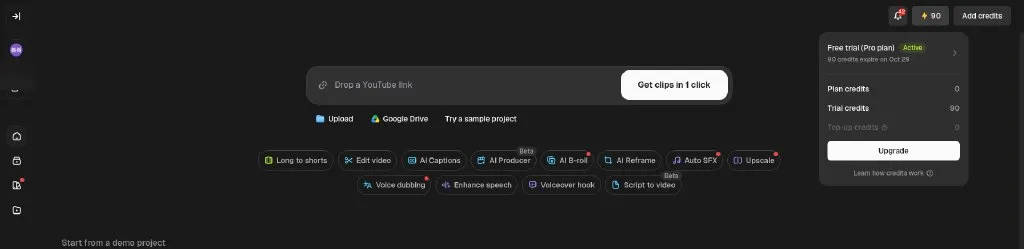
On October 22, 2026 we created a brand-new OpusClip account through Google sign-in. No credit card was required. The account landed on “Free trial (Pro plan) Active” with 90 trial credits, set to expire October 29, 2026.
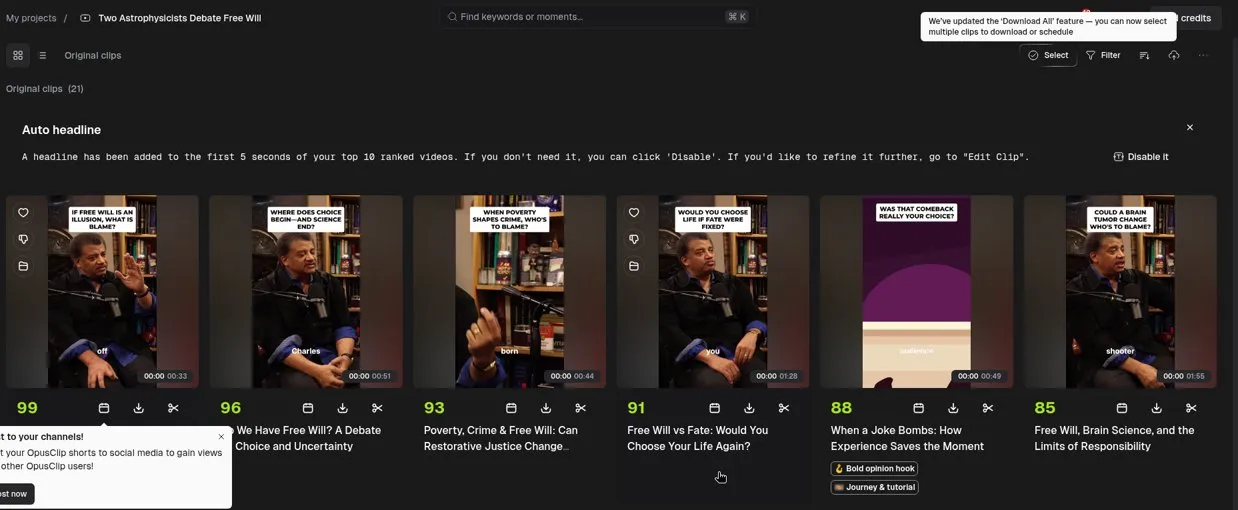
Clipping a 15-minute video. We ran OpusClip’s built-in sample, “Two Astrophysicists Debate Free Will” (15 minutes 18 seconds), with default settings. The app charged 15 credits. Processing took about 8 minutes. Output: 21 clips, ranging from 27 seconds to 1 minute 55 seconds. Virality scores for the top six: 99, 96, 93, 91, 88, 85. The top 10 clips received auto-generated headlines overlaid on the first 5 seconds of each short.
Editor. Caption word editing worked during the trial: double-click a word, change it, hit Apply. Over 20 caption presets were available, including Karaoke, Beasty, Simple, and Mozi. We switched aspect ratio from 9:16 to 1:1 with no upgrade wall, though a dialog warned that the change “may affect how hooks and motion graphics appear in the preview.”
Locked features. Four items showed lock icons even on the Pro trial: Remove watermark, 4K export, Upscale and download, and top-up credits.
Export and watermark. We downloaded one clip at HD Original quality. The file was 1080 by 1080 pixels (after switching to 1:1), h264 with AAC audio, 33.6 seconds, 26.2 MB. The “OpusClip” logo watermark sat in the top-left corner, visible at the 12-second and 33-second marks but hidden during the opening seconds while the auto headline overlay covered that part of the frame.
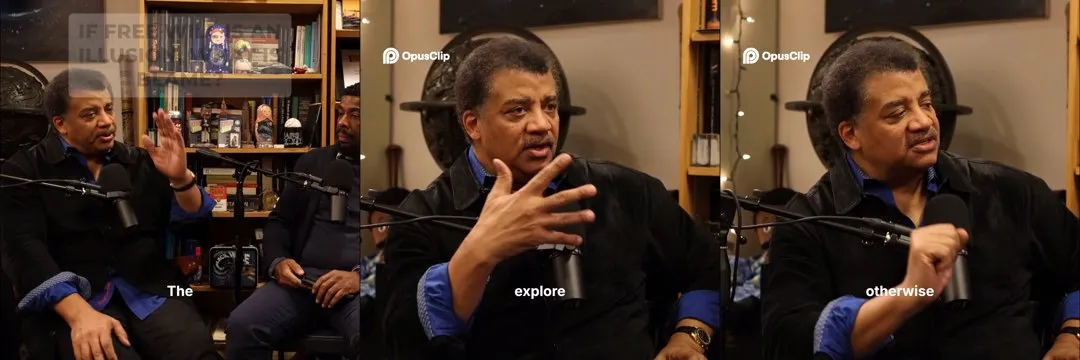
Exports carry the watermark even on the Pro trial. You need a paid plan to remove it.
What we did not test. The post-trial free plan. Our trial runs until October 29, 2026. We will recheck after that date and update this article with free-plan observations: the 3-day media expiry in practice, credit reset to 60, feature lockouts, and whether the watermark behavior changes on actual free-plan exports. We did not connect social accounts or confirm whether caption edits carry into the final downloaded file.
Try OpusClip's free trial →How far 60 free credits go
Our 15-minute sample cost 15 credits and produced 21 clips. At that ratio, 60 free credits cover four 15-minute videos and about 84 clips a month. Real numbers shift with content.
| Source video length | Videos per month (60 credits) | Expected clips (our ratio) |
|---|---|---|
| 5 minutes | 12 | ~84 total |
| 10 minutes | 6 | ~84 total |
| 15 minutes | 4 | ~84 total |
| 30 minutes | 2 | Varies |
| 60 minutes | 1 | Varies |
Two speakers changing topics often (like our test video) yield the most clips. A single-topic screencast with few natural breaks produces fewer. Credits reset monthly. They do not roll over, and only Pro subscribers can buy top-up packs.
The 3-day expiry and watermark
Two limits push creators off the free plan faster than the credit cap.
Media expiry. Free-plan clips expire after 3 days, per the pricing page. Process a batch on Sunday, forget to download by Wednesday, and the clips vanish from your dashboard. Re-uploading and reprocessing the same video burns your credits a second time, so batch-and-download discipline matters on the free plan. During our Pro trial the project card showed “6 days left to edit,” matching the trial’s remaining window. We have not yet observed the 3-day free-plan expiry ourselves because our trial was still active during testing.
Watermark. The “OpusClip” logo sits in the top-left corner of exported clips. On our test export it appeared at the 12-second and 33-second marks, hidden only during the opening seconds when the auto headline overlay covered that part of the frame. The watermark showed up even on the Pro trial. Starter removes it.
Downloaded files are standard .mp4. No DRM.
The commercial-use restriction
OpusClip’s terms of service, read October 22, 2026, say the free plan is “for your own internal, personal, non-commercial use.” Paid plans “are licensed to use the Services for commercial uses and otherwise to the fullest extent possible under applicable law.”
What counts as commercial? Posting clips to a monetized YouTube channel, promoting a product on TikTok, or including clips in a client deliverable. OpusClip could suspend your account under those terms.
The 7-day Pro trial gives you the full editor but does not remove the watermark, and we saw no commercial-use notice anywhere inside the app during the trial. To test clips for commercial use, start on Starter so the watermark is gone and the license covers you.
Pricing (verified October 22, 2026)
We checked two sources on October 22, 2026: OpusClip’s public pricing page and the in-app upgrade dialog. They showed different monthly prices for Starter and Pro.
| Plan | Pricing page | In-app (monthly) | In-app (yearly) | Credits/mo |
|---|---|---|---|---|
| Free | $0 | $0 | n/a | 60 |
| Starter | $15/mo | $12/mo | Not shown | 150 |
| Pro | $29/mo | $23/mo | $11.50/mo ($138/yr) | 300 |
| Business | Custom | Custom | Custom | Custom |
No annual billing toggle on the pricing page. The in-app dialog had a “Yearly (up to 60% off)” toggle showing Pro at $11.50 a month billed at $138 per year, which works out to 3,600 credits per year per the help center.
We do not know why the pricing page shows $15 for Starter while the in-app dialog shows $12. Check both the pricing page and the upgrade dialog inside your account before paying.
Cancel through account settings. Your plan runs until the end of the billing period, with no prorated refunds per the terms of service. Auto-renewal is on by default. To delete your account, email account.deletion@opus.pro (privacy policy, October 22, 2026).
Start with OpusClip's free plan →Which plan should you pick?
You want to see whether AI clipping picks the moments you care about. Stay on OpusClip's free plan. Download clips within 3 days, and remember the non-commercial restriction.
You post clips for a channel or a business. Move to Starter at $15 a month. Watermark gone. Social posting to YouTube Shorts, TikTok, and Instagram opens up, and storage extends to 30 days so you can batch a full week of content without losing clips to expiry.
You process more than 150 minutes of source video a month or want the visual AI tools. Choose Pro at $29 a month. Three hundred credits, 4 aspect ratios, AI B-roll, video dubbing, Premiere and DaVinci export, and a 2-seat team workspace.
Alternatives worth a look
Descript edits video by editing text. You highlight part of the transcript, and Descript cuts the video to match. Slower than OpusClip’s auto-clipping, but you pick exactly what stays, and the free plan includes 1 hour of transcription per month with watermark-free exports. Paid plans: $16 a month.
CapCut offers a free web and desktop editor with auto captions. No AI long-to-short clipping, but CapCut’s manual editing runs deeper for short-form work, and the free tier is generous. Paid: $9.99 a month.
FAQ
Is OpusClip’s free plan free forever?
Yes, forever. No credit card. OpusClip's free plan gives you 60 credits a month, AI clipping for spoken-word content, and up to 1080p exports. New accounts also start with a 7-day Pro trial (90 credits, full editor).
Does OpusClip watermark free clips?
Yes. The “OpusClip” logo shows in the top-left corner of exported clips. On our test export the watermark appeared at 12 seconds and 33 seconds, hidden only while the auto headline covered that part of the frame. Even the Pro trial watermarks exports. Starter at $15 a month removes it.
Can I use free OpusClip clips for my business?
No. The terms of service restrict the free plan to “personal, non-commercial use.” Paid plans license commercial use.
What happens after the 3-day expiry?
Free-plan media disappears after 3 days. If your clips expire, you re-upload and reprocess the source video, spending credits again. We have not observed this ourselves yet because our Pro trial was still active during testing.
How many clips does one video produce?
Depends on the source material. Our 15-minute two-speaker debate yielded 21 clips, from 27 seconds to 1 minute 55 seconds, with virality scores from 99 down to about 60. Frequent topic changes and multiple speakers tend to yield the most clips.
Can I cancel OpusClip anytime?
Yes. Cancel in account settings. Your plan continues until the billing period ends. No prorated refunds, per the terms of service.
How we tested
On October 22, 2026 we created a brand-new OpusClip account, which started on a 7-day Pro trial with 90 credits. We clipped OpusClip’s sample video (“Two Astrophysicists Debate Free Will,” 15 minutes 18 seconds) with default settings, exported one clip at HD quality, inspected the watermark on the downloaded file, browsed the editor’s caption presets and aspect ratio options, and noted every locked feature.
The same day we read OpusClip’s pricing page, the in-app upgrade dialog, the help center article on plans and credits, the terms of service, and the privacy policy. All plan limits, prices, and policy details in this article come from those sources on that date.
The post-trial free plan was not tested. Our trial expires October 29, 2026, and we will update this article with free-plan observations after that date.
More on how we work is on the About page.
Final verdict
Sign up and use the 7-day Pro trial to clip two or three of your own videos. You get 90 credits and the full editor. No credit card. Exports carry a watermark during the trial, so treat this week as a test run, not a production pipeline.
If the AI picks the moments you want, budget $15 a month for Starter. That removes the watermark, adds commercial rights, and extends storage from 3 days to 30. For heavier use or the visual AI tools (B-roll, dubbing, multiple aspect ratios), Pro at $29 a month covers it.
Try OpusClip free →