10 AI Tools Every Pinterest Creator Should Try in 2026
CapCut for video pins, Pictory for turning blog posts into video, ElevenLabs for a $5 voiceover, plus seven more tools for Pinterest creators, with prices checked October 18, 2026.
The short answer
Install CapCut first if you make video pins, since it is free to start. Add ElevenLabs Starter at $5 a month billed yearly once a pin sells something, because the free voice plan is non-commercial.
Prices checked on the vendor's own page. Some links are affiliate links (disclosure).
Our top 3: CapCut is the editor to install first if you make video pins, and the free version covers templates, vertical exports and a few auto-captioned videos a month (2 on the web editor when we checked). Pictory fits bloggers who want an existing post turned into a video pin without touching a timeline. ElevenLabs adds a voiceover with a commercial license for $5 a month on the annual Starter plan.
What Pinterest creators need from AI tools
Pinterest rewards a steady stream of fresh pins, and most people reading this make them alone, between Etsy orders, client work or a day job. So every tool below had to clear four bars. It has to turn out a vertical pin or a short video without a design degree. Its free plan or cheapest paid plan had to be worth using on its own, because a $30 subscription for a side business that made $400 last month is a hard sell. You have to own the output for commercial use. And you should be able to learn it in an afternoon.
Every price here was first read on the vendor’s own pages on September 7, 2026 and re-checked on October 18, 2026. Where a page would not load, or showed a price in the wrong currency, you’ll see a note instead of a guess.
The 10 best AI tools for Pinterest creators in 2026
1. CapCut, best overall for video pins
CapCut is a video editor that runs on your phone, in a browser and on desktop, with auto captions, a background remover, text to speech and a library of templates sized for vertical video. You drop in product clips or a screen recording, pick a template, and the app handles captions and timing. Two taps later you have a pin.
CapCut’s US App Store listing shows a Standard Monthly Subscription at $9.99 and a Pro Monthly Subscription at $19.99. CapCut’s own Standard vs Pro comparison page lists Pro at $19.99 a month or $179.99 a year, with about 1 TB of cloud storage, and it says prices vary by region, platform, taxes and promotions. The company’s help center calls Standard the budget option below Pro and says Pro now includes 1,200 AI credits, up from 550.
Etsy sellers filming products on a phone get the most out of it, along with anyone who wants one editor for Pinterest, TikTok and Reels at the same time. One catch. The plan lineup and price shift by country and by device, so the number in your app may differ from the number above, and CapCut points you to the in-app subscription page for the final figure.
CapCut2. Canva, best for static pins
Canva is where most Pinterest creators already live. The 1000 by 1500 pin templates are built in, Magic Resize turns one pin into a story, a Reel cover and an Etsy banner, and the background remover cleans up product photos shot on a kitchen table. Magic Write drafts the text on the pin for you.
Canva Free costs $0 and includes up to 20 uses of Standard or Premium AI tools a month, 5 GB of storage and one brand kit limited to three colors. Canva’s pricing page lists Pro at US$144 a year. Pro adds five brand kits, 100 GB, the resize and background remover tools, social content scheduling and up to 200 Premium AI uses a month, and its Standard AI tools don’t count against that allowance. Canva Business is US$250 a year per person and adds 100 brand kits, 500 GB and up to 400 Premium AI uses. The page we read showed yearly prices only, with no monthly figure.
Pick Canva if static pins outnumber your video pins and you sell physical products with photos. Free works at first. The AI cap is the problem. Every plan meters premium AI use, and 20 uses on the free tier can be gone in a week if you lean on Magic Write for every description, which pushes you toward Pro and its optional AI Pass add-on.
3. Pictory, best for bloggers turning posts into video
Pictory takes a blog post URL or a script, splits it into scenes, matches each scene with stock footage and captions, and adds a voiceover from ElevenLabs voices that are bundled into the plan. A 1,200-word post about “10 fall porch ideas” becomes a captioned video pin in about the time it takes to make coffee. No timeline, no keyframes.
On annual billing, Starter is $25 a month with 2,400 video minutes a year, 5 GB of storage, one brand kit and 720 minutes of ElevenLabs voices. Professional is $35 a month annually with 7,200 video minutes, 20 GB and five brand kits. Paid month to month, Starter is $29 with 200 video minutes and Professional is $59 with 600. Every plan exports without a watermark and starts with a 14-day free trial that covers three video projects.
Bloggers with a back catalog of posts are the obvious fit, since each old post is a pin waiting to happen. The footage is stock, though. A video about your handmade candles will show someone else’s candles unless you upload your own clips, so Etsy sellers should treat Pictory as a tool for tip and tutorial pins, with product pins staying in CapCut.
Pictory4. ElevenLabs, best budget voiceover
ElevenLabs turns typed text into a voice that sounds like a person reading it, with a library of stock voices and instant voice cloning so the voice on your pins can be yours. You paste a 40-word script, pick a voice, download the audio and drop it into CapCut or Pictory. Cloning takes minutes.
The Free plan gives you 10,000 credits a month with no commercial license. Starter is $5 a month on annual billing or $6 monthly, with 30,000 credits, a commercial license and instant voice cloning. Creator is $22 a month or $18.33 on annual billing, with 121,000 credits and professional voice cloning, and the page showed the first month of Creator at 50 percent off.
If a pin sells something, you need the Starter plan at minimum, because the free tier’s license does not cover commercial use. That is the one rule. Credits are the other thing to watch. The pricing page puts Starter at about 30 minutes of text to speech a month and Free at about 10, so try a few scripts on the free plan first and see how far that goes.
ElevenLabs5. OpusClip, best for clipping long videos into pins
OpusClip watches a long video, finds the moments most likely to hold attention, cuts them into vertical clips with captions and gives each clip a virality score. Record a 20-minute studio tour or a YouTube tutorial once, and OpusClip hands you a dozen candidate pins.
The Free plan is $0 with 60 credits a month. It works from local uploads up to 10 GB per video, with clipping by spoken words, watermarked 1080p exports, no editing and clips you can export for only three days. Starter is $15 a month, billed monthly only, with 150 credits a month. It adds imports from YouTube, Google Drive, Vimeo and Zoom, the virality score, three AI image B-roll clips a month, 20 AI voiceovers a day and watermark-free exports.
Pro is $29 a month, or $14.50 a month billed annually at $174 a year, with 300 credits a month that roll over for two months. It adds AI video B-roll, 1:1 and 16:9 formats, a social media scheduler, export to Premiere Pro and DaVinci Resolve, and a team workspace with two seats. OpusClip’s help center calls these monthly allowances processing minutes.
OpusClip fits creators who already film long videos for YouTube or run live workshops. Pinterest support depends on the tier. Starter posts only to YouTube Shorts, TikTok and Instagram Reels. Pro adds posting and scheduling to Pinterest, Facebook, LinkedIn, X, Threads and Bluesky. On Starter, plan on downloading each clip and uploading it to Pinterest by hand.
OpusClip6. ChatGPT, best for pin titles and descriptions
ChatGPT writes the words around the pin. Paste in a product listing and ask for ten pin titles under 100 characters and ten descriptions with two keywords each, then keep the three that sound like you. It also generates images, drafts board descriptions and rewrites a blog intro as a pin caption in one message.
The Free plan is $0. ChatGPT Go is $8 a month in the US with higher limits than the free tier. Plus is $20 a month with higher limits again, and OpenAI lists no annual option for it. Pro now starts at $100 a month, with tiers at $100, $200 and $500.
Anyone who freezes at a blank description box will use this daily. ChatGPT has never seen your Pinterest analytics, though, so the keywords it picks are guesses until you paste in terms from Pinterest Trends or your own top pins. Feed it data first.
7. Tailwind, best for scheduling and AI captions
Tailwind is a Pinterest scheduler with an AI writer, Ghostwriter, and a design tool, Tailwind Create, that turns a photo into a batch of pin layouts. SmartSchedule picks posting times, and Communities let you share pins with other creators in your niche. Tailwind calls itself an official Pinterest partner, and its scheduling plan publishes pins straight to Pinterest.
Tailwind now sells three Pinterest products, priced per Pinterest account. Pin Scheduling & Creation is $17.99 a month billed annually or $29.99 month to month, with 300 credits a month. Pinterest SEO and Pinterest Engagement are $11.99 a month billed annually or $14.99 monthly each, with 50 credits a month. A bundle of all three is listed at $29.98 a month, and extra credits cost $10 per 100. The 40 percent saving on the page is the discount for paying annually.
Tailwind suits creators pinning daily who are tired of doing it live. You can start free with no credit card, but the pricing page doesn’t say what the free tier includes, so treat it as a trial. Plan on Pin Scheduling & Creation. Scheduling one pin uses one credit, so its 300 credits cover up to 300 scheduled pins a month, fewer if you also spend credits on SmartPin or keyword searches.
8. Midjourney, best for original imagery
Midjourney generates images from a text prompt, and it is the tool behind a lot of the dreamy nursery, cottage kitchen and moody autumn pins in your feed. You describe the scene, pick one of four results, upscale it and drop it into Canva as a background.
Basic is $10 a month or $96 a year with 3.3 hours of fast GPU time. Standard is $30 a month or $288 a year with unlimited images in Relax mode. Pro is $60 and Mega is $120 a month, both with Stealth mode to keep your images private. Once you subscribe, the general commercial terms let you use the images in your business, though companies earning over $1 million a year must be on Pro or Mega.
Bloggers and digital product sellers who need a stream of atmospheric imagery get the most here. It cannot draw your actual product. For Etsy sellers that means Midjourney makes backgrounds and mood boards while the hero shot still comes from your camera. Every tier is paid. Budget $10 to start.
9. Pinterest Trends, best free research tool
Pinterest Trends is Pinterest’s own tool for seeing what people search for, save and shop, with up to two years of history by region and country. Type “fall wreath” and you see when interest starts climbing each year, which tells you when to publish. A crystal ball icon marks keywords with a prediction attached.
You log in with a Pinterest business account to use it. Pinterest’s business site says business accounts are free and lists Trends among the account’s features, and none of the Pinterest pages we read list a separate charge for the tool.
Open it first. Every creator on this list should check it before writing a single pin title, because it is the only tool here that knows what Pinterest users typed last week. Depth is where it runs thin. Audience-specific data covers only the past 90 days, and the tool reports at the region and country level, so a tiny niche may show a flat line.
10. Notion, best for planning a pin calendar
Notion is a workspace where a content calendar, a keyword list and a folder of pin drafts live in one database. Set up a table with columns for pin title, board, publish date and status, and the calendar view shows the month at a glance. Notion AI drafts and summarizes inside the page.
The Free plan is $0 per member and includes a limited trial of Notion AI, basic forms and sites, and file uploads up to 5 MB each. Plus adds unlimited file uploads, custom forms and custom sites, and Business adds Notion Agent and AI Meeting Notes.
Notion’s pricing page showed prices only in Japanese yen from our location on October 18, 2026, so we can’t confirm the US dollar price for Plus or Business. On that page, Business cost almost twice as much as Plus per member, and paying yearly saves up to 20 percent. Check the page in your own currency before you upgrade.
Notion fits creators juggling pins for a blog and an Etsy shop at once. Free covers that. Notion AI on the Free and Plus plans is labeled a trial on the pricing page, so if you want AI drafting every day, you are on Business, and that costs more than a solo creator needs to spend for a calendar.
Comparison table
| Tool | Best for | Free plan | Paid from (checked 2026-10-18) | Pinterest posting |
|---|---|---|---|---|
| CapCut | Video pins | Yes | Standard $9.99/mo, Pro $19.99/mo (US App Store, varies by region) | Manual upload |
| Canva | Static pins | Yes, 20 AI uses/mo | Pro US$144/yr | Social scheduler on Pro |
| Pictory | Blog post to video | 14-day free trial | Starter $25/mo annual, $29 monthly | Manual upload |
| ElevenLabs | Voiceover | Yes, 10k credits, no commercial license | Starter $5/mo annual, $6 monthly | n/a |
| OpusClip | Clipping long video | Yes, 60 credits/mo, watermarked | Starter $15/mo | Pro only, otherwise manual |
| ChatGPT | Titles and descriptions | Yes | Go $8/mo (US), Plus $20/mo | n/a |
| Tailwind | Scheduling and captions | Free start, limits not listed | Pin Scheduling $17.99/mo annual, $29.99 monthly | Yes |
| Midjourney | Original imagery | No | Basic $10/mo or $96/yr | Manual upload |
| Pinterest Trends | Keyword research | Free business account | No separate charge listed | n/a |
| Notion | Pin calendar | Yes | Plus (USD price not shown to us) | n/a |
How we chose
Every tool had to be one a solo creator can run without a team, with a free plan or a trial to test on a real week of pins, and with output you own for commercial use. We read each vendor’s pricing page on September 7, 2026, re-checked every one on October 18, 2026, and recorded the plan names and prices exactly as shown, flagging anything the page did not state. Popularity with Pinterest creators counted too, which is why Canva and Tailwind are here even though neither is new.
What we tested
We run a Pinterest account for this site, so two things on this list we could test with real data were Pinterest Trends and our own first pins.
On October 18, 2026 we searched “canva templates” in Pinterest Trends with the region set to the United States. The chart covers the past year and indexes searches from 0 to 100. Interest sat around 40 in October 2025, fell to about 15 in late May 2026, then climbed to its peak of 100 at the end of August. By mid-October it was just under 80. Trends also suggested four related searches to compare, including “canva presentation” and “canva ideas design”.
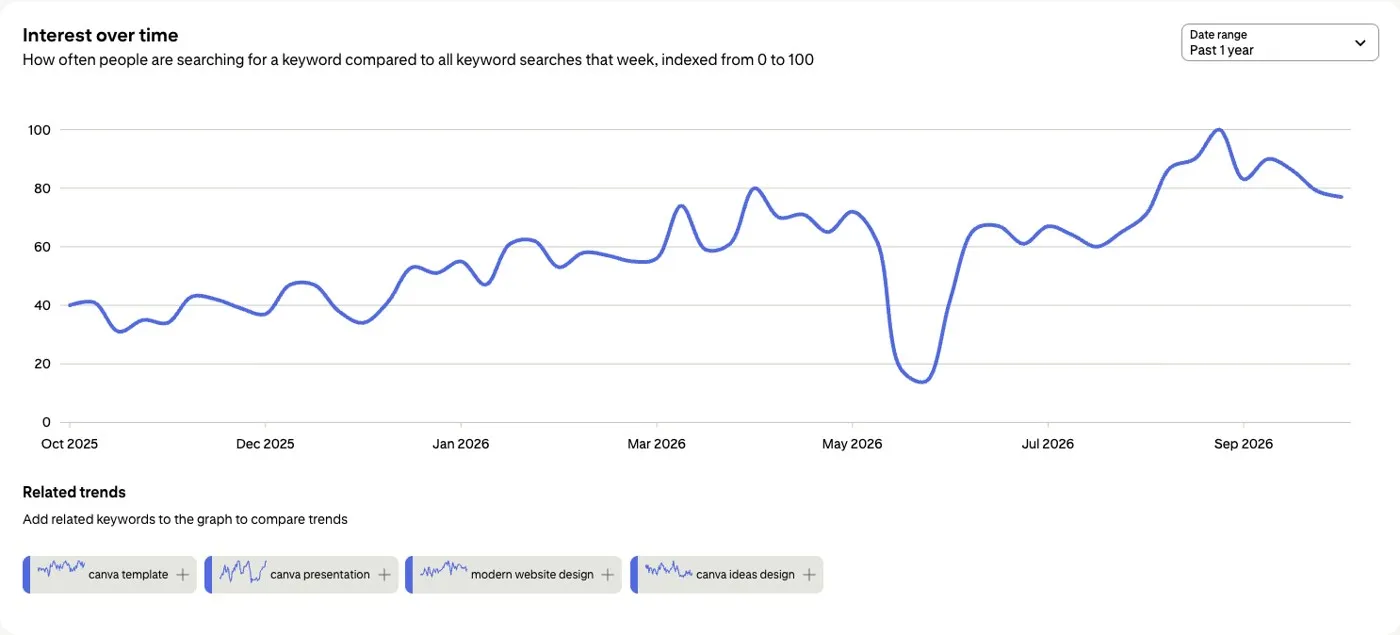
A chart like this tells you when to publish. A pin aimed at the late-August peak is better posted weeks ahead, in July, than in the week of the peak.
Our own pins show how slow the start is. On September 8, 2026 we published five pins for a calendar-app comparison on a brand-new business account. The images came from OpenAI’s gpt-image-2 model through its API, and we uploaded them with Pinterest’s bulk CSV tool under Settings, then Import content. The first upload created only one pin. Pinterest rejected the other four rows with “Duplicate Pin link” because all five pointed at the same URL. Giving each link its own UTM tag fixed it on the second upload.
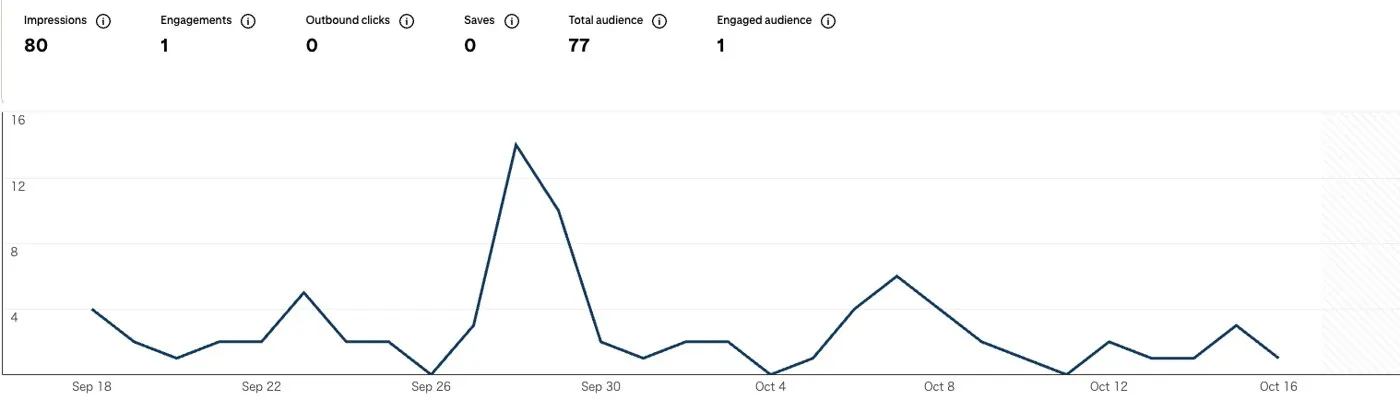
From September 18 to October 18 the five pins earned 80 impressions, 1 engagement, 0 saves and 0 outbound clicks. One pin took 69 of the 80 impressions. Expect numbers this small from a new account with a handful of pins, and use Trends to aim the next ones.
Start a Pictory free trial →Pricing (verified October 18, 2026)
Every number below was first read on September 7, 2026 and re-checked on the vendor’s own pages on October 18, 2026, and the notes column carries the same caveats as the tool sections above. Where a page failed to load or showed the wrong currency, the cell says so.
| Tool | Free plan | Entry paid plan | Billing notes |
|---|---|---|---|
| CapCut | Yes | Standard $9.99/mo (US App Store) | Pro is $19.99/mo, or $179.99/yr on CapCut’s comparison page. Price varies by region, platform and promotion. Pro includes about 1 TB of storage and 1,200 AI credits. |
| Canva | Yes, 20 AI uses a month, 5 GB, one 3-color brand kit | Pro US$144/yr | Business is US$250/yr per person. The page showed yearly prices only. Every plan meters premium AI use. |
| Pictory | No free plan, 14-day free trial | Starter $25/mo annual or $29 monthly | Annual Starter has 2,400 video minutes a year. Monthly Starter has 200. Professional is $35/mo annual or $59 monthly. |
| ElevenLabs | Yes, 10,000 credits/mo, no commercial license | Starter $5/mo annual or $6 monthly | Creator is $22/mo or $18.33 annual, with the first month shown at 50 percent off. Commercial license starts at Starter. |
| OpusClip | Yes, 60 credits/mo, watermarked exports | Starter $15/mo, monthly only | Starter has 150 credits/mo. Pro is $29/mo or $174/yr with 300 credits/mo and Pinterest posting. |
| ChatGPT | Yes | Go $8/mo (US) | Plus is $20/mo with no annual option listed. Pro starts at $100/mo. |
| Tailwind | Free start, no card, limits not listed | Pin Scheduling & Creation $17.99/mo annual or $29.99 monthly | 300 credits/mo, one credit per scheduled pin. SEO and Engagement are $11.99/mo annual each. |
| Midjourney | No | Basic $10/mo or $96/yr | Standard is $30/mo or $288/yr. Pro is $60/mo and Mega is $120/mo. |
| Pinterest Trends | Free business account | n/a | Pinterest lists no separate charge for the tool. |
| Notion | Yes, includes a Notion AI trial | Plus (USD price not shown to us) | The page showed yen only from our location. Business adds Notion Agent. |
Two gaps remain. Notion showed only yen from our location, and Canva showed yearly prices only, so check both pages in your own region and currency before you buy.
Start on CapCut's free plan →Which tools should you start with?
Ten tools is a list, not a plan, so below are three starting kits matched to the people who email us most.
You sell on Etsy and shoot products on your phone. Install CapCut first, because the free plan gives you a background remover, vertical exports and two auto-caption runs a month on the web editor, and a 15-second clip of the candle being poured is the pin that gets saved. Keep Canva Free open for the static pins and the Etsy banner, since the 1000 by 1500 template and Magic Resize are already there. Skip Pictory for now. Its stock footage will show someone else’s candles, and your camera roll is the better source.
You run a blog and want old posts working as video pins. Pictory is the tool built for this, and the annual Starter plan at $25 a month with 2,400 video minutes a year covers a post a day. Pair it with ChatGPT for the pin titles and descriptions. Paste the post in, ask for ten titles under 100 characters, and keep the three you would have written yourself. Check every keyword in Pinterest Trends before it lands in a title, because that is the one tool on this list that saw what Pinterest users typed last week.
You make faceless videos and never want to appear on camera. ElevenLabs Starter at $5 a month on annual billing gives you a voice with a commercial license, and instant voice cloning if you want it to be your own. Feed the audio into CapCut with stock clips or screen recordings, or hand the whole job to Pictory if you would rather never see a timeline. Add OpusClip later, once you have long recordings worth cutting into a dozen pins at a time.
Support, cancellation and refunds
This section covers the four tools we link to. The facts come from each vendor’s terms of service and help center, first read on September 8, 2026 and re-checked on October 18, 2026.
Pictory’s help center puts the free trial at 14 days, and the pricing page says it covers three video projects. Trials don’t renew and don’t charge automatically, so there is nothing to cancel when one ends. The help center doesn’t say whether the trial asks for a card. To cancel a paid plan, open My account, go to the Billing tab, click Cancel subscription, pick a reason and confirm. The plan stays active until the end of the billing cycle. Pictory’s terms add that fees are non-refundable unless the law or a separate written agreement says otherwise, and closing the account itself, as opposed to the subscription, is done by email with 30 days notice.
OpusClip’s help center says a Free Trial Pro account converts to a Free Forever account after 7 days, and the pricing page says the trial needs no credit card. To cancel, open your profile, choose Subscription, click Manage plan, then Cancel subscription and Continue to cancel. Changes take effect at the start of the next billing cycle. You cannot pause a subscription. The company’s answer is to cancel and resubscribe later. On refunds, the terms of service say you get no prorated refund for the rest of a paid period and that OpusClip will not refund fees you have already paid. Credits spent on a project are not returned if you delete the project.
CapCut Pro is cancelled on the platform where you bought it, so an App Store subscription is cancelled in your Apple account, a Google Play one in the Play Store, and a web one in CapCut’s own settings. CapCut’s Standard vs Pro page adds that a cancellation made during the current billing month takes effect the following month, and the help center says to cancel at least 24 hours before the renewal date. The help center treats subscriptions as virtual goods that generally can’t be refunded, with an appeal open for double billing or other special cases. CapCut offers a 7-day Pro trial to eligible new users in supported regions. It doesn’t publish which countries qualify, so check the subscription page in your app. On mobile, the trial turns into a paid plan after 7 days unless you cancel.
ElevenLabs lets you cancel from the Billing tab of your Subscription page at any time, and the plan stays active until the end of the billing cycle before dropping to Free. You lose any unused credits at that point. The help center says you can get a refund if you ask within 14 days of payment and haven’t used any credits in that period. The terms are stricter on paper. They say all sales are final, refunds are at the company’s discretion, and prepaid credit packs are not refunded except where the law requires it. ElevenLabs has no free trial as such, since the Free plan with 10,000 credits a month is the trial.
FAQ
What is the best free AI tool for making Pinterest pins?
Canva Free for static pins and CapCut's free plan for video pins. Canva gives you the pin templates and 20 AI uses a month at $0, and CapCut’s free editor handles captions and vertical exports. Add ElevenLabs Free for voice tests, but move to Starter before you publish anything that sells.
Can AI tools post directly to Pinterest?
Yes, a few can. Tailwind is the Pinterest scheduler on this list, and its scheduling plan publishes pins straight to Pinterest. OpusClip Pro posts and schedules clips to Pinterest, and Canva Pro includes social content scheduling. OpusClip Starter, CapCut, Pictory and Midjourney all leave you downloading the file and uploading it yourself.
Do I need to pay for a voiceover tool?
Only if the pin sells something. The ElevenLabs free plan has no commercial license, so a voiceover on a product pin or an affiliate pin needs Starter at $5 a month on annual billing. Pictory bundles ElevenLabs voices into its own plans, so Pictory users skip the separate subscription.
Is Canva Pro worth it for Pinterest?
Yes, once you make more than a handful of pins a week. Pro is listed at US$144 a year, and Magic Resize plus the background remover save the most time for sellers with product photos. Stay on Free if you publish a few pins a month and the AI cap hasn’t bitten you yet.
Scorecard
Our scores, out of 5, rest on the published plans, limits and terms read on September 7 and 8, 2026 and re-checked on October 18, 2026, and on how well each tool’s output matches what Pinterest wants, since we have not yet run a full week of pins through every tool.
| Tool | Price for a solo creator | Free plan | Pinterest fit | Learning curve | Overall |
|---|---|---|---|---|---|
| CapCut | 4 | 5 | 5 | 4 | 4.5 |
| Canva | 4 | 3 | 5 | 5 | 4.3 |
| Pictory | 3 | 2 | 3 | 5 | 3.3 |
| ElevenLabs | 5 | 3 | 3 | 5 | 4.0 |
| OpusClip | 3 | 3 | 3 | 4 | 3.3 |
| ChatGPT | 4 | 5 | 3 | 5 | 4.3 |
| Tailwind | 3 | 2 | 5 | 4 | 3.5 |
| Midjourney | 3 | 1 | 3 | 3 | 2.5 |
| Pinterest Trends | 5 | 5 | 5 | 4 | 4.8 |
| Notion | 4 | 4 | 2 | 3 | 3.3 |
How we tested
We read every pricing page on September 7, 2026 and recorded plan names, prices and limits as shown, then went back on September 8 for the terms of service and help centers of the four tools we link to. On October 18, 2026 we re-checked all of it and updated every price and policy that had changed. On the same day we ran a Pinterest Trends search and read 30 days of analytics for our own first five pins, shown in the section above. We haven’t made pins with CapCut, Canva, Pictory or the other paid tools yet, so the scorecard still leans on published plans, limits and terms for those. More on our method is on the About page.
Final picks
Start with three tools and add the rest as the pins pile up. Install CapCut for video pins, keep Canva open for the static ones, and put $5 a month into ElevenLabs Starter the first time a voiceover pin outperforms a silent one. Pictory earns its $25 the month your backlog of old blog posts outgrows your time to film. Run every keyword through Pinterest Trends before it becomes a title.
Try CapCut free →