CapCut vs Descript 2026: Which Editor Fits Your Videos (Free Plans and $9.99 vs $16, Tested)
CapCut is free to start and built for vertical video on your phone. Descript edits footage like a text doc, from $16/mo. Pick the right one for a solo creator in five minutes.
The short answer
CapCut for vertical TikTok, Reels or Shorts video: free with no credit card, paid plans from $9.99 a month. Descript if you talk to a camera and want to cut takes by deleting words: its free plan gives 60 media minutes, and Hobbyist is $16 a month billed yearly. In our test, deleting one sentence cut a clip from 14.5 to 11.1 seconds.
Prices checked on the vendor's own page. Some links are affiliate links (disclosure).
Quick verdict: Pick CapCut if most of what you post is vertical video for TikTok, Reels or Shorts and you want templates, auto captions and a phone app at no cost to start. Pick Descript if you record yourself talking, on camera or into a mic, and you’d rather cut the ums and the bad takes by deleting words in a transcript. Descript’s Hobbyist plan is $16 a month on annual billing.
At a glance
| CapCut | Descript | |
|---|---|---|
| Starting price | Free, then Standard $9.99/mo or Pro $19.99/mo (US App Store listing) | Free, then Hobbyist $16/mo (annual) or $24/mo monthly |
| Free plan | Yes, no credit card required | Yes (1 media hour/mo, 720p, watermark) |
| Core idea | Timeline editor with templates, effects and AI tools for social video | Edit video and audio by editing the transcript |
| Captions | Auto captions | Auto captions plus a transcript you edit the video from |
| Audio cleanup | Voice enhancement, noise removal | Studio Sound, filler word removal, retake removal |
| Apps | Desktop, web, iOS, Android, iPad | Mac, Windows, web |
| Best for | Short-form creators posting most days | Talking-head, podcast and tutorial creators |
What we tested
On October 18, 2026 we opened a new project on a free Descript account. The header showed the free plan’s allowance, 100 AI credits and 60 media minutes. We had no footage to upload, so we used Descript’s AI speaker. We picked a stock voice, skipped the avatar, and typed a four-sentence script. Descript estimated 17.6 seconds while we typed, and the generated voice came out at 14.5 seconds. That cost 1 AI credit.
Then we tried text-based editing. We selected the third sentence of the script and pressed Backspace. Descript regenerated the voice for the shorter script, and the clip dropped from 14.5 to 11.1 seconds. That cost 2 more credits, leaving 97. It also left a stray period where the sentence used to be, so check punctuation after a cut.
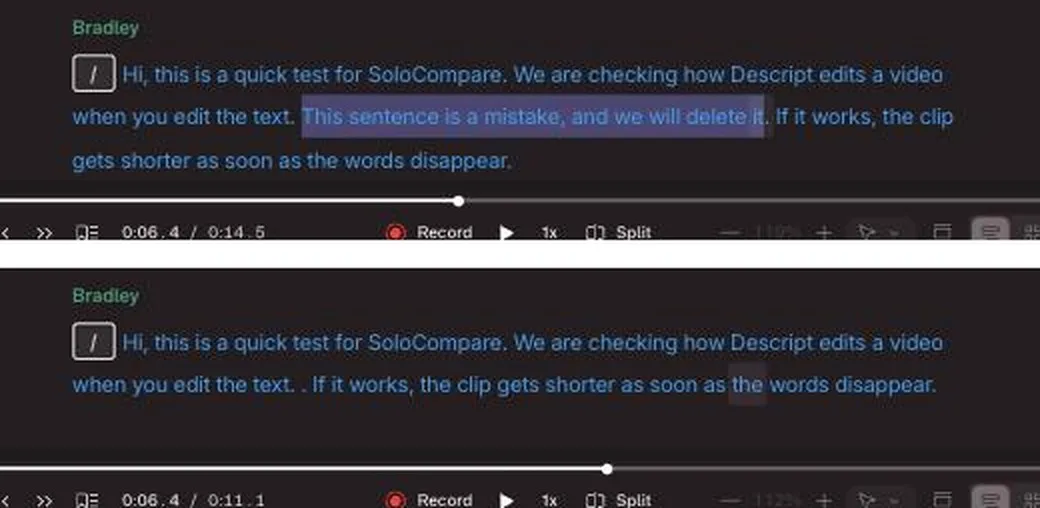
With an AI voice, deleting text means generating new speech, and that spends credits. Descript says that on a recording, deleting a word cuts that moment of video instead. We haven’t uploaded our own footage yet, so the talking-head section below still rests on Descript’s documentation.
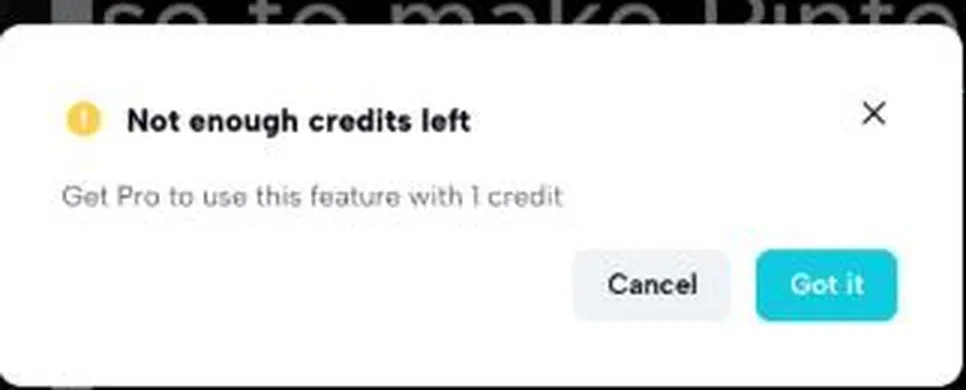
On the same day we opened CapCut’s web editor on a free account. The header showed 0 AI credits, and a pop-up offered one day of Pro for free if we installed the desktop app. We added a line of body text and tried to turn it into a voiceover with text to speech. Every voice in the Narration list carried a premium mark, and picking one brought up this message.
Auto captions were different. The Captions panel labels them Free, with a note that the free account gets 2 uses a month.
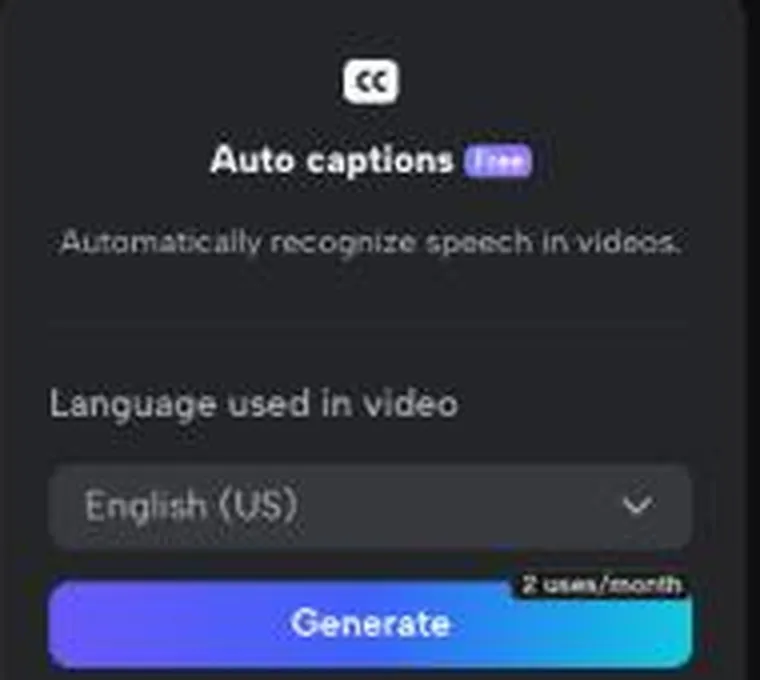
Two captioned videos a month is a test drive, not a posting schedule. We didn’t have a recording on the account to caption, so we can’t say how accurate the captions are yet. The text templates already had Halloween and Black Friday sets, which helps if you post seasonal content.
One thing to watch. CapCut’s Export button in the web editor first saves the video to your CapCut space and offers a share link, and the link was set to “Everyone: Anyone can open the link” by default. Our 3-second test clip finished in about ten seconds. We switched the setting to Space members only before closing the window, and you should too if the clip isn’t public yet. We didn’t download a file, so we haven’t checked the free plan’s watermark or export resolution ourselves.
Try CapCut free →Editing short-form video
Open CapCut on your phone, tap a Reels template, drop in three clips, and it has cut them to the beat before you’ve decided on a hook. That is the job it was built for. The template library is split into social media, Reels and TikTok, and business sets, and the app comes in desktop, browser, iPad and phone versions.
Captions come from the auto caption tool. Background removal works on video as well as photos, text to speech turns a typed script into a voiceover so you never have to record one (it asked us for credits on a free web account), and the AI video and image generators fill a b-roll gap when you have no footage of your own. Plenty of buttons.
Descript can make a vertical clip too, but it gets there from a different direction. You record or import a video, Descript transcribes it, and the automatic clip tool pulls short segments out of the long one for social platforms. Five Shorts from one recording. For a creator who films one 20-minute video a week, that is the faster path. For a creator who films 15-second clips over trending audio, it is a detour.
Editing talking-head and long-form video
Descript’s homepage describes the product in one line. Delete a word and that moment of video disappears, and if you move a sentence the footage moves with it. If you make YouTube tutorials, podcasts or course lessons, that changes the whole job, because you read your rambling take, select the paragraph that went nowhere, and press delete.
Filler word removal strips the ums and uhs in one pass. Retake removal finds the spots where you said the same line three times and keeps one. Studio Sound cleans up a laptop mic, Eye Contact nudges your gaze toward the lens when you were reading notes, and the multitrack timeline handles a two-host podcast. Underlord, Descript’s AI editor, runs edits like those for you. You still read through every change it made before you export, because it is your name on the video.
CapCut starts from a timeline, but its browser editor has a transcript option too. CapCut’s own tool page says you right-click a clip, pick Transcript-based editing, and edit the video from the text in a side panel. It also flags filler words and speech gaps so you can remove them from the transcript.
The difference is where the transcript sits. Descript builds the whole product around it, while CapCut adds it as one panel inside a timeline editor. We haven’t run a 40-minute take through either yet, so we can’t tell you which one gets you to a 12-minute cut faster.
Repurposing and publishing
CapCut exports sized for YouTube, TikTok, Instagram and Reels, and because the mobile app is the same product as the desktop one, you can post from the phone you filmed on. Descript adds a few things CapCut’s site doesn’t mention. It translates a finished video into other languages, writes a YouTube description, and generates a thumbnail.
Rooms, Descript’s remote recording feature, records a guest interview in the browser with each person on a separate track. Screen recording is built in too. If your channel is software tutorials, that saves you a separate recorder, a separate file, and the import step between them.
Descript’s Hobbyist plan includes 100GB of cloud storage and Creator includes 1TB. CapCut’s help center says newly created free cloud spaces now get 0GB, so a free account has no cloud backup for new uploads. CapCut’s pricing page lists 1 TB of space storage on Pro, Ultra and Teams, while several of its help center articles still say Pro comes with 100GB. Neither source gives a figure for Standard, so check the upgrade screen in the app before you pay for storage.
Set up CapCut in ten minutes
This is the signup path CapCut’s own help center describes, so you know what it asks for before you tap anything. We haven’t done it on our own phone yet.
- Install CapCut from the App Store or Google Play, or open CapCut Online in a browser. On the phone app you can sign up with TikTok, Google, Facebook or email. The web version adds a QR code option and, per the help center, does not support Apple ID or phone number signup.
- Create the account. CapCut’s help center lists no credit card step for a free account, and the free plan has no trial clock.
- If you plan to edit on a laptop too, sign in on the phone first, then scan the QR code to sign in on desktop or web with the same account. That is CapCut’s recommended order for keeping projects in sync.
- Skip the Pro screen for now. A “Join CapCut Pro” button sits next to your nickname on the Me tab. The 7-day trial behind it asks for a payment method and bills it automatically on day eight unless you cancel, and it is only offered to accounts that have never held Pro, in supported regions.
- Pick a Reels or TikTok template, drop in a clip, turn on auto captions and export. If the export screen asks you to pay, the effect or template you chose is a Pro one. Swap it for a free one.
- Remember which login method you used, because CapCut requires the same one every time, and a Google signup won’t work from the email tab later.
To undo a Pro purchase, cancel on the platform you bought it on, at least 24 hours before the renewal date. Phone purchases cancel in the App Store or Google Play, and web or desktop purchases cancel on the subscription page at capcut.com, since the desktop app routes its checkout through the browser anyway. To remove your data, use the request address listed in CapCut’s privacy policy.
Integrations
CapCut’s list is short and social. The web editor imports from your device, Google Drive, Dropbox or a QR code that pulls a clip off your phone, and the export screen shares straight to TikTok, YouTube, Instagram and Facebook, or gives you a private link. You can also sign in with your TikTok account, which is no surprise given who owns both apps. We found no Zapier connector or public API on the CapCut pages we could reach, and AI credits only exist on CapCut Online, so the desktop and phone apps don’t show a credit balance at all.
Descript’s list runs to about thirty names. Ecamm, Restream, SquadCast, Captivate and Zoom send recordings into Descript with one click, though the Zoom import only takes cloud recordings. There’s no YouTube link import: when we opened a new project on October 21, 2026, the Import from menu offered Zoom and Google Drive only, and Descript’s status page says YouTube Import was removed in its v110 release. Finished episodes publish to YouTube, Google Drive, Wistia, Blubrry, Buzzsprout, Castos, Podbean, Transistor, Headliner, HubSpot and Slack. If you outgrow Descript’s editor, it exports a timeline to Premiere, Final Cut Pro, DaVinci Resolve, Audition, Pro Tools, Logic and REAPER with your original files intact. Zapier is there too, plus MCP connections for Claude and ChatGPT and a LinkedIn link. The integrations page doesn’t say which plans get which, so check the free plan yourself before you rely on one. Every connected app can be cut off from App Settings, Profile, Cancel access.
Pricing (verified October 18, 2026)
CapCut
CapCut now has a pricing page on its website, but it shows prices in your local currency and calls them “for reference only” until you sign in. When we loaded it on October 18, 2026, it showed our region’s prices in yen for Free, Pro, Ultra and Teams, with no Standard plan. The US dollar prices below are the in-app purchase amounts on CapCut’s US App Store listing on the same day. CapCut sets prices by country, device and promotion, so your upgrade screen may show something different.
| Plan | Monthly billing | Annual billing | Highlights |
|---|---|---|---|
| Free | $0 | $0 | Editor, templates, auto captions (2 uses a month on the web editor in our test), no credit card required |
| Standard | $9.99/mo | Not listed | Paid tier below Pro |
| Pro | $19.99/mo | Not labeled | Premium templates, effects and AI features |
The App Store listing also shows a “Yearly Subscription” at $89.99 and a “Monthly Subscription” at $7.99 without saying which plan either belongs to, so we haven’t listed an annual Pro price. The web pricing page gives Pro 800 monthly AI credits. CapCut’s help center confirms a 7-day Pro trial for eligible new users in supported regions, and its trial article names 4K/60fps export, no watermark, premium templates and AI tools as Pro features. CapCut doesn’t publish a side-by-side list of Free, Standard and Pro limits, so we can’t tell you exactly what Standard adds over Free.
Descript
| Plan | Annual billing | Monthly billing | Highlights |
|---|---|---|---|
| Free | $0 | $0 | 1 media hour/mo, 100 AI credits (one time), 720p, watermark, 5GB |
| Hobbyist | $16/mo | $24/mo | 10 media hours/mo, 400 AI credits, 1080p, no watermark, 100GB |
| Creator | $24/mo | $35/mo | 30 media hours/mo, 800 AI credits, 4K, 1TB, team of up to 3 (billed separately) |
| Business | $50/mo | $65/mo | 40 media hours/mo, 1,500 AI credits, 4K, 2TB, up to 5 users |
| Enterprise | Custom | Custom | Contact sales |
Descript’s pricing page has a Monthly and Annual toggle and says annual billing saves up to 35% over the monthly plan. Its plan data lists the annual and monthly rates shown above.
A media hour is one hour of audio or video that Descript will transcribe for you in a month. One hour on the free plan is one podcast episode. Ten on Hobbyist covers a weekly YouTube video with retakes to spare.
CapCut Pro at $19.99 a month and Descript Creator at $24 a month on annual billing sit close together. Under $20 they split. Descript Hobbyist at $16 removes the watermark and gets you 1080p export, while CapCut’s free plan, by CapCut’s own description, needs no credit card at all.
Start on CapCut's free plan →Where CapCut wins
Price and the phone. You can film, edit, caption and post a vertical video from the phone in your pocket without paying anything, and if you do pay, Standard at $9.99 a month is the cheapest paid tier in this comparison. The Reels and TikTok template library means a beginner can match a trend in minutes. Text to speech, background removal and AI video generation live in the same app, so a faceless channel can run on CapCut alone. It also runs on desktop, web, iOS, Android and iPad, while Descript lists Mac, Windows and web.
Where Descript wins
Anything where you talk to a camera or a mic. Text-based editing turns a 40-minute rough take into a 12-minute video by reading instead of scrubbing, and filler word removal, retake removal, Studio Sound and Eye Contact each fix a problem solo creators hit every single week. The Hobbyist plan spells out what you get, 10 media hours, 1080p and 100GB, with no regional guesswork. Rooms records remote guests on separate tracks, screen recording is built in, and the automatic clip tool turns one long video into several shorts without a second app.
What we didn’t like about CapCut
Pricing is hard to pin down. CapCut’s web pricing page shows reference prices in your local currency and tells you to sign in for the final number, and its web lineup of Pro, Ultra and Teams doesn’t match the Standard and Pro plans in the App Store. CapCut’s help center has a dozen articles with titles like “Why Do CapCut Pro’s Prices Vary?” and “Why Do Your Prices Always Change?”, which tells you how often people ask. You find out what Pro costs you on the upgrade screen, and a friend in another country or on another device may see a different number.
The refund rule is blunt. CapCut’s help center calls subscriptions “virtual goods” and says purchases “generally” don’t support refunds, with an appeal path for cases like double billing. CapCut’s international terms offer a full refund within 14 calendar days if you haven’t used any paid feature, but they say US users are covered by separate US terms instead. On Trustpilot, CapCut holds a 1.2 out of 5 score across 1,275 reviews as of September 8, 2026, and 89% of them are one star. The complaints cluster around four things. Surprise charges after a trial, cancellations that didn’t stick, credits lost on failed AI generations, and support that never wrote back. The profile shows no company replies.
Which brings up support. CapCut’s help articles end with a “contact our support team” link that opens a page titled Online Support. The help center publishes no support hours and no response time. For a free editor that is fine. For a $19.99 a month one it is thin.
What we didn’t like about Descript
Descript’s Trustpilot score is 2.7 out of 5 from 283 reviews as of September 8, 2026, with 41% one star and 38% five star, so reviewers split between people who love the transcript editor and people who hit a wall. The wall is usually one of three things. AI credits run out faster than the plan page suggests, or the app crashes, lags and loses edits on a big project. Or a charge lands that the reviewer didn’t expect, and Descript’s own help center admits a cause, since every Drive is billed separately and canceling one doesn’t cancel another.
The refund window is 48 hours from the invoice date. Miss it and a downgrade waits until the end of your billing cycle with no proration. Live chat is for paid plans only, Monday to Friday, 5am to 5pm Pacific, and a bot answers first. Free users get email with a one business day target. There is still no phone app, and the “Share data with Descript” setting is on by default during onboarding until you toggle it off.
Which one fits your week
A solo creator posting five Reels or TikToks a week from her phone, shot in the kitchen or the car: CapCut, on the free plan. Templates, auto captions and direct posting to TikTok cover the whole job. The phone never leaves your hand.
A YouTuber or course creator who films one 20-minute talking-head video a week and a podcast on the side: Descript Hobbyist at $16 a month on annual billing. Ten media hours covers a weekly video plus retakes. Filler word removal handles the ums, and the clip tool cuts the shorts from the long take.
A creator who records remote interviews with guests and turns each one into a YouTube episode plus three shorts: Descript again, on Creator if you need 4K. Rooms records each guest on a separate track, Studio Sound fixes their laptop mic, and the timeline exports to Premiere if a project ever outgrows the app.
Who should skip both
If you edit on Linux, neither runs there. Descript lists Mac, Windows and web, CapCut’s desktop app is Windows and macOS, and DaVinci Resolve is the free editor that does. If you cut client footage under a confidentiality agreement, read the privacy section below before you upload anything to either, because both process your media on their servers and CapCut’s policy allows sharing within the ByteDance group. If you post less than once a week, the editor already on your phone is enough. And if you would rather own your software than rent it, both are subscriptions, and Resolve’s free version has no monthly fee at all.
Support, cancellation and refunds
Descript publishes its support terms in its help center. Paid plans get live chat Monday to Friday, 5am to 5pm Pacific, through the Help icon and then Contact support, with a bot trying first. Everyone, including people without an account, can email, and the help center says replies usually come within one business day. There is a live Q&A every Tuesday at 11am Pacific. To cancel, open App Settings with Command or Control plus comma, pick the Plan tab, then Change plan, Downgrade to Free, choose a reason and confirm. You keep the paid plan until the end of the billing cycle, then drop to Free with your projects intact. Subscriptions renew automatically each month or year. Descript refunds a plan if you cancel and ask within 48 hours of the invoice date, and after that there is no proration and top-up credits are final. Deleting your account cancels the plan on the spot and forfeits the unused time without a refund. There is no free trial of a paid plan, only the free plan, which the pricing page says needs no card.
CapCut is thinner on paper. Its help center says Pro and Teams subscriptions auto-renew and that you must cancel at least 24 hours before the renewal date or a new cycle bills. It may send a notice one day before renewal. You cancel where you bought, so App Store or Google Play for a phone purchase and the subscription page on the website for a web purchase, and desktop purchases are routed to the web anyway. The 7-day Pro trial takes a payment method up front and charges it after seven days unless you cancel, and only accounts that have never held Pro, in supported regions, see the offer. On refunds the help center says subscriptions are virtual goods that “generally” can’t be refunded, with an appeal for things like double billing. Any monthly credits you had keep working until the cycle ends.
CapCut’s international terms of service, last updated April 15, 2026, add a 14-day window. You can cancel within 14 calendar days of subscribing for a full refund, as long as you haven’t used the paid service in any way, and requests go through a support ticket form on CapCut’s website. App Store and Google Play purchases also follow those stores’ rules. The same terms say US users are governed by separate CapCut US Terms of Service. The US terms copy we read on September 8, 2026 had no 14-day clause, and we couldn’t reach a US copy on October 18, so US readers shouldn’t count on that window.
For help, CapCut’s help articles link “contact our support team” to a page titled Online Support. The help center lists no support hours or response time.
Privacy and account safety
CapCut belongs to ByteDance. The terms of service name Bytedance Pte. Ltd. in Singapore as the operator, and the US App Store listing shows the same seller. The international terms send disputes to arbitration in Singapore, and say US users are covered by separate CapCut US terms, which we couldn’t load on October 18, 2026. The privacy policy copy we reached, dated March 28, 2024, says CapCut collects your registration details, the content you upload, IP address, device and advertising identifiers, “face and body features and attributes”, voice transcriptions and your contacts if you allow syncing. It uses that information to improve “our machine learning models and algorithms”, shares it with entities in its corporate group, and stores it on servers in the United States and Singapore. Apple’s privacy label on the listing says identifiers are used to track you across other companies’ apps, and that contact info, user content, identifiers, usage data and diagnostics are linked to your identity. Deletion requests go to the address in the policy. We did not verify whether uploaded footage trains CapCut’s generative AI features specifically, or how long a deleted project stays on its servers.
Descript, Inc. is a private company in San Francisco. Its about page says it has raised about $100 million from the OpenAI Startup Fund, Andreessen Horowitz, Redpoint and Spark. The security page lists SOC 2 Type II, AES-256 encryption at rest, TLS 1.2 in transit and media storage on Amazon S3 or Google Cloud. Sign-in is Google or an emailed one-time code, and the help center says Descript’s production AI models “use no Descript user data”, with internal research models drawing only on accounts that left “Share data with Descript” switched on. That switch is on by default. Turn it off under App Settings, Profile. The privacy policy, last updated April 14, 2025, keeps voiceprints for up to three years after your last login. Deleting the account is immediate from Settings, Profile, Delete account, and removes every project. We did not verify whether Descript offers two-factor authentication, and we haven’t yet checked what either app asks for on a real phone or laptop.
Alternatives worth a look
If neither fits, three tools sit nearby. OpusClip cuts long videos into captioned shorts and posts them for you, and its site lists a free plan and a 7-day trial. VEED is a browser editor with auto captions and AI tools, free to try per its homepage. DaVinci Resolve is a free desktop editor from Blackmagic for Mac, Windows and Linux, with a steep learning curve and no subscription. We’ll compare the first two in a future article.
Who should choose CapCut
You post short vertical videos most days, you shoot on your phone, and trends move faster than your editing budget. Start on the free plan. If a locked effect gets in your way, Standard at $9.99 a month is the next step. Your captions, your hook text and your trending sound all live in one app, and nothing has to leave your phone until the video is done.
Who should choose Descript
You make YouTube videos, tutorials or a podcast where you’re the one talking, and the slow part of your week is cutting your own mistakes. Go straight to Hobbyist at $16 a month on annual billing. Ten media hours covers a weekly show, and the watermark is gone at 1080p.
FAQ
Is CapCut free?
Yes. CapCut has a free plan with the editor, templates and auto captions, and its site says no credit card is required. In our October 18 test, the web editor limited free auto captions to 2 uses a month and asked for credits before text to speech would run. Standard is $9.99 a month and Pro is $19.99 a month on the US App Store listing.
Does Descript have a free plan?
Yes. The free plan includes one media hour of transcription a month, 100 one-time AI credits, 720p export with a watermark and 5GB of storage.
Can Descript make TikTok and Reels clips?
Yes. Descript’s automatic clip tool pulls short segments out of a longer recording, adds captions, and hands you several vertical clips from one filming session. CapCut is faster when the clip starts life as a short.
Which is better for YouTube?
Descript, if your videos are you talking on camera. CapCut, if they are montages, product clips, cooking videos or anything else edited to music rather than speech.
Do I need both?
Some creators cut the talking in Descript and add captions and effects in CapCut. On a budget, pick the one that matches what you film most, and add the second only when you can name the exact job it would do.
Does CapCut’s free trial need a credit card?
The free plan doesn’t. The 7-day Pro trial does. CapCut’s help center says a valid payment method is required to start it and that the account is charged automatically after seven days unless you cancel at least 24 hours before renewal.
Can I get a refund from CapCut or Descript?
Descript refunds a plan if you cancel and submit a support request within 48 hours of the invoice date, per its help center. CapCut’s help center says subscriptions are virtual goods that generally can’t be refunded, and points you to an appeal for cases like double billing. CapCut’s international terms allow a full refund within 14 days if you haven’t used any paid feature, but US users fall under separate US terms. Phone purchases go through Apple or Google either way.
Scorecard
Our scores, out of 5. They rest on the published plans, help center terms and public reviews cited above, plus our October 18 tests. Those tests lowered CapCut’s free-plan score from 5 to 4, because auto captions stop at 2 uses a month on the web editor and text to speech asked for credits.
| CapCut | Descript | |
|---|---|---|
| Free plan and entry price | 4 | 4 |
| Short-form vertical video | 5 | 3 |
| Talking-head, podcast and tutorial editing | 2 | 5 |
| Integrations and publishing | 2 | 4 |
| Mobile app | 5 | 1 |
| Pricing clarity | 2 | 4 |
| Cancellation, refunds and support | 2 | 3 |
| Overall for solo short-form creators | 3.5 | 3.4 |
The Overall row weights the first two rows heaviest, because most of the solo creators we write for post vertical video from a phone. If your week is talking-head video, read the third row as the one that matters.
How we tested
On October 18, 2026 we ran short hands-on tests in both editors, described in the What we tested section, without uploading our own footage. Prices were re-checked on October 18, 2026 on CapCut’s US App Store listing, CapCut’s pricing page and Descript’s pricing page. CapCut’s trial, storage, support and refund terms, its transcript editing page and its international terms were re-checked the same day. Descript’s support hours, cancellation paths and refund rules, CapCut’s account creation steps and CapCut’s privacy policy were read on September 8, 2026 from help.descript.com, Descript’s terms, security and privacy pages, CapCut’s help center and the CapCut privacy policy copy that capcut.com redirects to. Review themes come from Trustpilot on September 8, 2026. Next we’ll caption and export the same 60-second recording in both tools and update the scorecard. More on our method is on the About page.
Final verdict
Make one video this week in the tool that matches your format. If it’s a 30-second phone clip, download CapCut, pick a Reels template and post it from the free plan. If it’s a 20-minute talking-head video, sign up for Descript’s free plan, let it transcribe the take and delete one bad paragraph to see how that feels. CapCut is our pick for most solo short-form creators because it starts at $0 and lives on the phone you already film with.
Try CapCut free →