Fireflies vs Otter (2026): Both Free Plans Tested on the Same Meeting
We uploaded the same 3:57 meeting recording to Fireflies Free and Otter Basic on October 23, 2026. Both nailed the numbers. Fireflies sorted action items by owner. Otter finished in 23 seconds. Here's what to pick.
The short answer
Fireflies for unlimited free transcription and action items sorted by owner. Otter for 23-second processing and the cheaper paid plan at $8.33 a month — but Otter Basic limits file imports to 3 lifetime.
Prices checked on the vendor's own page. Some links are affiliate links (disclosure).
Quick verdict: Pick Fireflies if you want unlimited free transcription, action items sorted by owner, and 100+ language support. Pick Otter if you need 23-second processing, a clean paragraph-style summary, and the cheaper paid plan at $8.33 a month — Otter Basic allows only 3 lifetime file imports.
At a glance
| Fireflies.ai | Otter.ai | |
|---|---|---|
| Starting price | $10/seat/mo (annual) | $8.33/user/mo (annual) |
| Free plan | Unlimited transcription*, 400 min storage, 20 AI credits | 300 min/mo, 30 min per conversation, 3 lifetime file imports |
| Speaker labels | Speaker 1/2 (renaming not tested) | Speaker 1/2 (renaming not tested) |
| AI chatbot | AskFred (worked on free) | AI Chat (worked on free, 20 queries/mo) |
| Mobile app | iOS and Android | iOS and Android |
| Languages | 100+ (many in beta, per its FAQ) | 10 listed in the import dialog |
| Best for | Teams who want owner-sorted action items and 100+ languages | Solo users who want fast, readable summaries |
What we tested
On October 23, 2026 we uploaded the same 3-minute, 57-second audio file to Fireflies Free and Otter Basic. The file was a scripted two-speaker meeting between a freelance designer and a client. It contained one key decision, three action items with owners and deadlines, and about 12 specific numbers (dollar amounts, dates, percentages). We scored both tools against a written answer key.
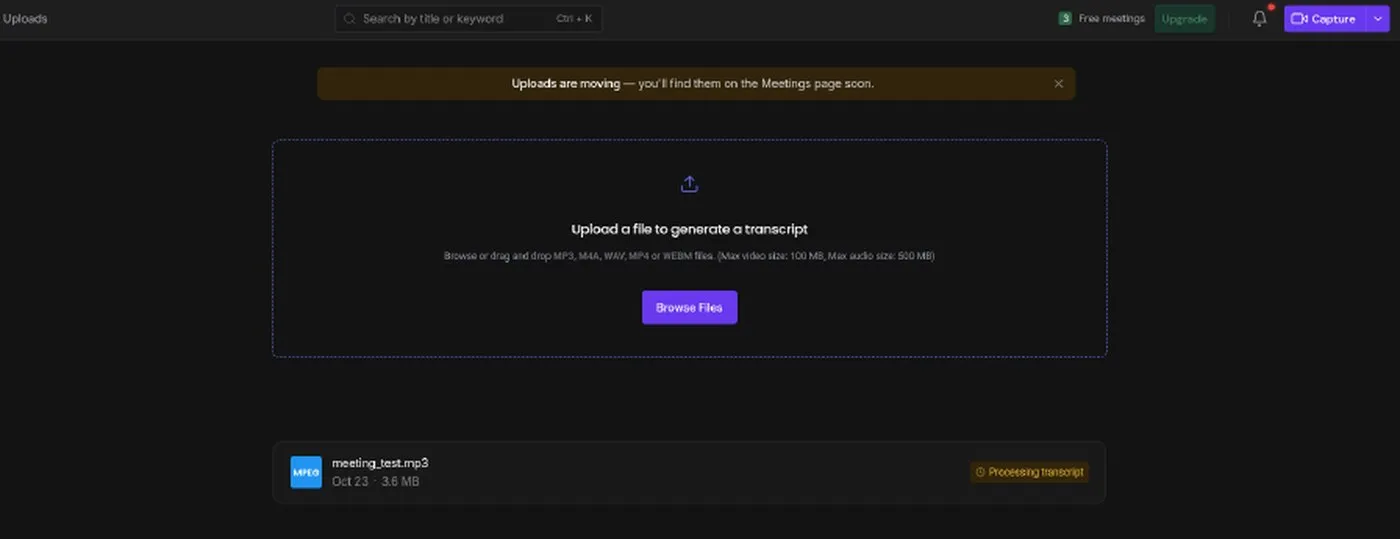
Fireflies processed the file in about 1.5 minutes. The header showed a “Free meetings” counter that went from 3 to 2 after this upload, even though the pricing page says “unlimited transcription” with an asterisk.
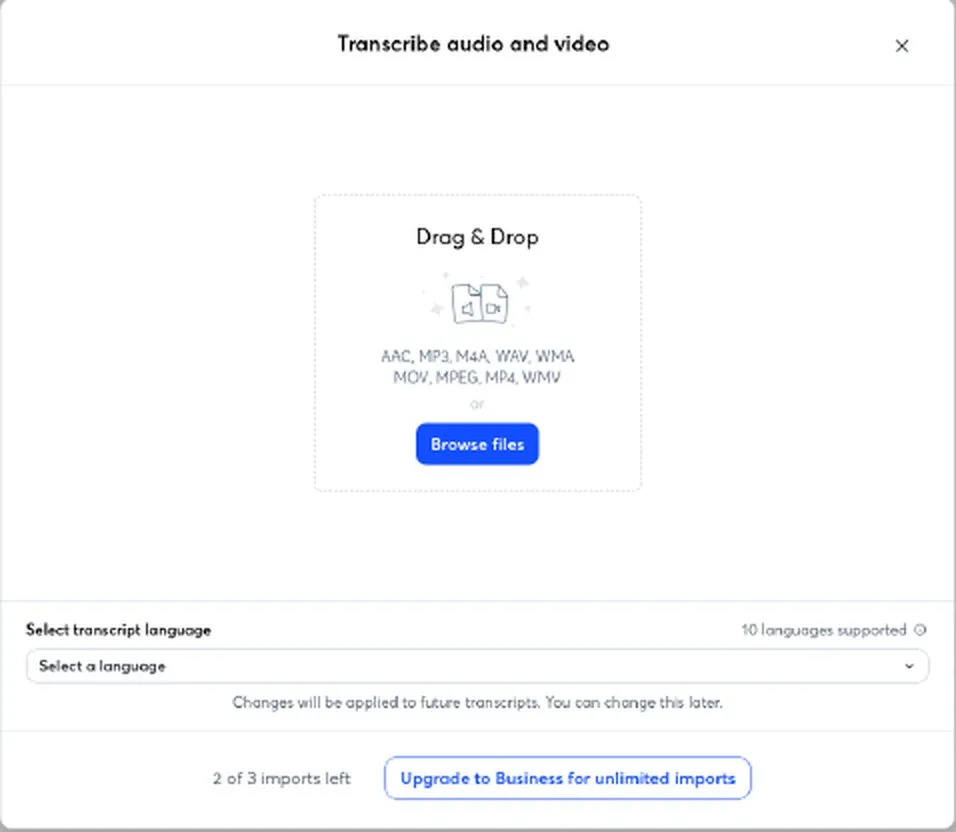
Otter finished in about 23 seconds. Its free plan gives you 3 lifetime file imports. After our upload, the import dialog showed “2 of 3 imports left.”
Results against our answer key
| Test area | Fireflies Free | Otter Basic |
|---|---|---|
| Processing time (3:57 file) | ~1.5 min | ~23 s |
| Decision (WordPress to Webflow) | Captured | Captured |
| Action item 1: mockup by Oct 30 (Alex) | Correct owner and date | Correct owner and date |
| Action item 2: copy + 12 photos by Nov 3 (Jordan) | Correct, split into two items | Correct |
| Action item 3: contract + invoice Oct 23 (Alex) | Correct | Correct |
| Extra action items generated | 3 (Build website, Attend check-ins, Ask Priya) | 1 (Sign contract and pay deposit) |
| Key numbers (12 checked) | All correct | All correct |
| Speaker labels | Speaker 1/2, separation correct | Speaker 1/2, some merging in fast dialogue |
| Transcript errors | Garbled sentence (“five Home, about services”) | Merged several short replies into one speaker block |
Both tools got every number right. Both assigned generic “Speaker 1” and “Speaker 2” labels, not real names. The differences showed up in action-item generation and transcript accuracy during fast back-and-forth dialogue.
Try Fireflies free →Transcription and speaker labels
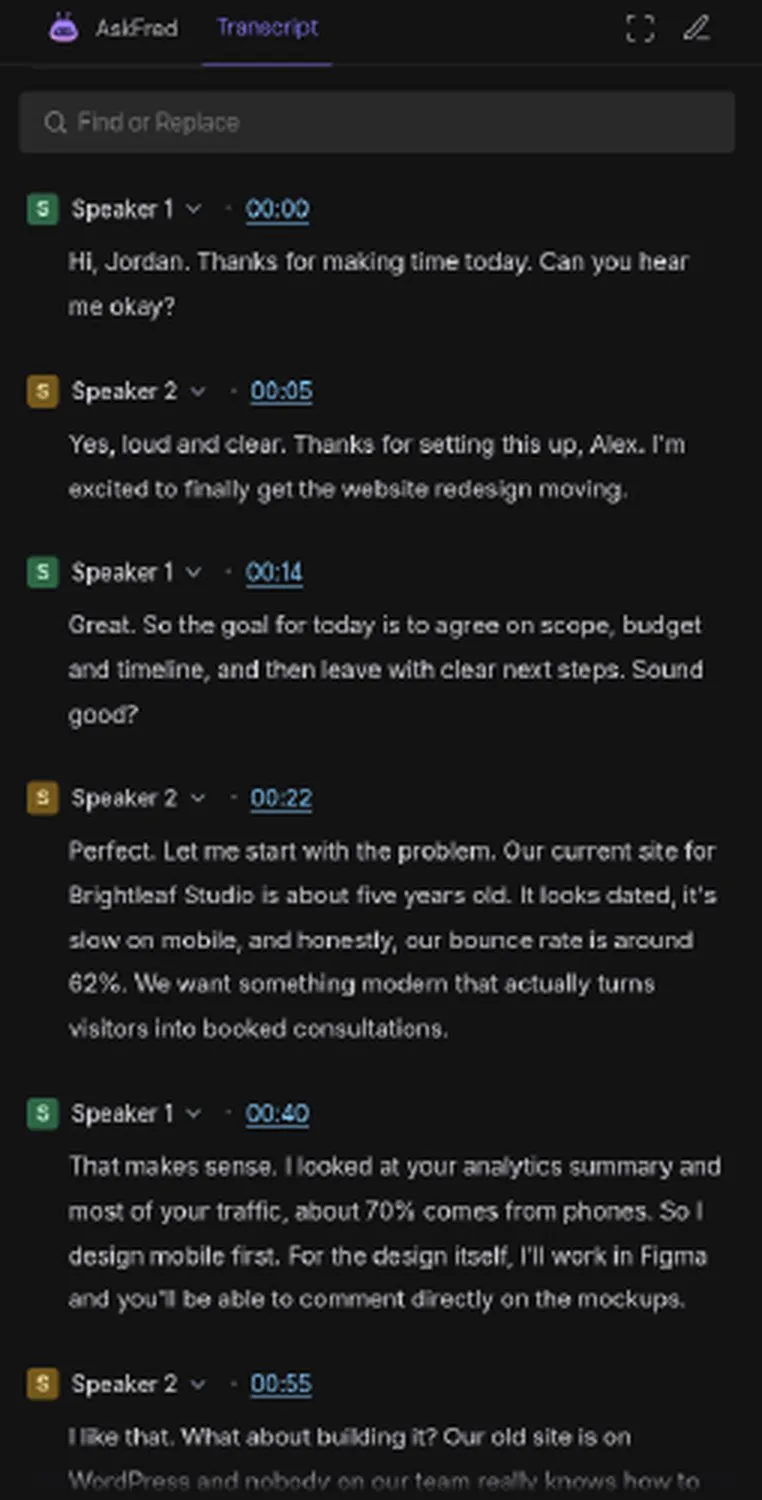
Fireflies labeled speakers as “Speaker 1” (60% talk time, 209 WPM) and “Speaker 2” (40%, 216 WPM). Separation was correct on the first 25 or so turns we read. A dropdown sits next to each label for renaming speakers, though we did not test it. The transcript caught proper nouns well: Webflow, Figma, WordPress, Brightleaf Studio, and Priya all appeared correctly.
One clear error: the sentence “I’m proposing five pages: Home, About, Services, Portfolio, and Contact” came out as “five Home, about services, portfolio and contact.” A sentence break also landed in the wrong place, splitting “the remaining half at” from “Launch.”
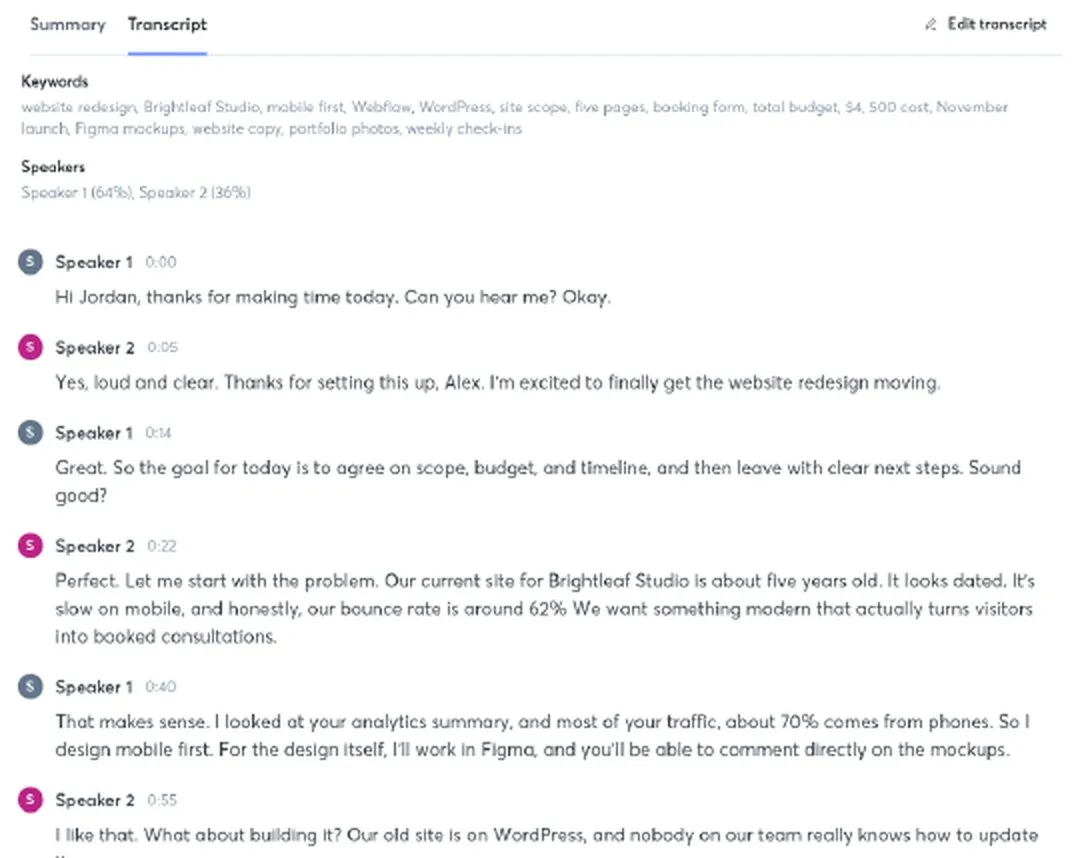
Otter used the same “Speaker 1” and “Speaker 2” format. On most turns, separation was right. But in the 2:25 stretch where speakers traded short replies back and forth (“Please do…”, “Got it…”, “Okay, that one’s mine…”), Otter merged several of Jordan’s responses into Speaker 1’s block. The transcript itself was clean for numbers and names.
Summaries and action items
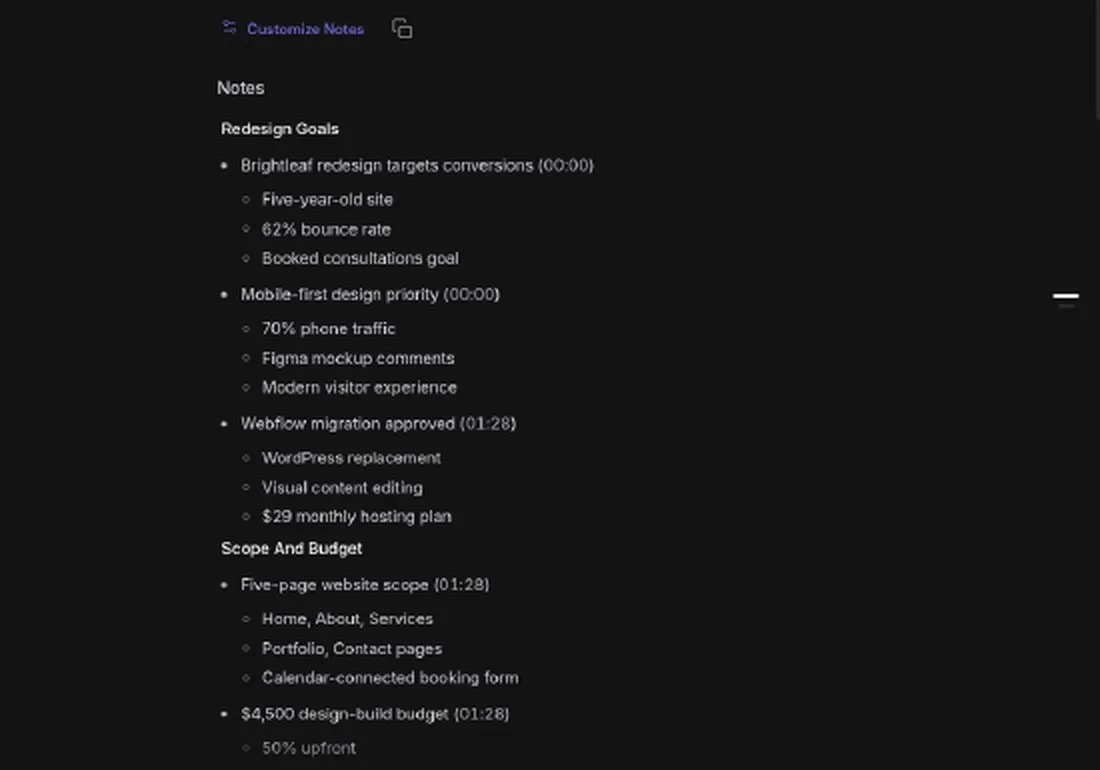
Fireflies organizes its summary into topic sections with bullet points and timestamps: “Redesign Goals,” “Scope And Budget,” “Timeline And Dependencies.” Every key number appeared in the right section. The summary used a concise style, listing three supporting details under each topic.
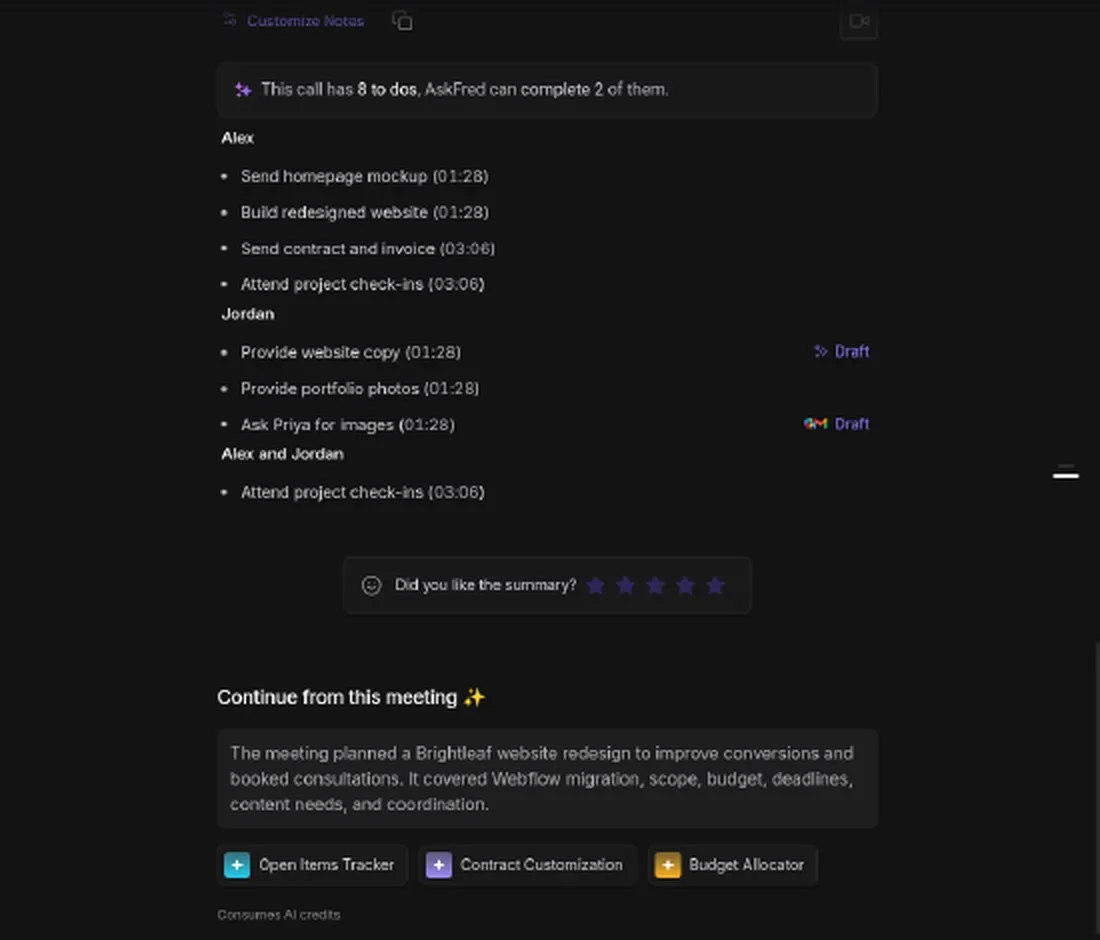
The action-item block listed 8 to-dos split by owner: Alex, Jordan, and “Alex and Jordan.” It caught all three real action items but over-generated. “Build redesigned website” and “Attend project check-ins” (duplicated for both speakers) are follow-up commitments, not action items with a deadline. It also listed “Ask Priya for images” as Jordan’s task.
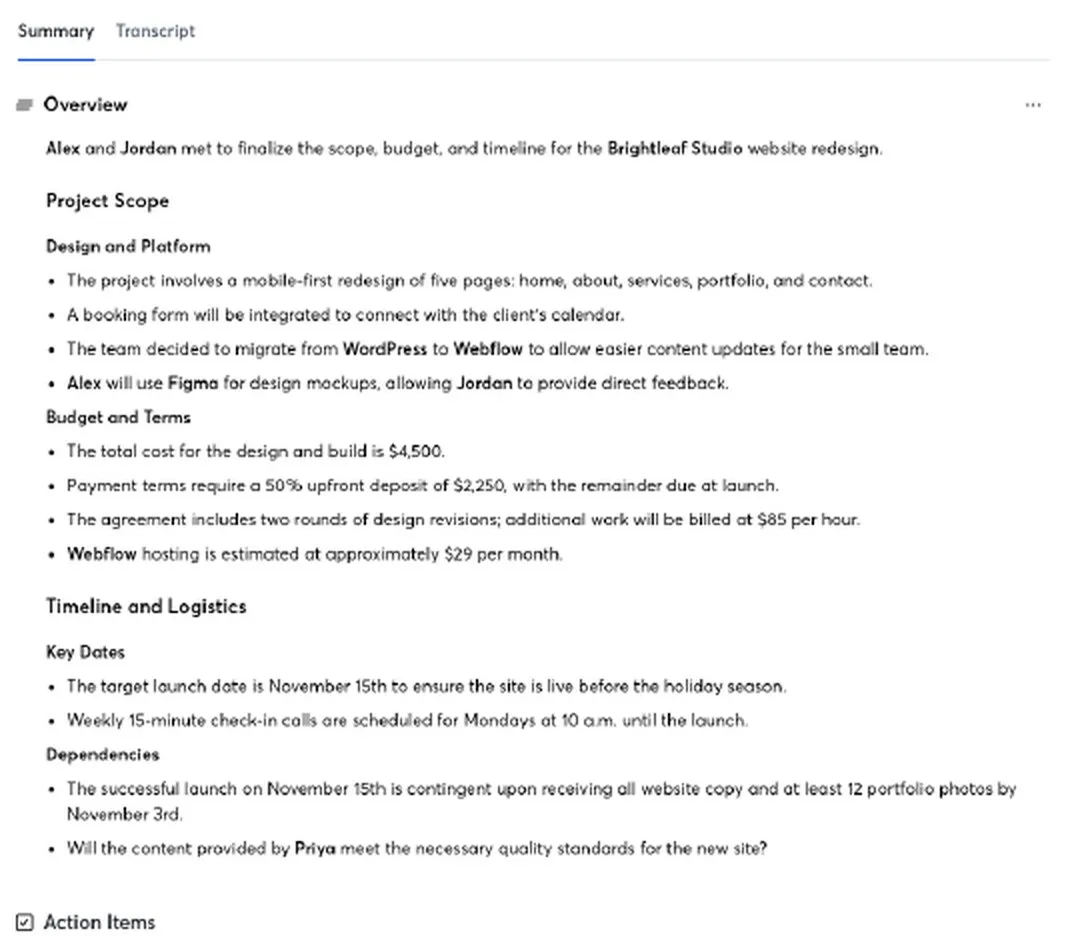
Otter wrote its summary as full sentences grouped under headings: “Project Scope,” “Budget and Terms,” “Timeline and Logistics.” The format reads like meeting minutes you could forward to a client. All numbers matched our key. One small glitch: under “Dependencies,” Otter inserted a question (“Will the content provided by Priya meet the necessary quality standards…?”) that was not stated in the meeting as a dependency.
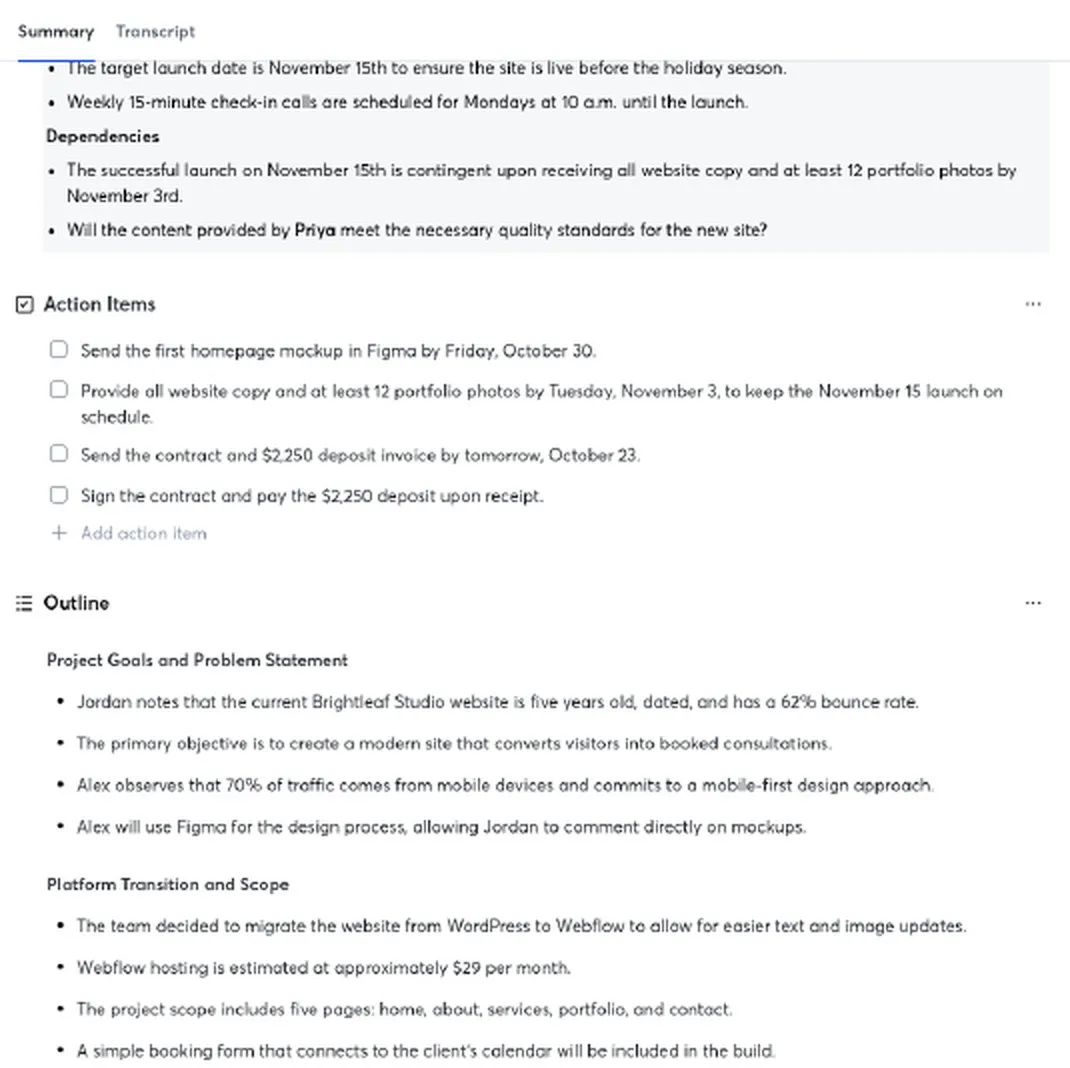
Otter generated four action items with checkboxes: the three correct ones, plus “Sign the contract and pay the $2,250 deposit upon receipt.” That last one is Jordan’s commitment to pay, not an action item in the traditional sense. Still, Otter’s list was tighter than Fireflies’ eight. Action items appeared about a minute after the summary loaded.
AI chatbot: AskFred vs Otter AI Chat
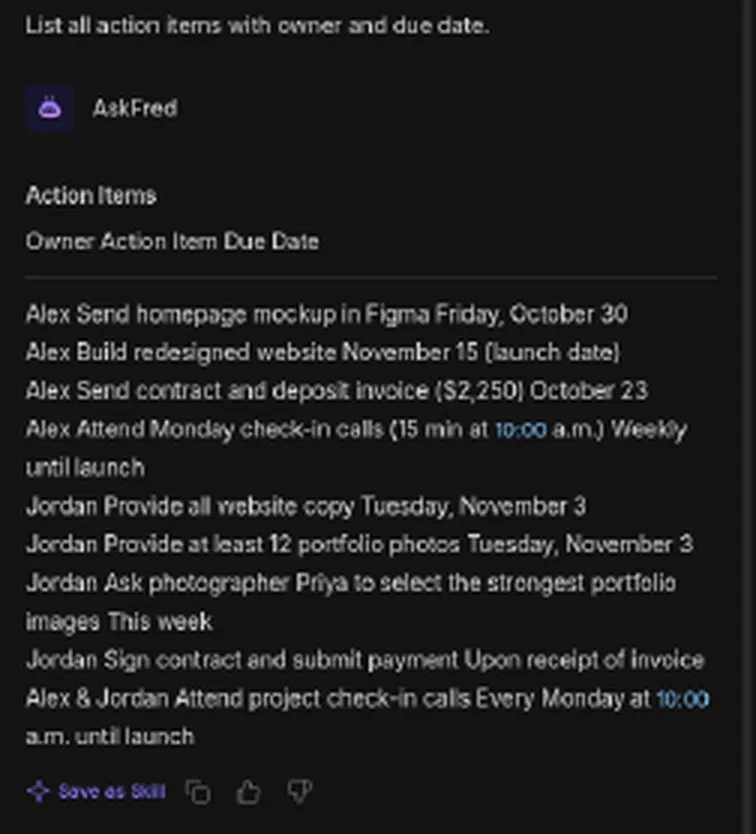
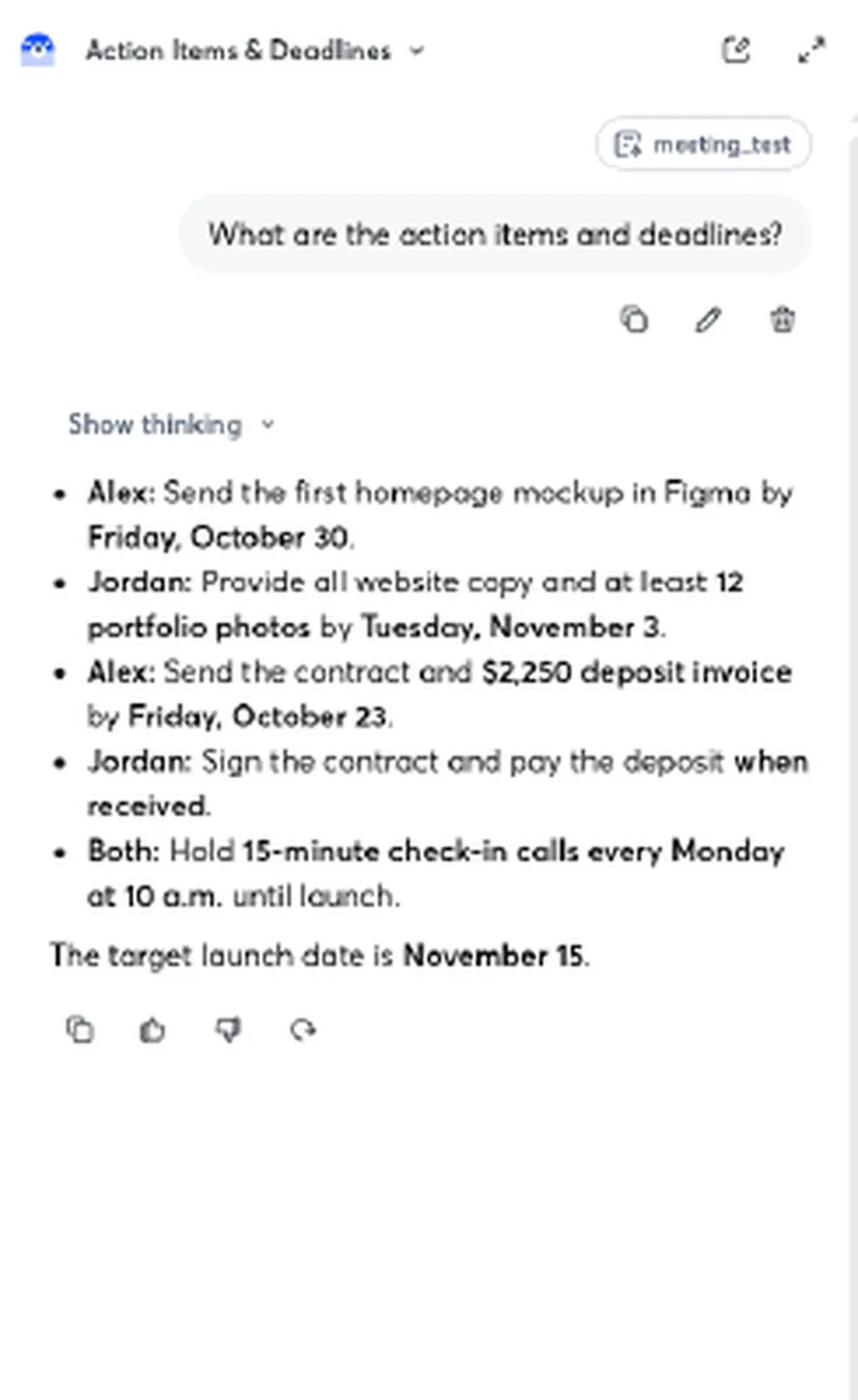
Both tools include an AI chatbot that answers questions about your meeting. We asked each one: “List all action items with owner and due date.”
Fireflies AskFred answered in about 25 seconds with 9 items, each showing owner and date. It included Jordan’s “Sign contract and submit payment” and the weekly check-in calls. The response was thorough but repeated some of the over-generation from the action-item block. AskFred worked on our free account with no visible paywall or credit warning.
Otter AI Chat answered with 5 items including owners and bolded dates. The list was clean: Alex’s mockup by October 30, Jordan’s copy and photos by November 3, Alex’s contract by October 23, Jordan’s deposit payment, and the Monday check-in calls. It added “The target launch date is November 15” at the end. AI Chat worked on Basic. Otter’s plan table lists 20 AI Chat queries per user per month on Basic, with 3 per conversation.
Set up Fireflies in five minutes
- Go to Fireflies.ai and create a free account. Sign-in works through Google or Outlook, per its FAQ.
- During onboarding, change auto-join to “Only when I invite” and recap emails to “Only me.” The defaults would join every calendar meeting and email summaries to all participants.
- Skip the 7-day Business trial if you want to stay on Free. It requires a credit card.
- Click Meetings, then Uploads. Drag your audio or video file in. Supported formats: MP3, M4A, WAV, MP4, WEBM. Size limits: 100 MB for video, 500 MB for audio.
- Wait about 1.5 minutes for a 4-minute file. You will see “Processing transcript” in yellow.
- Open the meeting to find the Notes with the action-item block below them, a Transcript tab, and AskFred.
Set up Otter in five minutes
- Go to Otter.ai and sign up for a free Basic account.
- Check Otter’s auto-join and sharing settings. Set them to your comfort level before connecting a calendar.
- Click the import icon to open the file upload dialog. Basic allows 3 lifetime imports. The dialog shows how many you have left.
- Drop your audio file. Otter supports AAC, MP3, M4A, WAV, WMA, MOV, MPEG, MP4, and WMV. Ten languages are available.
- Processing took about 23 seconds for our 3:57 file.
- Open the conversation to see Summary and Transcript tabs. Action Items appeared under the summary about a minute later in our test.
Integrations
Fireflies connects to Zoom, Google Meet, and Microsoft Teams on the free plan. The Pro plan lists “unlimited integrations”. The pricing page lists API access on every plan, including Free (30 requests a minute, 500 a day). Our free account showed prompts to connect Slack, Gmail, and Zoom, and we did not connect any of them.
Otter connects to Zoom, Microsoft Teams, and Google Meet on Basic. Pro adds Salesforce, HubSpot, and Zapier integrations, though Salesforce and HubSpot carry user limits noted on the pricing page. Enterprise adds custom integrations with CRM and dialer tools, plus an API and webhooks.
Otter’s Zapier integration starts at Pro. Check Fireflies’ integrations page for the specific apps you use, because we did not test any connection.
Pricing (verified October 23, 2026)
Fireflies
Prices from the Fireflies.ai pricing page, read October 23, 2026.
| Plan | Monthly billing | Annual billing | Storage | AI credits |
|---|---|---|---|---|
| Free | $0 | $0 | 400 min/team | 20 |
| Pro | $18/seat | $10/seat | 8,000 min/seat | 20 |
| Business | $29/seat | $19/seat | Unlimited | 30 |
| Enterprise | Annual only | $39/seat | Unlimited | 50 |
Fireflies sends mixed signals on the free plan. The plan card says “Unlimited transcription*”, but the feature table further down lists Transcript as “Limited” for Free. The free plan also has a 2-hour recording limit. Our account showed a “Free meetings” counter in the header that started at 3 and dropped to 2 after one upload. We did not find what the counter measures. Pro adds downloads, Email Assistant, AI Skills, and voice agents. On our free test account on October 23, 2026, the Download dialog opened with transcript, summary, and audio tabs and no visible lock, even though the pricing page lists downloads under Pro. We did not complete a download to confirm.
Otter
Prices from the Otter.ai pricing page, read October 23, 2026.
| Plan | Monthly billing | Annual billing | Minutes/mo | Per conversation |
|---|---|---|---|---|
| Basic | $0 | $0 | 300 | 30 min |
| Pro | $16.99/user | $8.33/user | 1,200 | 90 min |
| Business | $30/user | $19.99/user | 6,000 | 4 hours |
| Enterprise | Custom | Custom | Custom | Custom |
Basic gives 3 lifetime file imports. Pro gives 10 monthly imports and unlimited storage. Otter also shows promo prices marked with an asterisk for first-time subscribers ($8.49 on monthly Pro, $4.17 on annual Pro, at the time we looked), so the price you see at checkout can differ from the table. A 20% student discount is available for Pro with a .edu email. Otter’s plan table lists mp3 and txt export on Basic, with PDF, DOCX, and SRT starting at Pro. We did not test export.
Try Otter's free plan →Where Fireflies wins
Fireflies transcribes in 100+ languages. Otter supports 10. If your meetings happen in Japanese, Portuguese, or Hindi, Fireflies is the only option here.
Action items come pre-sorted by owner. In our test you opened the meeting and saw Alex’s four items, Jordan’s three, and one shared item in separate groups, without scanning a flat list. For a project manager tracking who owes what, that saves time every day.
Otter Basic stops at 300 minutes a month and 30 minutes per conversation, so a one-hour team call is over its cap. Fireflies Free lists no monthly minute figure and a 2-hour recording limit, although its own table calls free transcription “Limited” and we did not test a long file.
Fireflies lists 100+ languages (many in beta, per its FAQ) against Otter’s 10, and its Pro plan lists “unlimited integrations”. Otter puts Salesforce, HubSpot, and Zapier integrations on Pro. We did not connect any integration during our test.
Where Otter wins
Otter processed our file in 23 seconds. Fireflies took about 90 seconds. That is one file, so we cannot say how the gap scales.
The summary reads like meeting minutes. Full sentences under clear headings, ready to paste into an email. Fireflies’ bullet-point format is denser but needs more scanning.
Otter’s action-item list was tighter. Four items versus Fireflies’ eight, with fewer false entries. Less cleanup before you forward the list to your team.
The paid plan is cheaper. Otter Pro at $8.33 a month (annual) costs less than Fireflies Pro at $10. On monthly billing the gap is wider, $16.99 for Otter against $18 for Fireflies Pro, so it narrows. Otter Pro gives 1,200 minutes a month, while Fireflies Pro lists unlimited transcription.
What we didn’t like about Fireflies
The “unlimited transcription” claim comes with an asterisk, and the feature table lists free transcripts as “Limited”. Our free account showed a “Free meetings” counter of 3 that ticked down after one upload. We found no explanation of it in the app during our test, so check it before you plan around “unlimited”.
Eight action items for a four-minute meeting with three real tasks is too many. “Build redesigned website” and duplicate “Attend project check-ins” entries are noise. You need to review and delete before sharing the list.
The transcript garbled a key sentence about project scope. “Five pages: Home, About, Services, Portfolio, and Contact” became “five Home, about services.” Anyone reading the transcript without the recording would miss the scope.
Upsells appear everywhere. A 7-day Business trial banner (requires a credit card), a “40% OFF” sidebar badge, a video-recording upgrade card, and “Consumes AI credits” labels on advanced skills. The free plan feels like a demo.
What we didn’t like about Otter
Three lifetime file imports is almost nothing. Upload a test file and a real meeting, and you have one import left. After that, per Otter’s pricing page, uploads need Pro (10 a month) or Business, or you record live in Otter instead.
Speaker separation broke during fast back-and-forth dialogue. In the stretch at 2:25 where speakers traded short replies, Otter merged Jordan’s lines into Speaker 1’s block. That would mislead anyone reviewing the transcript for attribution.
The summary inserted a question (“Will the content provided by Priya meet the necessary quality standards…?”) as a “dependency.” Nobody said that in the meeting. It looked like AI-generated speculation in what should be a factual record.
The 30-minute per-conversation cap on Basic means you cannot transcribe a typical one-hour meeting without upgrading.
Which one fits your week
A solopreneur who records client calls that run past 30 minutes and wants action items grouped by owner: Fireflies Free. Otter Basic would cut those calls off at 30 minutes.
A freelancer who uploads one or two recordings a month and wants a clean summary to send the client: Otter. The full-sentence summary is easy to paste into an email. Basic’s 3 lifetime imports run out fast, and Pro at $8.33 a month (annual) lists 1,200 minutes and 10 imports a month.
A small agency with five people in daily standups: Fireflies Pro at $10 per seat. Fireflies lists unlimited transcription and unlimited AI summaries on Pro, and 8,000 minutes of storage per seat. We tested only the free plan, so treat this as a pointer for your own trial.
Who should skip both
If your meetings are shorter than five minutes and you can take notes by hand, neither tool saves you enough time. If you need HIPAA compliance, both require an Enterprise or add-on plan. If you never record meetings, a note-taking app like Notion or Google Docs works fine. And if your calls happen in a language neither tool supports, look at other tools first.
Support, cancellation and refunds
Fireflies shows a chat widget on its pricing page and a help center. Its feature table lists priority support from Business and dedicated support on Enterprise only. We did not look for a refund policy beyond the pricing page.
Otter lists standard email support on Basic and prioritized support on Pro and Business. Enterprise adds a Customer Success Program. Otter’s pricing page does not display a refund policy. We did not test the cancellation flow on either tool.
Privacy and account safety
Fireflies defaults to auto-joining all calendar meetings and emailing recaps to all participants. During onboarding, change “Auto-join” to “Only when I invite” and recap emails to “Only me.” If you skip this step, Fireflies will join calls your colleagues did not expect to be recorded.
Otter also offers auto-join settings. Check them during signup and set sharing and recap preferences to match your comfort level before connecting your calendar.
We uploaded our audio file to both services, so both process your recordings on their servers. If you handle sensitive client conversations, read each tool’s privacy policy and terms before uploading.
Alternatives worth a look
We did not test other note-takers for this article. Notta and Fathom are two commonly mentioned alternatives, so check their current free plans against your meeting length and language before you commit. Compare any tool the same way: upload one recording with known numbers and read the output.
Who should choose Fireflies
You run client calls in multiple languages, you want action items sorted by owner without editing, and you need those notes in your CRM. Start with Fireflies' free plan and see whether the meeting counter fits your volume before upgrading.
Who should choose Otter
You want the fastest processing, a summary you can forward without editing, and the lowest paid price. Start with Otter Basic and save your 3 file imports for real meetings, not tests.
FAQ
Is Fireflies really free?
Fireflies has a free plan with “unlimited transcription” (asterisk), 400 minutes of storage per team, and 20 AI credits. Our test account showed a “Free meetings” counter of 3. The feature table lists free transcripts as “Limited”, and we did not find what the counter measures.
How many minutes does Otter Basic give you?
Otter Basic gives 300 transcription minutes a month, capped at 30 minutes per conversation. You also get 3 lifetime file imports.
Can I download transcripts on the free plans?
On Fireflies Free, the pricing page lists downloads as a Pro feature, yet our free test account’s Download dialog opened with transcript, summary, and audio tabs and no visible lock on October 23, 2026. We did not complete a download to confirm. On Otter, the plan table lists mp3 and txt export on Basic and PDF, DOCX, and SRT from Pro.
Do either tool name speakers automatically?
No. Both labeled our two speakers as “Speaker 1” and “Speaker 2.” Fireflies shows a dropdown next to each speaker label and Otter has an “Edit transcript” button. We did not test renaming on either tool.
Which tool is better for long meetings?
Otter Basic caps each conversation at 30 minutes. Fireflies Free lists a 2-hour recording limit. We did not test a file longer than 4 minutes on either tool, so for meetings over 30 minutes the Fireflies limit is the vendor’s claim.
Can I cancel anytime?
We did not test cancellation on either tool. Neither pricing page showed a refund policy during our review on October 23, 2026. Read each vendor’s terms before you pay.
Scorecard
Scores are out of 5, based on our October 23, 2026 test of both free plans with a 3:57 two-speaker audio file.
| Fireflies | Otter | |
|---|---|---|
| Transcription accuracy | 4 | 4 |
| Speaker separation | 4.5 | 3.5 |
| Summary quality | 4 | 4.5 |
| Action-item accuracy | 3.5 | 4 |
| AI chatbot usefulness | 4 | 4 |
| Free plan value | 3.5 | 3 |
| Processing speed | 3.5 | 5 |
| Paid plan value | 4 | 4.5 |
| Overall | 3.9 | 4.1 |
How we tested
On October 23, 2026 we used free accounts on both Fireflies.ai and Otter.ai. We uploaded the same 3:57 MP3 file (a scripted two-speaker meeting with a known answer key covering one decision, three action items, and 12+ verifiable numbers) to each tool. We read the full transcript, summary, and action items from each, then asked each AI chatbot the same question. We scored results against the answer key, noting correct items, false additions, speaker separation errors, and transcript mistakes. Fireflies and Otter prices come from each vendor’s pricing page (monthly and annual tabs, read October 23, 2026). Screenshots were captured from each tool’s interface during the test, with account names and avatars cropped out. All testing was done by the author YOKI. More on our method is on the About page.
Final verdict
Both tools transcribed our meeting accurately and caught every action item. Fireflies adds more structure with owner-sorted tasks and deeper integrations. Otter gets you there faster with cleaner summaries and a lower price tag.
Start with the free plans. Upload a real meeting, read the output, and decide which format matches how you share notes with your team or clients.
Try Fireflies free →