Reclaim vs Motion (2026): Which AI Calendar Fits a Solopreneur?
Reclaim has a free plan and syncs with the task app you already use. Motion costs from $12.73/mo and replaces it. We tested how Reclaim moves a focus block when a call lands on it.
The short answer
Reclaim if your tasks already live in Todoist, Asana or Google Tasks and client calls keep landing on your focus time. Its free plan covers a one-person business. Motion if you want tasks and calendar in one app, from $12.73 a month.
Prices checked on the vendor's own page. Some links are affiliate links (disclosure).
Quick verdict: Pick Reclaim.ai if you already keep your tasks in Todoist, Asana or Google Tasks and your main problem is client calls landing on top of your work blocks. The free plan covers a one-person business. Pick Motion if you’d rather move tasks, projects and calendar into a single app and pay from $12.73 a month for it.
Client calls eating your focus time? Connect Reclaim’s free plan to your calendar in about ten minutes, then read on to see when Motion is the better buy.
Start Reclaim free →At a glance
| Reclaim.ai | Motion | |
|---|---|---|
| Starting price | Free plan; paid from $10/mo (annual) | From $12.73/mo (annual) or $19/mo monthly |
| Free plan | Yes (Lite) | No, free trial only |
| Core idea | Auto-schedules habits, tasks and focus time around your meetings | AI plans your whole day from your task and project list |
| Task management | Syncs with Todoist, Asana, ClickUp, Jira, Linear, Google Tasks | Built in (tasks, projects, docs, notes) |
| Meeting booking links | 1 on free, 3 on Starter, unlimited on Business | Booking pages on every paid plan |
| Apps | Web app and Slack; no native mobile app yet | Web, desktop, iOS, Android |
| Best for | Solopreneurs who already use a task app | Solopreneurs who want one planner for everything |
What we tested
We connected Reclaim to a working Google Calendar on September 7, 2026 and watched what it did with the week ahead. Setup took about ten minutes. The onboarding offers three ready-made habits (10 hours of Focus Time a week, breaks after long meetings, a daily lunch hour), and everything lands in a Preview Mode first, so nothing touches your real calendar until you press Apply.
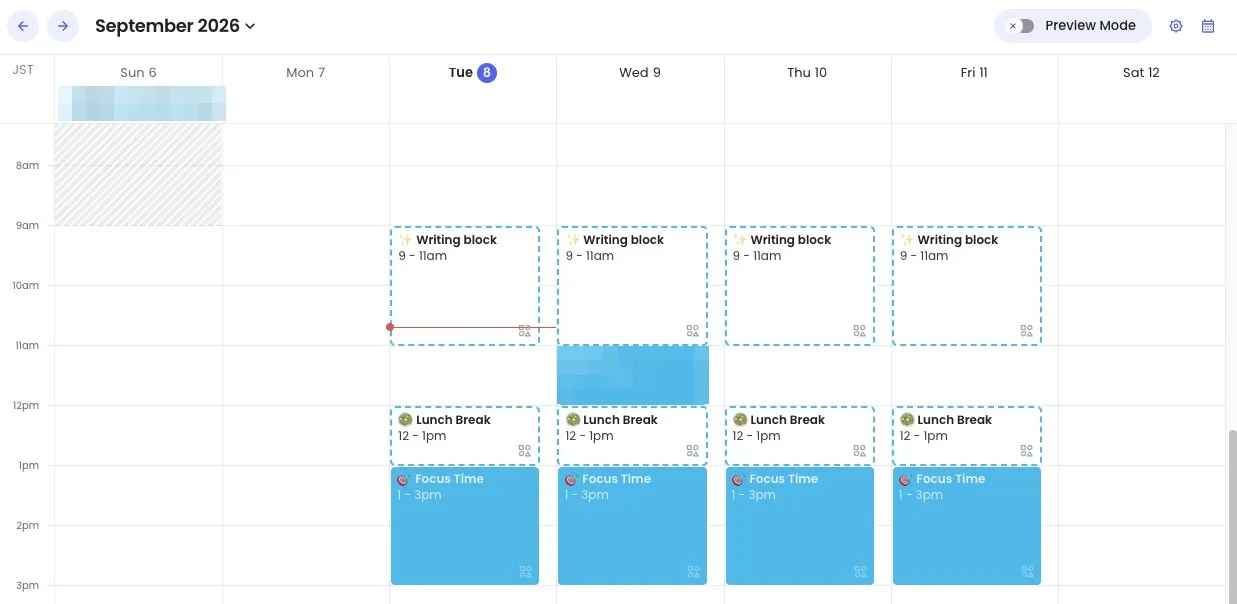
Then we added one custom habit, “Writing block”, two hours every weekday morning. Reclaim placed it at 9 to 11am Tuesday through Friday and, without being asked, moved the Focus Time it had scheduled at 8 to 10am down to 1 to 3pm so the two didn’t fight. An existing 11am client meeting on Wednesday stayed exactly where it was. The dashed borders mean those blocks are still flexible: Reclaim will slide them if a meeting lands on top. New accounts get a 14-day trial of the paid features with a 30% first-year discount offered on day one.
What happens when a meeting lands on a block
On September 8 we dropped a fake client call onto Wednesday’s Writing block: 9:30 to 10:30am, right in the middle of the 9 to 11am slot. We didn’t touch anything else.
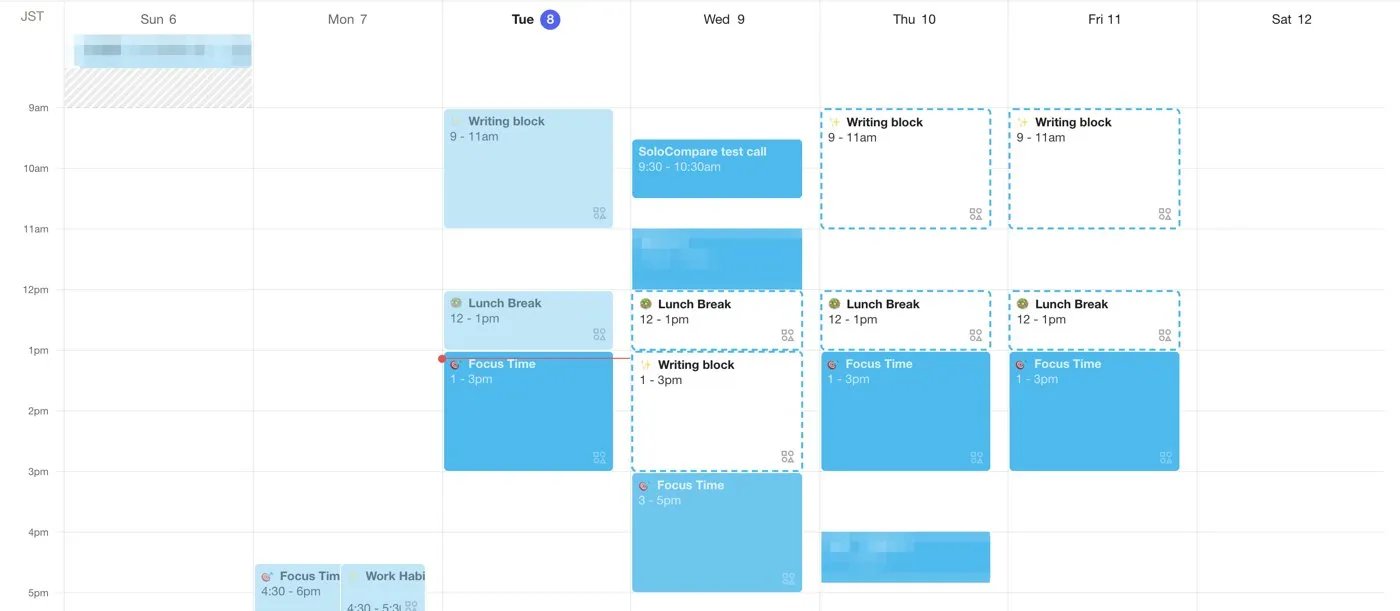
About ten seconds later the Writing block had moved to 1 to 3pm, and the Focus Time that used to sit there had moved down to 3 to 5pm. The lunch hour at noon and the real 11am meeting stayed where they were. Nothing on Tuesday, Thursday or Friday changed. The block kept its full two hours instead of being split around the call. We deleted the fake call afterwards and the Writing block went back to 9 to 11am on its own.
You can see the same thing on your own calendar in about ten minutes on the free plan.
Set up Reclaim free →How each tool plans your day
You tell Reclaim what needs to happen every week, such as “write for two hours on weekday mornings,” and it books that time on your Google Calendar as a Habit. A client grabs your Tuesday writing slot? Reclaim moves the block to Wednesday instead of deleting it, then adds Buffer Time before and after the call so you aren’t back to back from 9 to 5. Your to-do list stays wherever it lives today.
Motion wants the to-do list too. Every task goes into Motion with a deadline and a duration, and its planner lays your whole day out for you, then re-plans the rest of the week when you fall behind on Tuesday. That is a lot of power. It also means your entire workflow now lives inside Motion.
With three or four recurring habits and a few client calls a week, Reclaim’s lighter touch is enough. With a dozen small deliverables and hard deadlines, Motion’s full re-plan earns its price.
Task management and integrations
Reclaim leaves your task app alone. The free plan syncs with Google Tasks, Slack, Zoom and Google Meet, and the paid plans add Todoist, Asana, ClickUp, Jira and Linear, so your list stays put while your calendar gets smarter around it.
Motion bundles tasks, projects, docs, notes and a meeting notetaker into one app, and connects to Gmail, Outlook, Slack, Teams and Zoom, plus hundreds of other tools through Zapier. Tired of switching between five apps? That is the pitch. If you’ve already spent a year setting up Notion or Asana, it’s a migration.
Meeting scheduling links
Both give clients a booking page, so nobody trades six emails to find a slot. Reclaim’s free plan includes one link. Starter gives you three, Business makes them unlimited, and Motion includes booking pages on every paid plan.
One link for discovery calls and one for existing clients covers most solo businesses.
Set up Reclaim in ten minutes
This is the exact path we took, so you know what you’re agreeing to before you click.
- Open Reclaim's signup page and sign in with the Google account that holds your work calendar. Reclaim asks for two calendar permissions: read all calendars, and edit events. It doesn’t touch Gmail or Drive.
- Accept or edit the three starter habits it proposes: 10 hours of Focus Time a week, short breaks after long meetings, and a daily lunch hour. They land in Preview Mode, not on your calendar.
- Press Review and apply. Only now do the blocks appear in Google Calendar.
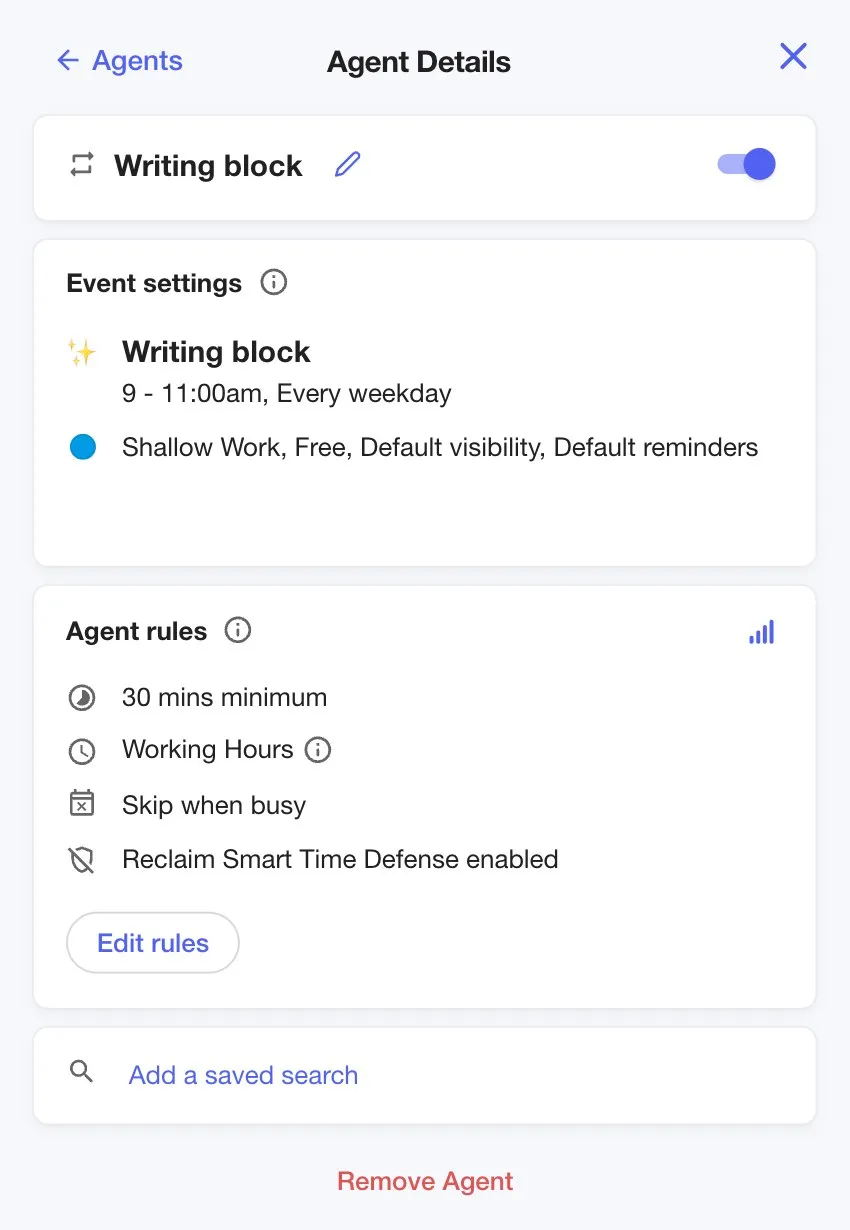
- Add one habit that matters to you. We used Create, then Habit, then Custom Work Habit, and set “Writing block” to 9 to 11am every weekday. The habit’s panel shows the rules Reclaim applies: a 30-minute minimum, working hours only, skip when busy.
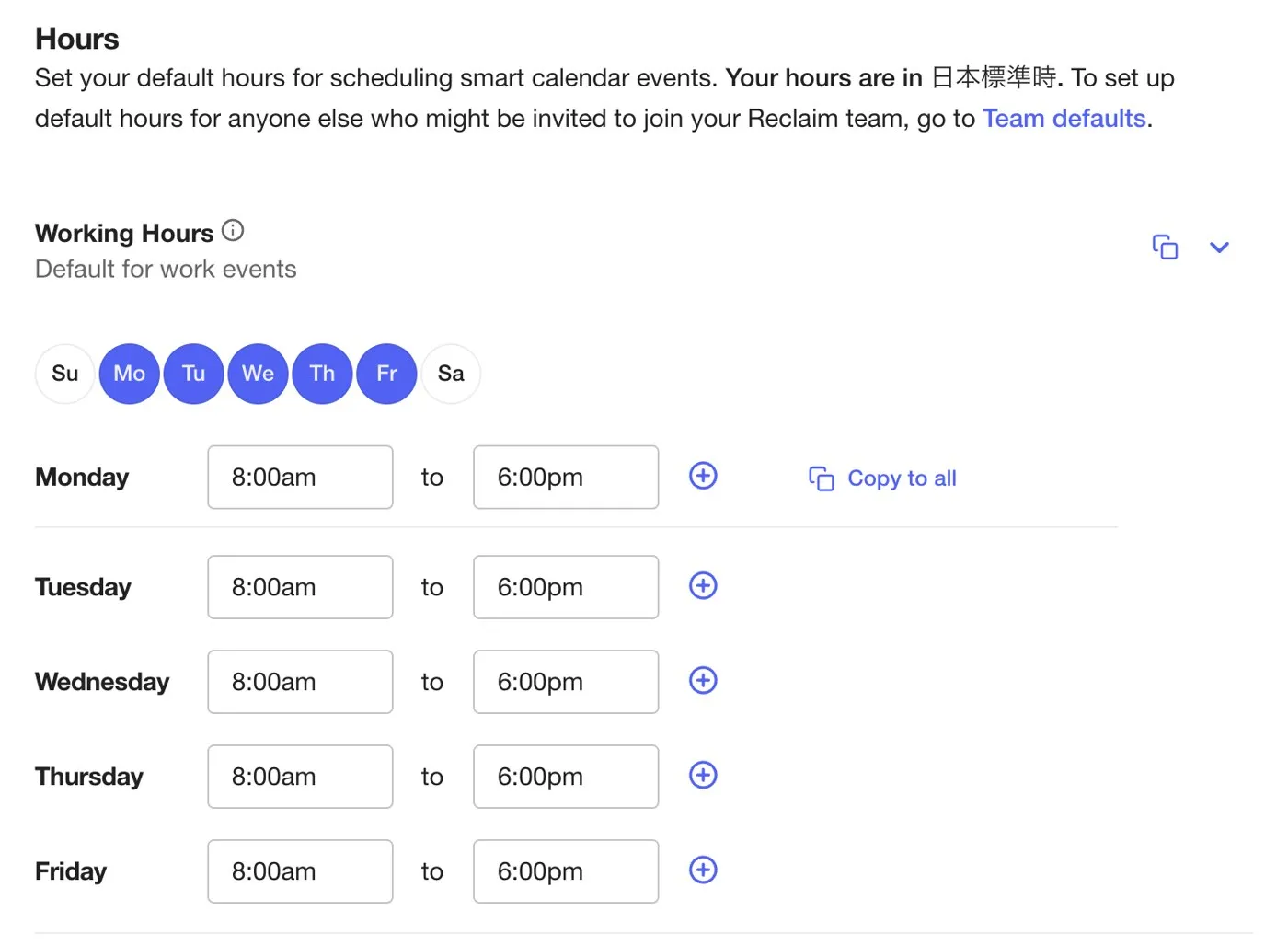
Before that, check Settings, then Hours. Reclaim only schedules habits and focus time inside the working hours you set there, which default to 8am to 6pm on weekdays.
- Watch the planner for a week. Dashed blocks are flexible and will move when a meeting lands on them. Solid blocks are locked.
If you decide it isn’t for you, remove Reclaim at myaccount.google.com/permissions and delete the habit events it created. Nothing else changes.
Integrations
Reclaim connects to Google Calendar and Outlook Calendar, and pulls tasks from Todoist, Asana, ClickUp, Jira, Linear and Google Tasks. It also syncs your status with Slack, joins Zoom meetings, exposes an MCP connection for ChatGPT and Claude, and offers webhooks on the Business plan. On the free Lite plan the integrations are limited to Google Tasks, Slack, Zoom and Google Meet.
Motion connects to Gmail, Outlook, Slack, Microsoft Teams and Zoom directly, and to most other tools through Zapier. It doesn’t need a task-app integration because the task manager is built in.
Pricing (verified September 6, 2026)
Reclaim.ai
| Plan | Annual billing | Monthly billing | Highlights |
|---|---|---|---|
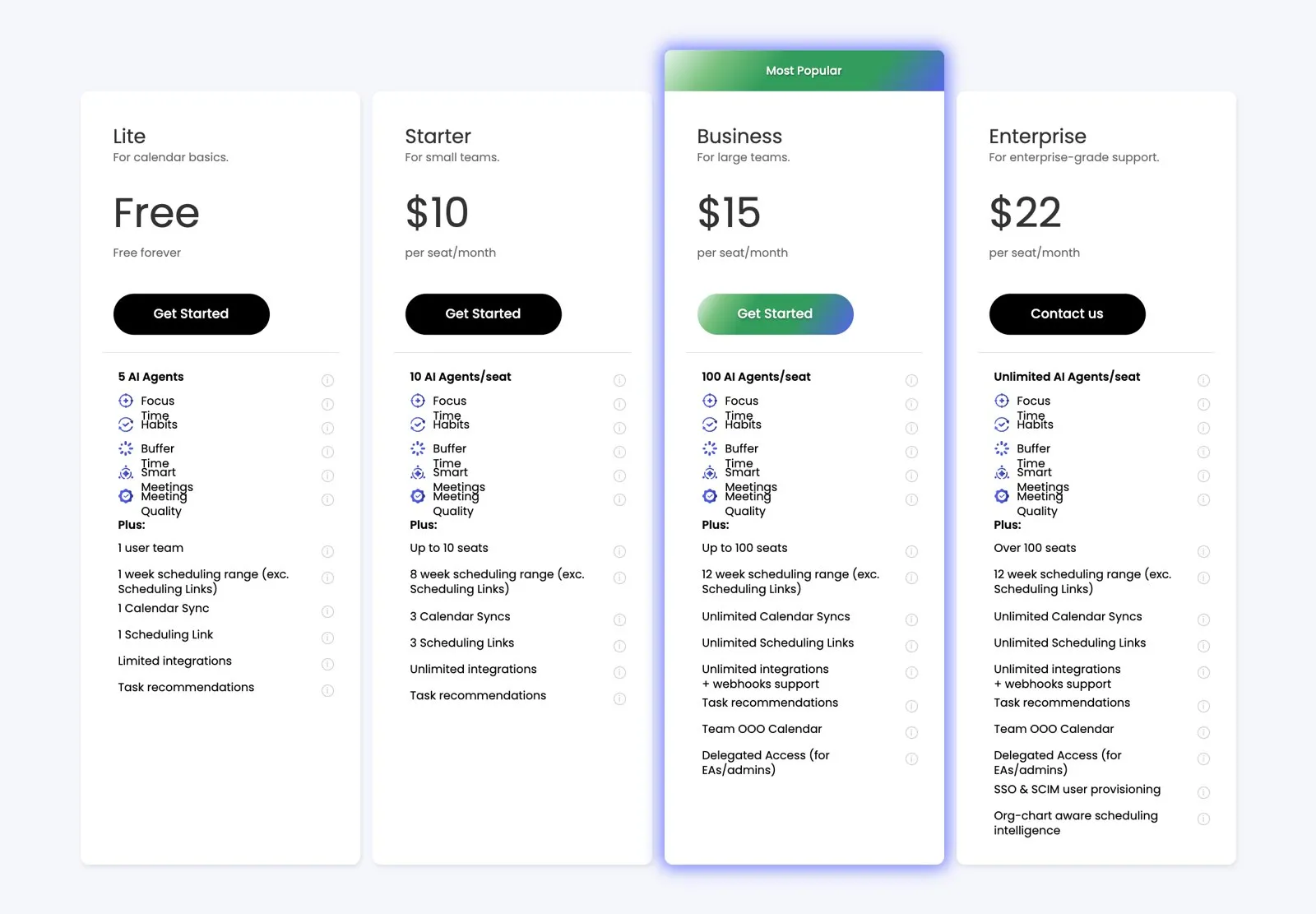
| Lite | Free | Free | 1 user, 1-week scheduling range, 1 calendar sync, 1 scheduling link |
| Starter | $10/seat/mo | $12/seat/mo | 8-week scheduling range, 3 calendar syncs, 3 links, all integrations |
| Business | $15/seat/mo | $18/seat/mo | 12-week range, unlimited syncs and links, webhooks |
| Enterprise | $22/seat/mo | n/a | SSO, org-wide scheduling |
New accounts get a 14-day trial of the paid features. On the day we signed up, Reclaim also showed a 30% first-year discount with a countdown that expired after 24 hours, so don’t plan around it.
Motion
| Plan | Annual billing | Monthly billing | Highlights |
|---|---|---|---|
| Pro AI | $12.73/seat/mo | $19/seat/mo | AI task planner, projects, calendar, docs, 7,500 AI credits/mo |
| Business AI | $19.43/seat/mo | $29/seat/mo | Adds capacity planning, dashboards, Gantt charts, time tracking |
Motion has no free plan. You get a free trial, then Pro AI at $12.73 a month if you pay for the year up front.
Paid annually, Reclaim Starter costs about $10 a month and Motion Pro AI about $13. Three dollars. The gap that matters is that Reclaim lets you start at $0 and stay there for months if one calendar and one booking link are all you need.
Start on Reclaim's free plan →Where Reclaim wins
The free plan is the big one. Habits, focus time and a booking link, for one user, at no cost, with no trial clock running. Reclaim.ai also plugs into the task app you already use, and its Buffer Time and Smart Meetings nudge your calendar instead of taking it over. Paid plans start $3 a month cheaper than Motion’s.
Where Motion wins
Motion puts tasks, projects, docs, notes and calendar in one place, with native desktop, iOS and Android apps. When a deadline slips it re-plans the rest of your week without you touching anything. The meeting notetaker and workflow builder come on the same plan, so you aren’t paying for a separate transcription tool.
What we didn’t like about Reclaim
The upsell starts on day one. A banner with a 24-hour countdown for 30% off sits at the top of the planner from the moment you sign up, which is a strange first impression for a tool whose main selling point is a free plan.
Editing a habit is less obvious than creating one. When we changed the Writing block from afternoon to morning, Reclaim closed the old series “until Sep 7” and started a new one, and the settings panel kept showing the old time for a while. It sorted itself out, but the first look is confusing.
There is still no native mobile app. Reclaim works in a phone browser, but you don’t get push notifications or quick actions, and public reviews in 2026 list this as the most common complaint. The free Lite plan also caps you at a 1-week scheduling range and five agents, so a solopreneur with more than a handful of recurring habits hits the ceiling fast.
What we didn’t like about Motion
There is no free plan, only a trial. You have to decide within days whether an app that wants to own your task list, your projects and your calendar is worth $12.73 a month before you have really settled in.
The learning curve is real. Long-term users on Trustpilot and in 2026 reviews describe the AI’s scheduling choices as hard to predict until you have tuned deadlines, durations and priorities carefully, and several say they never got there before the trial ended. Motion has also grown from a scheduler into a much bigger app with meeting notes, docs and AI agents, and users who joined for the calendar say the interface has become heavier as a result.
Which one fits your week
A freelancer with three or four client calls a week and one task app already in use: Reclaim, on the free plan. Set one Focus Time habit and one booking link and you’ve covered 80% of the problem for $0.
A solopreneur running several client projects with hard deadlines, who is tired of a task list that lives in a different app from the calendar: Motion, on the annual plan. The all-in-one approach only pays off if you commit to moving everything in, tasks, projects and notes included.
Someone who mostly needs a booking page and a lunch break protected: neither tool is necessary. A free Calendly-style link plus a recurring calendar event does the job.
Who should skip both
If your calendar lives in Apple Calendar or a self-hosted server, both tools will be a poor fit. Reclaim needs Google or Outlook, and Motion is built around the same two. If you dislike software moving your events without asking, you’ll fight both tools every day. And if your week has fewer than two meetings, there isn’t enough conflict for an AI scheduler to earn its fee.
Support, cancellation and refunds
Reclaim offers live chat in the app and email support, staffed Monday to Friday, 7am to 7pm Pacific, with replies typically within an hour during those hours. You can cancel or pause at any time. A paid plan runs to the end of the billing period and then drops to the free Lite plan. Monthly plans aren’t refunded. Annual plans can be refunded pro rata, equal to eleven months of the fee, if you cancel within 30 days of the start date and contact support.
Motion’s trial asks for a card up front and bills it automatically on the first day after the trial ends. Subscription fees are non-refundable under its terms, with one exception: Motion states it may refund a customer who is dissatisfied within the first two weeks. Cancellation is done from Settings, then Manage Plan, on a desktop browser.
Privacy and account safety
Reclaim has been owned by Dropbox since August 2024, so the data handling sits under a public company’s policies rather than a small startup’s. The Google permissions it asks for are calendar read and write only, and you can revoke them in one click from your Google account page. Motion publishes its terms and a master subscription agreement on its site. We haven’t tested its security page, so check it yourself if you handle client data under a confidentiality agreement.
Alternatives worth a look
If neither fits, three tools sit in the same space. Morgen combines a unified calendar with an AI planner and its own comparison page prices its Pro plan at $15 a month. Sunsama is a guided daily planner that pulls tasks in from other apps. Akiflow is a fast time-blocking app for people who want keyboard control over everything. We’ll compare them in a future article.
Who should choose Reclaim
You run a one-person business. Tasks live in Todoist, Asana or Google Tasks, and your real pain is client calls eating the mornings you set aside for deep work. Start on the free Lite plan. Upgrade to Starter when you need a second booking link.
Who should choose Motion
You juggle several client projects with real deadlines, you’re willing to move your task list into a new app, and you want a planner that tells you what to work on next. Start Motion's trial and pay annually to keep it at $12.73 a month.
FAQ
Does Reclaim have a free plan?
Yes. The Lite plan is free for one user and includes habits, focus time, one calendar sync and one scheduling link.
Does Motion have a free plan?
No. Motion offers a free trial, then Pro AI starts at $12.73/mo billed annually or $19/mo billed monthly.
Can I use Reclaim with Outlook?
Yes. Reclaim lists Outlook Calendar alongside Google Calendar on its integrations page. Outlook support arrived in 2025, years after the Google version, so the Google side has fewer rough edges. If your business runs on Microsoft 365, start on the free plan and check that your calendar syncs cleanly before paying.
Which is better for a freelancer with lots of client meetings?
Reclaim, in most cases. Buffer Time and focus-time protection were built for exactly that problem, and the free plan is enough to test both on a real week of calls before you pay anything.
Does Motion’s free trial need a credit card?
Yes. Motion’s terms state that a payment method is collected at signup and billed automatically on the first day after the trial. Cancel before then if you don’t want to be charged.
Can I get a refund?
Reclaim refunds annual plans pro rata if you cancel within 30 days, and doesn’t refund monthly plans. Motion’s fees are non-refundable, except that it may refund a dissatisfied customer within the first two weeks.
Can Motion replace my task manager?
Yes. Motion includes tasks, projects, docs and notes. If you’d rather keep your current task app, Reclaim fits better.
Scorecard
Our scores, out of 5, based on the plans, features and terms above and on the week we ran Reclaim on a real calendar. Motion’s scores rest on its published plans and terms and on public user reviews, since we haven’t yet run it on our own calendar.
| Reclaim.ai | Motion | |
|---|---|---|
| Free plan and entry price | 5 | 2 |
| Auto-scheduling for a solo calendar | 4 | 4 |
| Works with your existing task app | 5 | 2 |
| All-in-one task and project management | 2 | 5 |
| Mobile | 2 | 4 |
| Ease of setup | 4 | 3 |
| Cancellation and refund terms | 4 | 2 |
| Overall for solopreneurs | 4.2 | 3.3 |
How we tested
We signed up for Reclaim on September 7, 2026 with a working Google Calendar, applied the default habits, added a custom one, and recorded what the planner did. Prices and plan limits were read from each vendor’s pricing page on the dates shown. Support hours, refund and trial terms come from each company’s help center and terms of service. On September 8 we added a fake meeting on top of a habit block and recorded how Reclaim rescheduled it. We will update this article again once we’ve run Motion on the same calendar.
Final verdict
Start with Reclaim’s free Lite plan, set up one Habit for your deep-work block and one booking link, and run it for two weeks. If you find yourself wishing the calendar also managed your task list, that is your signal to trial Motion.
Try Reclaim free →