ClickUp Free Plan: What You Actually Get (and Its Limits)
ClickUp's Free Forever plan has 60MB of storage and 5 Spaces. We hit the Space cap on a new account, but Gantt, custom fields and time tracking showed no limit in a short test. Tested October 24, 2026, prices in USD.
The short answer
Free Forever has unlimited tasks and members. The limits that hit first are 5 Spaces and 60MB of storage. Core costs $9 per user a month.
Prices checked on the vendor's own page. Some links are affiliate links (disclosure).
Quick verdict: ClickUp's Free Forever plan has no cap on tasks or members, but it has hard limits on Spaces (5) and file storage (60MB). In our test on a new account, the sixth Space was the only thing that stopped us. ClickUp’s plan table labels Gantt, custom fields, time tracking, Dashboards and Goals as “Trial” on Free, and we saw no limit message for any of them in a short session. For a solo freelancer who needs lists, boards and Docs, the plan looks like enough. We can’t say how long the trial features last, so check your own use before you build client work on them. Limits and prices may change.
Testing status: On October 24, 2026 we created a new ClickUp account on the Free Forever plan and tried the limits below. The screenshots come from that account. Prices are in USD, as of Oct 2026. Pricing and limits may change, so check the plans page before you decide. We did not test paid plans.
At a glance
The table puts the free plan next to Core, the first paid step. The Free column comes from the plan comparison table in our new account (Settings > Upgrade), read October 24, 2026. Where a Core cell comes from ClickUp’s public pricing page, read October 23, we say so below the table.
| Free Forever | Core | |
|---|---|---|
| Price per user | $0 | $9 yearly, $12 monthly |
| File storage | 60MB | Unlimited (pricing page) |
| Spaces | 5 (we hit the cap) | Unlimited (the upgrade popup says so) |
| Folders per Space | 100 | Not checked |
| Lists per Space | 40 (help center) | Not checked |
| Gantt, custom fields, time tracking | Labeled “Trial” | Not checked |
| Automation actions | 100 a month, 5 active rules | 1,000 a month (pricing page) |
| Activity view and Pulse | 1 day | Not checked |
| Message history | 90 days | Not checked |
| AI credits | 500 per workspace | 1,000 per user a month, pooled |
Sources: the in-app plans page and comparison table (October 24, 2026), plus ClickUp's public pricing page and the help-center articles read on October 23 and 24, 2026.
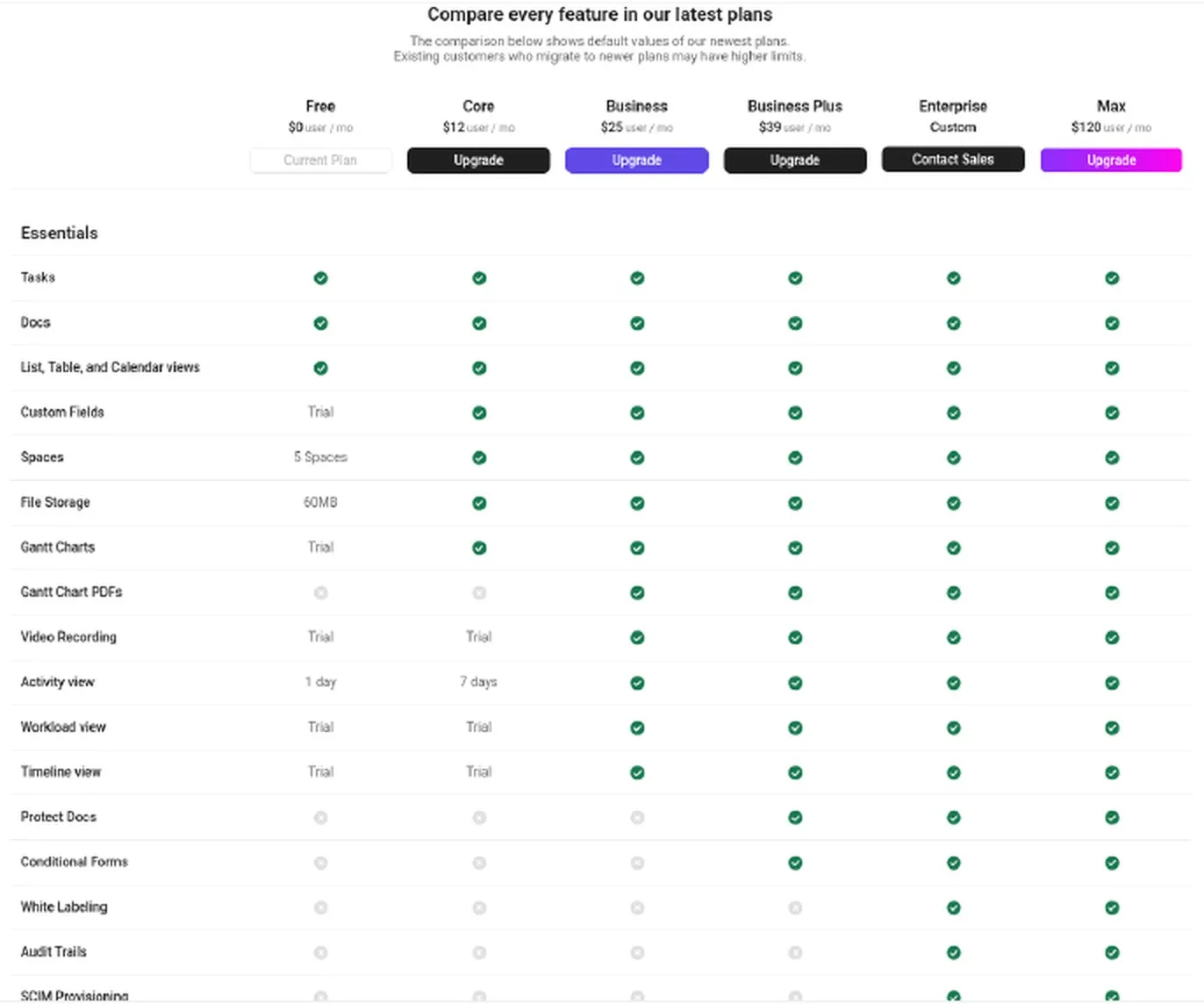
Our test account, Oct 24, 2026: the Free column of the in-app plan comparison table.
What the free plan includes
Per the public pricing page we read on October 23, Free Forever lists unlimited tasks, unlimited free plan members, collaborative Docs, Kanban boards, sprint management, two-factor authentication and 24/7 support. The page also names calendar view, SyncUps video calls, time tracking and one form.
Views are where the plan gets uneven. List, Board, Calendar, Table and Doc views are included, according to ClickUp’s help center. The comparison table we saw on October 24 labels Gantt, Timeline and Workload “Trial” on Free, and the help center we read the day before gave each a count of 60 uses. We added a Gantt view and a Calendar view in our test and saw no limit text at all. Map, Mind Map and Team view are not available on Free, per the help center.
List view also has a ceiling that applies to every plan. The help center says up to 5,000 tasks load at a time, so you filter to see the rest. A freelancer will rarely get there.
The limits that hit first
5 Spaces
The Spaces cap is the one we hit. We created Spaces until we had 5 in total. The sixth attempt showed a popup that read “Spaces isn’t available on your current plan” with the line “Upgrade to Core to get unlimited Spaces” and the Core price of $9 per user per month.
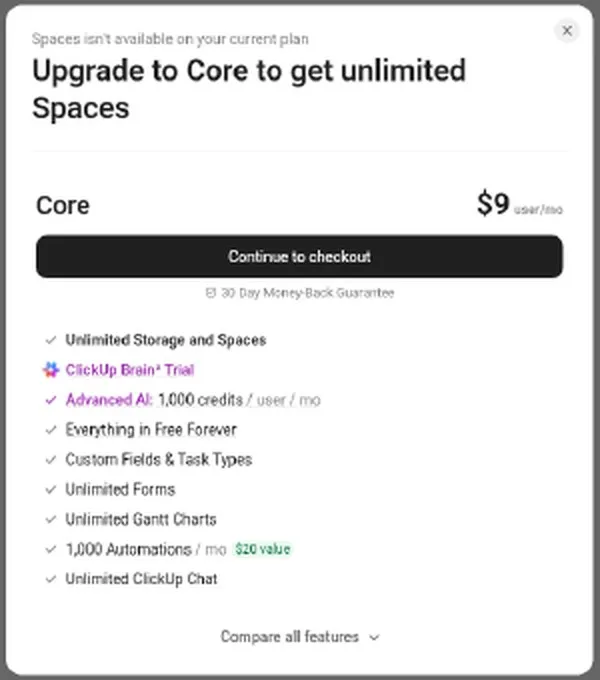
Our test account, Oct 24, 2026: the popup on the sixth Space.
The default setup counts too. After onboarding our workspace held one Space plus a “Team Space”, so you don’t start with five empty slots.
A Space is the top level of ClickUp’s hierarchy. Give each client a Space and the fifth client uses the last one. Folders help. The comparison table lists 100 Folders per Space on Free.
With five Spaces, a Space-per-client setup has a ceiling.
Lists have a tighter cap. ClickUp’s help center article on List limits, read October 24, 2026, lists 40 Lists per Space on Free Forever. It also says each Folder you create includes one List, so a free Space that has hit 40 Lists can’t take new Folders. In practice the List cap comes before the 100-Folder figure. We did not create 40 Lists to check it.
60MB of file storage
This is the smallest number on the page. The comparison table lists File Storage at 60MB on Free, and ClickUp’s FAQ says only file attachments count against it, not tasks. Ten client PDFs at 6MB each would fill it.
That sum is our arithmetic, not a ClickUp example. We could not check the limit. The billing page showed only “Free Forever, 1 seat, $0 / seat”, we found no storage meter in any settings page, and uploading a tiny text file showed no storage text. A storage usage meter was not visible to us.
Trial features: Gantt, custom fields, time tracking and more
The comparison table labels these features “Trial” on Free: Custom Fields, Custom Task Types, Time Tracking, Advanced Time Tracking, Gantt Charts, Goals, Dashboards, Sprint Points, Workload view, Timeline view, Video Recording, Embedded Content, Annotate Attachments and Email Integration.
The help center we read on October 23 describes the same features as capped “uses.” ClickUp’s FAQ calls uses “a demonstration of paid plan features” and says they are “cumulative throughout a Workspace” and “do not reset or count down.” It lists 60 uses each for Gantt, Timeline and Workload, 60 for custom fields, 40 for Embed views, and 100 plus 40 advanced for time tracking.
Our short test did not show any of that. We added a Gantt view, a Calendar view and a Text custom field with no limit message and no “uses left” counter. The time tracking timer started and stopped. A Dashboard “Start from scratch” and the Goal creation form both opened with no limit text, though we did not save a goal.
That is one session on a new account. We can’t say how long the trial lasts. A counter may appear later. Treat the help-center numbers as ClickUp’s description of the plan, which we did not confirm.
Some dashboard cards and templates carry a plan tag. The Time Tracking and Project Management templates and the Calculation card are tagged Business. The Time Reporting and Portfolio cards are tagged Core.
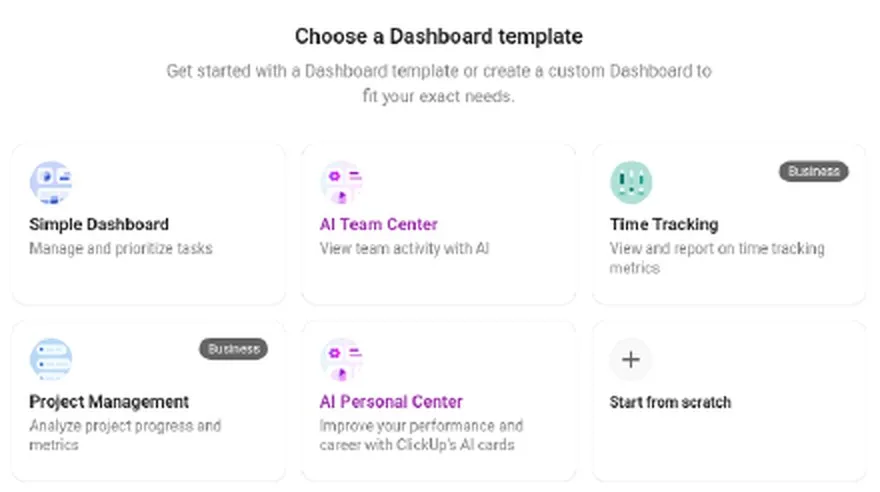
Our test account, Oct 24, 2026: two dashboard templates carry a Business tag.
The help center says one use is one custom field value added to a task, so two labels on one task would cost two uses. By our arithmetic, that would reach 60 uses after 30 tasks. We did not get near a cap, so that sum is untested.
Automation: 5 active rules and 100 actions a month
The comparison table lists 5 Automation Active Rules and 100 Automation Actions a month on Free. Business adds webhooks and automation integrations, per the pricing page we read on October 23. We built no automation.
If you want to connect ClickUp to other apps without paying, the pricing page lists Zapier and Make as included on Free. Our Make free plan guide shows what Make’s own limits look like.
Guests
The help center says Free Forever workspaces can have unlimited members and guests. On Free, guests get full create and edit permissions, and that setting can’t be changed. Limited permissions for guests come with paid plans. We did not invite anyone, since the onboarding step for inviting people can be skipped.
For a freelancer, that matters when you invite a client to see progress. They could also edit or delete things you share with them.
AI
The comparison table lists 500 AI Credits per workspace on Free, and the AI usage footer in our account showed “500 Credits left”. Core includes 1,000 AI credits per user per month, pooled across the workspace. Business includes 1,500. Business Plus includes 2,000.
The new workspace also opened with an AI chat panel that said “Setting up your Workspace…”. You will see AI during setup even if you skip it later. We did not test what the credits buy.
Smaller caps
The comparison table lists 3 Whiteboards at most and 1 Doc Wiki. Activity view and Pulse keep 1 day of history. Chat message history runs 90 days. API calls are limited to 100 a minute. The table also marks Timesheets as included on Free.
The help center we read also lists two Teams (user groups) and one form, which we did not check. None of these will stop a solo freelancer on day one.
What the free plan leaves out
The help center we read on October 23 marks several features as unavailable on Free Forever. They are private views, column calculations, Gantt baselines and protected or default views.
Export is the one that decides how easily you can leave. In our account, List > Customize > “Export view” opens an export panel with CSV and Excel and column options. The Download button is labeled “Business feature”, so export is locked on Free. We did not click Download, so we can’t say what happens after that.
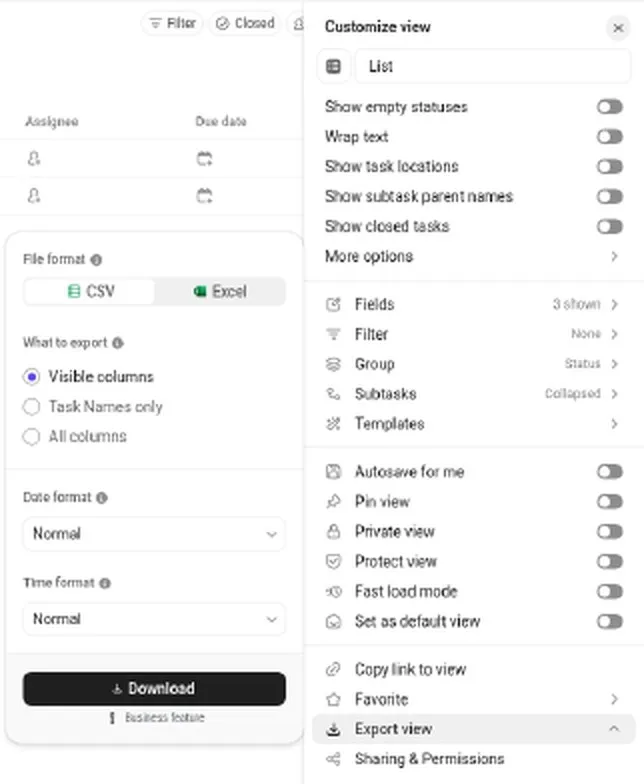
Our test account, Oct 24, 2026: the export panel on a free List.
So a free workspace holds your client work with no easy way out. Test an export route before you store a year of it there. The pricing page we read on October 23 also lists standard and advanced reporting, pinned and required custom fields, custom task IDs and Private Docs as not included on Free. Most of these suit teams.
What happens when you hit a limit
We saw one limit message. It was the Spaces popup, which blocks the sixth Space and names Core as the fix. Nothing else in the workspace changed during our session.
ClickUp’s FAQ says you won’t lose data. You can keep using ClickUp, and the company says it will tell you as soon as a limit is reached and is “happy to provide a grace period to find the plan that works for you.”
For custom fields, the help center says that after the use cap you can’t add values to any custom field, and that includes Relationships and Tasks custom fields. You can still add and remove fields, and clear existing values, but you can’t re-add them. We did not reach that cap, so this is ClickUp’s description.
What users on Reddit report
Users on Reddit report that the free plan runs out faster than the headline suggests. A November 2025 r/clickup thread includes a comment that 99% of the plan is gated behind a paywall and another that you max out the limits before you know it. A ClickUp representative in the thread said unlimited Gantt use, advanced reporting, time tracking and higher automation limits come with paid plans.
A December 2025 thread is titled “Just want to note, 60 views not being shown as a limitation until AFTER I’ve added my 150 items to a Gantt chart is beyond frustrating.” That fits the help center’s rule that Gantt has 60 uses. In our short test we added a Gantt view without seeing any such message, so the timing may vary.
An October 2025 thread asks whether ClickUp Unlimited is worth it for personal task management. A July 2026 thread is titled “Shoutout to ClickUp for taking a basic housekeeping feature and locking it behind a paywall.” The poster objects to paying $19 per member a month for AI Notetaker deduplication, which is a paid-plan question more than a free-plan one. And an August 2026 thread asks how a “New Business” plan compares with Business and Business Plus. These are a few users’ views, not a survey.
What we tested
On October 24, 2026 we signed up for a new ClickUp account. The workspace was on “Free Forever” and we paid nothing and never started a trial.
Onboarding asked for a use case (Work, Personal or School), what to manage, who to invite (skippable), tools you use, features you are interested in (AI is one option), tools to connect (skippable) and a workspace name. Then the workspace opened with the AI panel. The default setup was one Space plus a “Team Space”.
| What we tried | What happened |
|---|---|
| Create Spaces | Worked up to 5 in total. The sixth showed the upgrade popup for Core. |
| Add a Gantt view | Worked, no limit or “uses left” text. |
| Add a Calendar view | Worked, no limit text. |
| Add a Text custom field | Worked, no limit text. |
| Start and stop the time tracking timer | Worked. |
| Dashboard “Start from scratch” | Opened, no limit text. |
| Goal creation form | Opened, no limit text. We did not save a goal. |
| Upload a tiny text file | It created a task and showed no storage text. |
| List > Customize > “Export view” | CSV and Excel offered. Download is labeled “Business feature”. We did not click it. |
Pricing (verified October 24, 2026)
The plans page in our new account (Settings > Upgrade) lists these prices per user per month in USD. The yearly toggle says “Save up to 30% with yearly.” By our arithmetic from the listed prices, the yearly saving runs from about 17% on Max to 32% on Business. ClickUp notes a 30-day money-back guarantee.
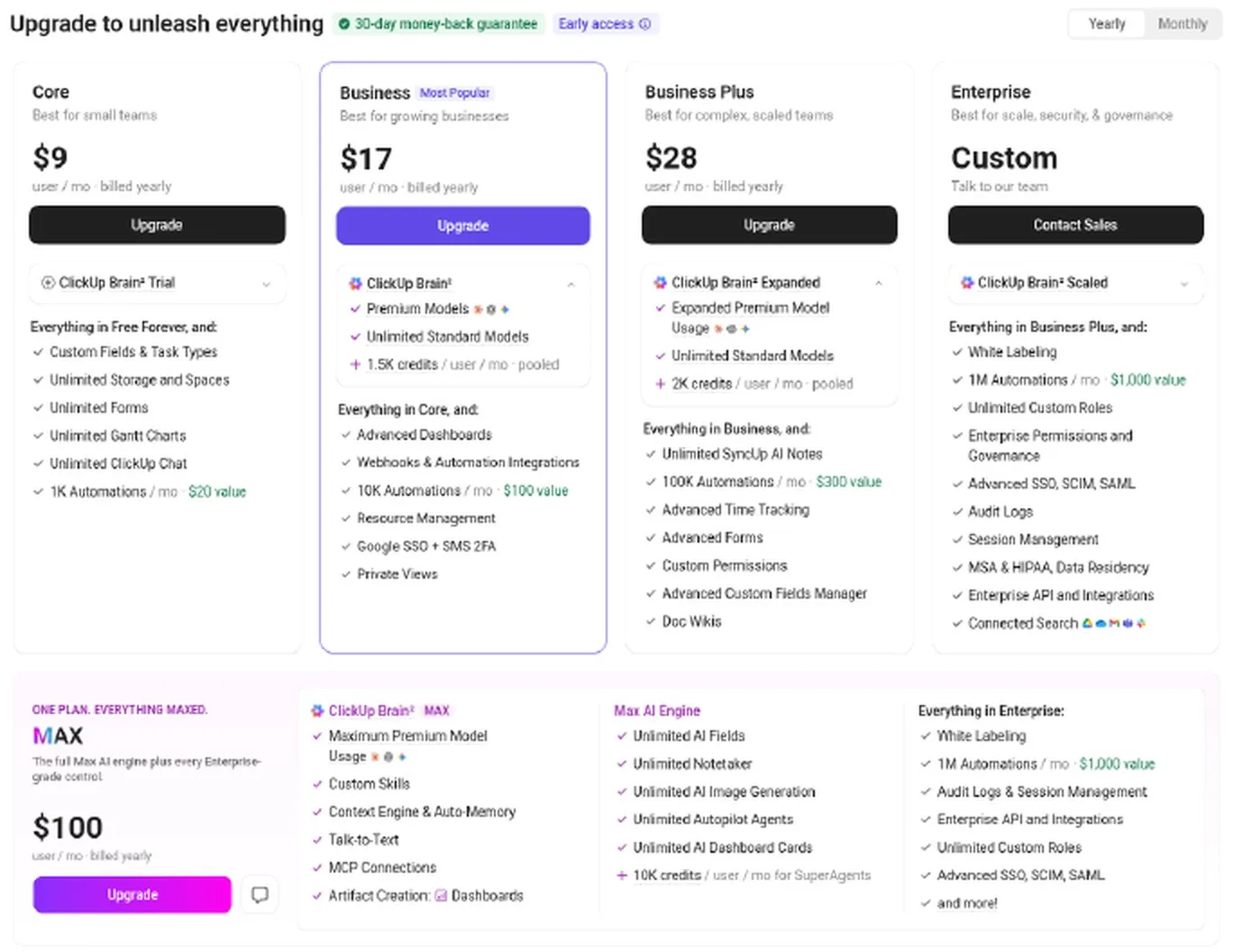
Our test account, Oct 24, 2026: plan prices with yearly billing.
| Plan | Billed yearly | Billed monthly |
|---|---|---|
| Free Forever | $0 | $0 |
| Core | $9 | $12 |
| Business | $17 | $25 |
| Business Plus | $28 | $39 |
| Max | $100 | $120 |
| Enterprise | Custom | Custom |
AI credits are included in each paid plan, pooled per workspace: 1,000 per user a month on Core, 1,500 on Business and 2,000 on Business Plus. ClickUp’s FAQ says you must upgrade the whole workspace, and each workspace is paid for separately.
On October 23 the public pricing page source held two lineups, labeled “control” and “variant,” which suggests a test. The other lineup listed Unlimited at $7 yearly and $10 monthly and Business at $12 yearly and $19 monthly, with AI as an add-on. The plans page in our account showed only the table above, so you may see a different lineup on the public page. Prices may change.
Start on ClickUp's free plan →Which plan should you pick?
Stay on Free Forever if you are one person with fewer than five clients or projects at the Space level, who keeps tasks in Lists and Boards and writes in Docs. You are unlikely to touch the hard caps.
Move to Core at $9 per user per month (billed yearly, $12 monthly) if you need a sixth Space or want to attach more than 60MB of files. That was the only upgrade popup we saw in our test.
Look at Business if you need webhooks or automation integrations, or the Download button for exports. Some dashboard templates and cards are tagged Business too. If you rely on Gantt, custom fields or time tracking, re-check the plan table first. Those features are labeled “Trial” on Free, and we could not tell how long that lasts. If a one-person workflow needs none of this, a simpler task app may suit you better.
Support, cancellation and refunds
The pricing page we read on October 23 lists 24/7 support on Free Forever. Its second lineup adds live chat support from Core. We did not contact support.
The plans page notes a 30-day money-back guarantee, and ClickUp’s FAQ says to ask within 30 days for a full refund. You can cancel at any time, and the plan then runs to the end of your billing cycle unless you downgrade immediately. We did not test the cancellation flow.
FAQ
Is the ClickUp free plan really free?
Yes. Free Forever is $0, and we paid nothing and never started a trial. The limits come as storage, counts and “Trial” features. ClickUp’s FAQ says that when you hit a use limit, you keep your data but can’t edit or create new items with that feature. We hit only the Spaces limit.
How many tasks can I create on ClickUp’s free plan?
The pricing page lists unlimited tasks and subtasks on every plan. The help center adds that List view loads up to 5,000 tasks at a time.
Do ClickUp’s free plan uses reset every month?
ClickUp’s FAQ says no. It says uses are cumulative across a Workspace and do not reset or count down, and that the only way past a cap is a paid plan. We saw no counter in our short test, so we can’t confirm how it works.
Can I add clients as guests on the free plan?
Yes. Free Forever allows unlimited members and guests, but guests get full create and edit permissions that can’t be changed. Limited permissions need a paid plan.
Does the free plan include time tracking?
Partly, and the label is unclear. The comparison table marks Time Tracking and Advanced Time Tracking “Trial” on Free, and the help center we read lists 100 uses of basic time tracking and 40 of advanced features. In our test the timer started and stopped with no limit message. It marks Timesheets as included. You can read the current plan table before you plan around it.
Can I export my data on the free plan?
Not as far as we could see. The Export view panel offers CSV and Excel, but the Download button is labeled “Business feature”. We did not click it.
Is ClickUp too complicated for a solopreneur?
Some users on Reddit wonder about it. An r/clickup thread is titled “I like Clickup, but it feels overkill for a solopreneur, stick with Notion?” We haven’t tested the learning curve ourselves.
How we tested
YOKI tested on October 24, 2026 with a brand-new ClickUp account. The workspace was on Free Forever, prices were in USD, and we paid nothing. We did one short session. Each result is a single run.
We created Spaces, a Gantt view, a Calendar view, a Text custom field, a timer entry, a Dashboard from scratch and the Goal form, and we opened the Export view. We read the in-app plans page and plan comparison table. The ClickUp help-center and public pricing-page figures come from October 23, 2026, and we checked the Reddit thread links and titles on October 24, 2026.
We did not test any paid plan, the Download button, saved goals, automations, guest invites, the mobile apps or the storage limit. We also could not see how “Trial” features count over time. Anything in those areas is ClickUp’s claim or marked as untested. More on our method is on the About page.
Final verdict
ClickUp’s free plan is generous with tasks and members, and it stops you at 5 Spaces and 60MB of storage. Use it if your work fits in lists, boards and Docs. Plan on Core at $9 once you need a sixth Space, and check the “Trial” features before you depend on them. Export is locked on Free, so keep your own copies.
Open a free workspace and build one real client project in it. Our session showed one limit, and a week of use may show more. Limits and prices are as of Oct 2026 and may change.
Try ClickUp's free plan →