Make Free Plan Explained (2026): What 1,000 Credits Actually Run
Make's free plan gives you 1,000 credits a month and 2 active scenarios. We ran a 3-module scenario on it: 3 credits per successful run, 1 credit for a failed one. How far the credits go, and when Core is worth $9 a month.
The short answer
Make's free plan covers about 330 runs a month of a three-module scenario. Move to Core at $9 a month billed yearly for a third active scenario or a schedule faster than 15 minutes.
Prices checked on the vendor's own page. Some links are affiliate links (disclosure).
Quick verdict: Make's free plan covers about 330 runs a month of a three-module scenario. That’s what we measured on October 18, 2026, when each successful run cost 3 credits and a failed run cost 1. You need Core ($9 a month billed yearly, $10.59 month to month) once you want a third active scenario, a schedule faster than every 15 minutes, or more than 1,000 credits.
What Make’s free plan includes
Make sells automation by the credit. You get 1,000 a month on the free plan, and every module that does something in a scenario spends one. Two of the other limits hit most people before the credits do.
| Plan | Credits per month | Active scenarios | Fastest schedule | Max run time | Logs kept |
|---|---|---|---|---|---|
| Make Free | 1,000 | 2 | Every 15 minutes | 5 minutes | 7 days |
| Make Core | 10,000 | Unlimited | Every minute | 40 minutes | 30 days |
We took these figures from our October 18, 2026 recheck of Make’s plans, which also showed a 5 MB file cap on the free plan and access to Make’s API on Core. The free plan has no end date and asks for no card, so it doubles as Make’s trial.
Unused credits don’t roll over. Make’s pricing FAQ, read on October 21, 2026, says credits expire at the end of the term, so a quiet month on the free plan doesn’t bank anything for a busy one.
What counts as a credit
Make’s help center says each action a module performs costs credits, and for regular apps “1 operation equals 1 credit.” A trigger that checks Google Sheets for new rows counts as one operation per check. A router module costs nothing, and neither do the error handler modules such as Ignore, Resume and Break.
Bundles change the math. A bundle is one item passing through the scenario, like one new row or one email. If the trigger returns 10 rows, every module after it runs 10 times, and Make’s own example of that case comes to 31 operations for a single run.
AI steps are the other exception. Make says modules that use its built-in AI provider charge credits for tokens on top of operations, so one AI step can cost more than one credit.
What we tested in Make
On October 18, 2026 we built a three-step scenario on a free Make account for our Zapier alternatives comparison. An HTTP module fetched a public GitHub API page, a Set variable step stored a label, and a Compose a string step wrote a short message. It took about ten minutes, including one mistake.
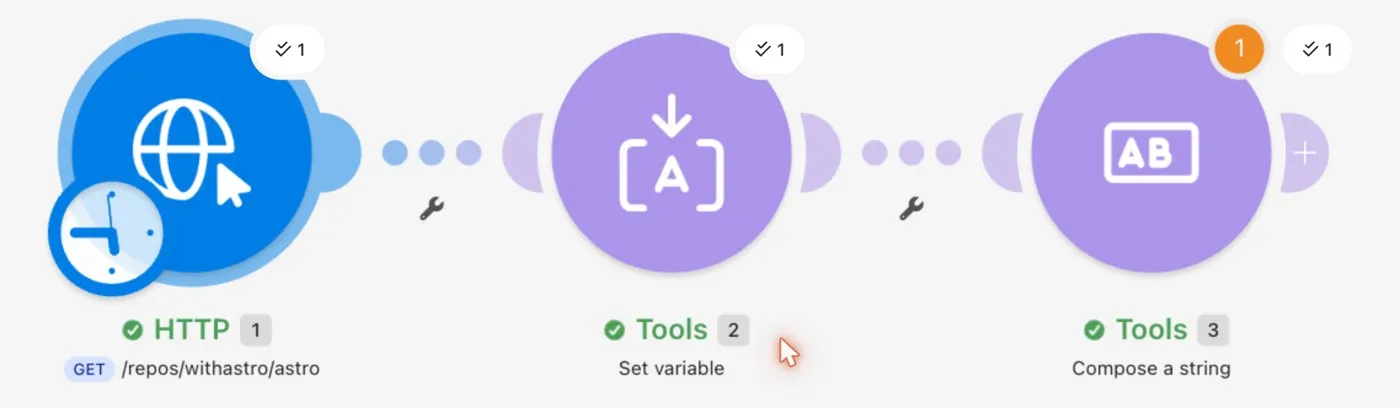
The mistake was ours. Typing a slash in a Make field opens its function picker, so the end of our URL landed in the picker’s search box, and the request came back “Not Found”. The second run finished in under a second.

The history page shows the bill for each run. The successful run used 3 credits, one per module, and the failed run used 1, because the first module ran before the error. Afterward the Subscription page showed 4 of our 1,000 monthly credits used.
Run the same three-module test on Make's free plan →How far 1,000 credits go
Start from what we measured. At 3 credits a run, 1,000 credits cover about 330 runs a month of a scenario like ours, or roughly 11 a day.
The three scenarios below use Make’s rule of one credit per module action. They’re our arithmetic, not runs we tested.
| Scenario | Credits per run | Runs per month | Credits per month | Fits the free plan? |
|---|---|---|---|---|
| A three-module scenario run once a day | 3 | 30 | 90 | Yes, with room for more |
| A form sends a webhook, Make adds a sheet row and sends a Gmail reply | 3 | 300 | 900 | Barely |
| Our test scenario left on its default 15-minute schedule | 3 | about 2,880 | about 8,600 | No, about eight times over |
That last row caught us. When we created our test scenario on October 18, Make set it to run every 15 minutes by default. Left switched on, that’s 96 runs a day, so while you build, run scenarios by hand or start them from a webhook, which only fires when the other app sends data.
Polling triggers are the hidden cost. Make’s help center counts a Watch trigger as one operation per check, and a scenario that checks every 15 minutes makes 96 checks a day whether or not anything new shows up.
What a failed run costs
A failed run costs the credits of every module that ran before the error. In our test that was 1 credit, because only the HTTP module ran. By the same rule, a six-module scenario that breaks at module five should cost 5 credits, though we’ve only seen the first-module case.
Error handlers don’t add to the bill. Make lists Ignore, Resume, Break, Rollback and Commit as free, so an Ignore route on a flaky module costs nothing extra when it fires.
If you run out, Make’s pricing FAQ says your scenarios stop running until credits are added. Paid plans can buy extra credits or turn on auto-purchase, and the FAQ says auto-purchase is only available on Core, Pro and Teams. On the free plan your options are to wait for the next month or upgrade.
When you need Core
Most solo businesses outgrow the free plan through the scenario cap first. Two active scenarios is a small number. A lead form, an invoice reminder and a weekly report is already three, and the third one can’t stay switched on.
Speed is the second trigger. If a new Stripe payment has to reach your sheet within a minute, the free plan’s 15-minute floor won’t do it, and Core drops that to one minute.
Volume comes last. Core’s 10,000 credits a month are ten times the free allowance, and a scenario that would need about 8,600 credits on a 15-minute schedule fits inside them with room left over for the rest of your automations.
Two smaller limits matter for some people. A run that needs more than 5 minutes, such as a big file conversion, gets cut off on the free plan, and so does any file over 5 MB.
Pricing (verified October 21, 2026)
| Plan | Billed monthly | Billed yearly | Cost over 12 months, monthly vs yearly | Credits per month |
|---|---|---|---|---|
| Make Free | $0 | $0 | $0 | 1,000 |
| Make Core | $10.59/mo | $9/mo | $127.08 vs $108 | 10,000 |
| Pro | $18.82/mo | $16/mo | $225.84 vs $192 | not recorded |
| Teams | $34.12/mo | $29/mo | $409.44 vs $348 | not recorded |
We first read these prices on the Subscription page inside a free Make account on October 18, 2026, and they matched Make’s public pricing page on October 21 at the 10,000-credit tier. The page’s toggle says yearly billing saves 15%. On Core the yearly plan saves $19.08 over twelve months, and the 12-month totals in the table are our math from the monthly prices.
Pro adds full-text log search, custom variables and 250 MB files, and Teams adds team roles and shared scenario templates on top of that. Solo? Skip both.
When we set up our partner link on October 18, 2026, Make’s partner settings listed one free month of Core for people who sign up through it. Make’s sign-up page doesn’t mention the offer (we looked on October 21), so treat it as a bonus that may or may not appear in your account. After any free month, Core costs the prices above. Make's free plan is the place to start either way.
Start on Make's free plan →Monthly or yearly Core?
Pay monthly first. The $19.08 a year you save on annual Core is small next to the risk of prepaying for a tool you stop using in March.
Make’s Master Services Agreement (March 2026 version, read September 8, 2026) says subscription fees are non-refundable once ordered, and the subscription renews for the same period unless you cancel first. Switch to yearly once your scenarios have run for two or three months and you know your credit use.
Cancelling takes three clicks. An owner or admin opens Organization, then the Subscription tab, and clicks Cancel subscription, after which the paid plan runs to the end of the cycle and the organization drops back to the free plan with its 1,000 credits. Make’s pricing FAQ adds that downgrading stops any active scenario that uses higher-plan features.
Which plan should you pick?
Stay on Make's free plan if you have one or two automations that run a few times a day. Light use fits. A daily three-module scenario spends about 90 credits a month, so you’d need several more before the credits pinch.
Move to Make Core on monthly billing if you need a third active scenario, any schedule under 15 minutes, or more than about 330 three-module runs a month. Check whether a free Core month shows up after you sign up through our link, and watch the credit counter on the Subscription page.
Skip Make for long loops. If your workflows chain loops and AI steps that run thousands of times a month, per-module billing adds up fast, and our Zapier alternatives guide covers tools that charge per run instead.
How we tested
On October 18, 2026 we built and ran a three-module scenario on a free Make account, recorded the credits on the scenario history page, and read prices on the Subscription page inside that account. On October 21, 2026 we read Make’s pricing FAQ and its help center articles on credits, operations, pricing parameters and module types. The refund and renewal terms come from Make’s Master Services Agreement, and the cancellation steps from Make’s help center, both read on September 8, 2026.
We haven’t yet tested AI modules, empty polling checks or error handlers on the free plan, and the examples in the credit table are arithmetic from Make’s counting rules. More on our test method is on the About page.
FAQ
Is Make’s free plan free forever?
Yes. Make's free plan has no time limit and needs no card. You get 1,000 credits a month and 2 active scenarios, and the credits reset each month without rolling over.
How many credits does a Make scenario use?
One credit per module action for regular apps. A three-module scenario that handles one item uses 3 credits per run, which is what our October 18, 2026 test showed. If the trigger returns several items, each later module runs once per item.
Does a failed run in Make use credits?
Yes, for the modules that ran before the error. Our failed run on October 18, 2026 used 1 credit because only the first of its three modules ran before the request came back “Not Found”. Error handlers are free.
What happens when I run out of Make credits?
Make’s pricing FAQ says your scenarios stop until credits are added. On a paid plan you can buy extra credits or turn on auto-purchase, which is limited to Core, Pro and Teams.
Is Make Core worth $9 a month?
It is if the free plan’s 2 active scenarios or 15-minute schedule hold you back. Core’s $9 a month is the annual rate, $10.59 is month to month, and both include 10,000 credits and unlimited active scenarios.
Final verdict
Build your first two automations on the free plan and check the credit counter after a week. If you hit the two-scenario cap or need faster runs, move to Core on monthly billing, starting with the free month through our link.
Try Make free →