Zapier Alternatives for Small Business: 7 Cheaper Tools Compared (2026)
Zapier's free plan stops at 100 tasks and two-step Zaps. Make gives you 1,000 credits free and multi-step scenarios from $9/mo billed yearly. Seven cheaper options, prices rechecked October 2026.
The short answer
Make. Its free plan gives 1,000 credits a month against Zapier's 100 tasks, and Core is $9 a month billed yearly against $19.99 for Zapier Professional. Can you run a server? n8n self-hosted is free.
Prices checked on the vendor's own page. Some links are affiliate links (disclosure).
Zapier alternatives for small business — top picks by free-plan value: Make gives you 1,000 credits a month free and allows multi-step scenarios, where Zapier’s free plan stops at 100 tasks and two-step Zaps only. Make Core is $9 a month billed yearly for 10,000 credits. If you can run a server, n8n self-hosted is free with no execution cap. The other five options are in the table below.
Why look for an alternative to Zapier?
Zapier’s free plan gives you 100 tasks a month, two-step Zaps only, and a 15-minute check for new data. A two-step Zap means one trigger and one action, so “new Stripe payment, add a row to Google Sheets, then send a Slack message” is already off limits. Premium apps stay locked too.
The first paid step is Professional at $19.99 a month billed annually, or $29.99 billed monthly, for 750 tasks. Zapier counts a task each time an action step runs, so a Zap with three action steps that fires 200 times in a month eats 600 of those 750 tasks before you build anything else. The next tier for busy shops is Team, from $69 a month for 2,000 tasks.
That’s the squeeze. You pay per step, the free plan blocks anything with more than one action, and the plan you need for a real workflow costs $240 a year at minimum. Every tool below attacks at least one of those three problems.
Quick comparison table
| Tool | Starting price | Free plan | Best for | Learning curve |
|---|---|---|---|---|
| Make | $9/mo billed yearly or $10.59 monthly (Core, 10,000 credits) | Yes, 1,000 credits/mo, 2 active scenarios | Most small businesses leaving Zapier | Medium |
| n8n | €20/mo cloud billed annually (Starter, 2,500 executions), self-hosted free | 14-day cloud trial only, self-hosted free | Technical owners, AI workflows | High |
| Pabbly Connect | $19/mo (Standard, 10,000 tasks), $16/mo billed yearly | Yes, 100 tasks/mo, 2 two-step workflows | High volume on a fixed budget | Low to medium |
| Activepieces | $20/mo (Plus, billed monthly, 10,000 credits) | Yes, 1,000 credits/mo, unlimited flows | Free no-code automation | Low to medium |
| Zoho Flow | $29/mo (Standard, 5,000 tasks), $25/mo billed yearly | Yes, 100 tasks/mo, 5 flows | Businesses already on Zoho apps | Low |
| IFTTT | $2.99/mo billed annually (Pro, 20 Applets) | Yes, 2 Applets | Simple two-app automations | Low |
| Jotform | $34/mo (Bronze, billed yearly) | Yes, 5 forms, 100 submissions/mo | Workflows that start with a form | Low |
Every price in this table comes from the vendor’s own pricing page, rechecked on October 18, 2026. Make doesn’t say which billing period its listed prices use, so read its section before you compare it line by line.
1. Make: best overall Zapier replacement
Make is a visual automation builder. You drag app modules onto a canvas, connect them with lines, and watch data flow through each step when the scenario runs, so a broken workflow shows you which module failed and what data it received. It connects to 3,000+ apps and has routers and filters built in.
The free plan includes 1,000 credits a month, 2 active scenarios, a 15-minute minimum interval between runs, a 5-minute limit on each run, a 5 MB file size cap and 7 days of execution logs. Core is $9 a month billed yearly or $10.59 billed monthly, for 10,000 credits a month, unlimited active scenarios, scheduling down to one minute, 40-minute runs, access to Make’s API and 30 days of logs. Pro is $16 billed yearly or $18.82 monthly and adds full-text log search, custom variables and 250 MB files. Teams is $29 billed yearly or $34.12 monthly and adds team roles and shared scenario templates.
We read those prices on the Subscription page inside a free Make account on October 18, 2026. The page has a monthly and yearly toggle that says yearly billing saves up to 15%, and Core paid yearly comes to $19.08 less over a year than paying month to month. Make’s public pricing page didn’t load its plan cards for us, so check the figure at checkout if you sign up from another country.
Set that against Zapier. Ten thousand credits for $9 versus 750 tasks for $19.99. A credit is spent every time a module runs, so an eight-module scenario uses eight credits per run, and the comparison with Zapier tasks is close but not exact. Make also renamed operations to credits, which is why you’ll see both words on the pricing page.
The catch is the learning curve. Make expects you to think in data bundles and modules, and a scenario that would take ten minutes in Zapier can take thirty the first time. The free plan’s cap of two active scenarios pinches faster than the 1,000 credits do, and error handling takes more setup than Zapier’s automatic replay.
Try Make free →2. n8n: best for technical owners and AI workflows
n8n is open source. You can run it on n8n’s cloud or install it on your own server, and either way you build workflows as a chain of nodes with code steps, branching, and AI agent nodes available where you need them. The Community edition is free on GitHub.
Cloud Starter is €20 a month billed annually for 2,500 workflow executions with unlimited steps, 5 concurrent executions, and unlimited users. Pro is €50 a month billed annually for 10,000 executions and up to 50 concurrent runs. There is no permanent free cloud plan, only a 14-day trial with 1,000 executions.
The pricing page has a monthly toggle and says annual billing saves 17%. When we loaded it on October 18, 2026, it still showed only the annual rates, and only in euros. We found no monthly-billing price and no US dollar price on it, so expect to pay more per month on monthly billing and check the currency at checkout.
The pricing model is the reason it’s on this list. n8n charges per workflow execution, so a 20-step workflow that runs once costs one execution, where Zapier would charge up to 19 tasks. For anything with loops, retries, or an AI step that calls back and forth, that difference decides your bill.
Self-hosting is the trade. You need a small server, Docker or a hosting provider that runs n8n for you, and the patience to keep it updated. The editor also assumes you can read a JSON payload and write an expression like {{ $json.email }}, which puts it a step above Make in difficulty and two steps above Zapier.
3. Pabbly Connect: best for high volume on a fixed budget
Pabbly Connect looks and works like Zapier. Trigger, then actions, in a list. The difference is in what it counts, because triggers and internal steps such as Filter, Router, and Text Formatter do not consume tasks, only the actions that touch an outside app do.
The free plan is 100 tasks a month, with up to 2 workflows of 2 steps each. Standard is $19 a month billed monthly, or $16 a month billed yearly, for 10,000 tasks and unlimited workflows. Unlimited is $79 a month billed monthly, or $69 a month billed yearly, and removes the task cap entirely.
Pabbly also sells lifetime licenses, which are one-time payments for a fixed monthly task allowance. Standard Lifetime is $349 for 3,000 tasks a month, Ultimate Lifetime is $799 for 10,000, and Ultimate Plus Lifetime is $1,298 for 20,000. The pricing page lists unlimited team members but says that feature isn’t available on monthly plans.
Pabbly’s pricing page shows Indian rupees by default and switches to US dollars once it detects a visitor outside India. The dollar figures above are the ones built into that page on October 18, 2026. Confirm the currency at checkout.
The strongest argument for Pabbly is cost per task once you’re past a few thousand runs a month. If you’re doing 10,000 tasks on Zapier you’re on Team pricing, and the $799 lifetime license for the same volume costs less than one year of Zapier Team at its lowest tier ($69 a month billed annually, or $828 a year).
Two cautions. Check the app directory for every app you rely on before you pay, and read the lifetime terms closely, because “lifetime” means the life of the product, not yours. The interface is plainer than Make’s and it shows you less about what happened inside each run.
4. Activepieces: best free no-code option
Activepieces is open source too. The drag-and-drop editor is simpler than n8n’s and needs no code, you can run it on Activepieces’ cloud or on your own server, and the pricing page says self-hosting is available on every plan. The Community edition is free to self-host.
The free cloud plan is the headline. It lists 1,000 credits a month, unlimited flows and up to 5 users, with no card and no time limit. Plus is $20 a month billed monthly for 10,000 credits a month and up to 5 users, and Team is $200 a month billed monthly for 50,000 credits and 25 users. On Plus and Team, flows keep running past the allowance at $0.007 per extra credit.
The counting rule is the draw. Activepieces charges one credit per flow run however many steps the flow has, and only AI steps cost more (2, 10 or 20 credits depending on the model).
The annual toggle promises two months free, but the page text we loaded on October 18, 2026 didn’t show the annual price for either plan. The page also contradicts itself on the free reset. The FAQ says you get a fresh 1,000 credits every month, while the comparison table marks the free plan’s reset as daily.
For a one-person business with a handful of daily automations, 1,000 runs a month covers a lot, because a ten-step flow still costs one credit per run unless it calls an AI model. On Zapier the same flow would cost nine tasks per run. That adds up.
The app catalog (Activepieces calls them pieces) is smaller and younger than Make’s or Zapier’s, so check yours first. Community answers replace vendor support on the free plan.
5. Zoho Flow: best if you already run on Zoho apps
Zoho Flow is the automation layer inside the Zoho suite. If your CRM, invoicing, or help desk already lives in Zoho, Flow talks to those apps without the extra hop through a third-party connector, and it also connects to outside apps like Gmail and Slack.
The free plan is 100 tasks a month, 5 flows, and 15-minute polling. Standard is $29 a month billed monthly, or $25 a month billed yearly, for 5,000 tasks with 15-minute polling and custom functions. Professional is $49 a month billed monthly, or $41 a month billed yearly, for 10,000 tasks with 5-minute polling, premium apps, and auto-rerun. Both paid plans come with a 15-day free trial with no credit card, and higher task tiers cost more.
Zoho’s pricing page fills in its prices with a script after it loads. The dollar figures above come from the US price list that page loaded on October 18, 2026.
The 15-minute polling on Standard is the same speed as Zapier’s free plan, so if you need something to happen within a minute or two of a trigger, you’re looking at Professional. Its third-party app list is also shorter than Make’s, and the editor feels built for Zoho customers first.
6. IFTTT: best for simple two-app automations
IFTTT began as a consumer tool for smart-home and social-media tricks. It still has that shape. Each automation is an Applet with one trigger and one or more actions, and it’s the easiest tool on this list to set up.
Free gives you 2 Applets and no multi-action Applets. Pro is $2.99 a month billed annually ($35.88 a year) for 20 Applets with multi-action support and faster speeds. Pro+ is $8.99 a month billed annually ($107.88 a year) for unlimited Applets, queries, filter code, and AI services. The plans page has a monthly toggle that advertises 40% savings on yearly billing, but it didn’t show a month-to-month price when we loaded it on October 18, 2026.
At $2.99 a month on annual billing it’s the cheapest paid plan here by a wide margin. That price buys “post new blog articles to Pinterest” or “save every Instagram photo to Dropbox” without fuss.
What it doesn’t buy is data handling. There are no routers, no formatter steps, and limited control over which fields go where, so anything that touches invoices, CRM records, or spreadsheets with multiple columns will feel cramped fast.
7. Jotform: best when your workflow starts with a form
Jotform is a form builder with payments, approvals, and AI agents built in. It earns a spot on a Zapier list because a lot of small-business automation begins with a form submission, even though it can’t replace a connector for triggers that come from other apps. If the trigger is always “someone filled this out,” Jotform can often handle the whole chain itself.
Starter is free with 5 forms, 100 submissions a month, 100 MB of upload space, and 10 payment submissions a month. Bronze is $34 a month billed yearly ($39 monthly) for 25 forms and 1,000 submissions. Silver is $39 billed yearly ($49 monthly) for 50 forms and 2,500 submissions, and Gold is $99 billed yearly ($129 monthly) for 100 forms and 10,000 submissions.
A client intake form that collects a deposit through Stripe or PayPal, routes to you for approval, and drops the record into Google Sheets is one Jotform workflow with no connector in the middle. That’s the use case. If your triggers come from a dozen different apps, you still need Make or one of the others.
That $34 buys forms first. The automation comes along with them, so treat Jotform as a replacement for your form tool plus a slice of your Zapier bill rather than a like-for-like swap for Make.
Try Jotform free →Pricing (verified October 18, 2026)
One table, every tool. Zapier sits on the first row so you can read the gap. Where a vendor only showed one billing rate, the other column says so.
| Tool | Free plan | Entry paid plan, monthly | Entry paid plan, annual | Task or operation limit on entry plan |
|---|---|---|---|---|
| Zapier (for reference) | 100 tasks/mo, two-step Zaps | Professional, $29.99/mo | $19.99/mo | 750 tasks/mo |
| Make | 1,000 credits/mo, 2 active scenarios | Core, $10.59/mo | $9/mo billed yearly | 10,000 credits/mo |
| n8n | No permanent cloud free plan, 14-day trial with 1,000 executions, self-hosted free | Not shown | Starter, €20/mo billed annually | 2,500 executions/mo |
| Pabbly Connect | 100 tasks/mo, 2 two-step workflows | Standard, $19/mo | $16/mo billed yearly | 10,000 tasks/mo |
| Activepieces | 1,000 credits/mo, unlimited flows | Plus, $20/mo | Not shown | 10,000 credits/mo |
| Zoho Flow | 100 tasks/mo, 5 flows | Standard, $29/mo | $25/mo billed yearly | 5,000 tasks/mo |
| IFTTT | 2 Applets | Pro, not shown | $2.99/mo ($35.88/yr) | 20 Applets |
| Jotform | 5 forms, 100 submissions/mo | Bronze, $39/mo | $34/mo billed yearly | 25 forms, 1,000 submissions/mo |
Read the last column with the counting rules in mind. Zapier and Pabbly count tasks, Make counts a credit per module run, Activepieces counts one credit per flow run plus extra for AI steps, n8n counts one execution per workflow run no matter how many steps it has, and Jotform counts submissions rather than automation steps at all.
Start on Make's free plan →How we picked
Every price and limit above comes from the vendor’s pricing page, first read on September 7, 2026 and rechecked on October 18, 2026. We ranked on four things a solopreneur cares about in order: what the free plan blocks, what the first paid tier costs, how tasks or credits are counted, and how long it takes to build a three-step workflow the first time.
What we tested in Make
On October 18, 2026 we built a three-step scenario on a free Make account. An HTTP module fetches a public GitHub API page, a Set variable step stores a label, and a Compose a string step writes a short message. It took about ten minutes, including one mistake. Make’s AI builder, Maia, told us its free trial on our account had ended, so we built everything by hand.
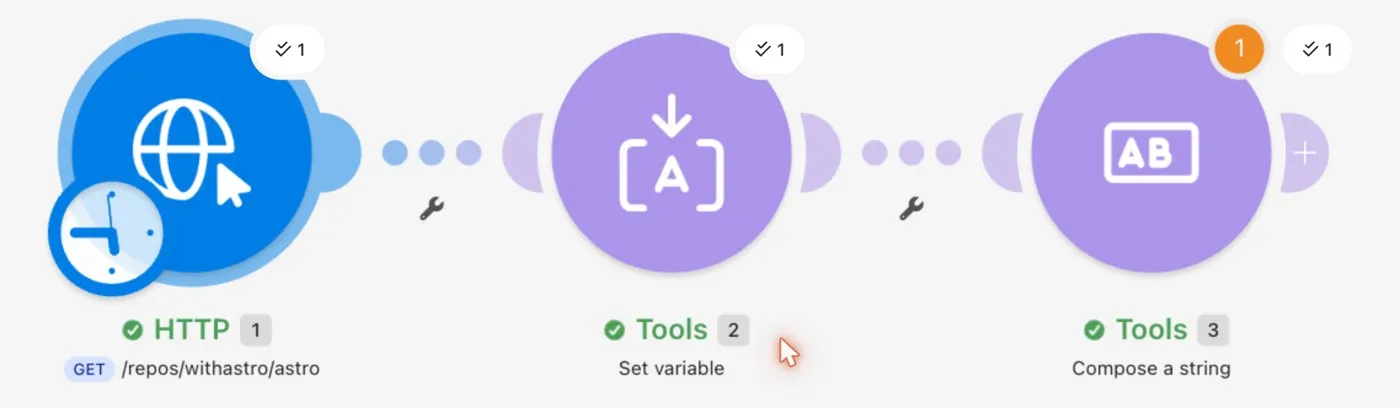
The mistake taught us how the editor works. Typing a slash inside a Make field opens its function picker, so the last part of our URL went into the picker’s search box instead of the field. The request went to the wrong address and came back “Not Found”. Make’s error panel showed the API’s reply next to an “Explain error” button and a suggested error handler. Pressing Enter after typing the last part of the URL put it back in the field.
The second run finished in under a second. Make’s history page shows what every run cost.

The successful run used 3 credits, one per module. The failed run still used 1 credit, because the first module ran before the error. Afterward the Subscription page showed 4 of our 1,000 monthly credits used. At 3 credits a run, the free plan covers about 330 runs of a scenario like this each month.
Watch the schedule. Our new scenario defaulted to running every 15 minutes. Left switched on, that’s 96 runs a day and about 8,600 credits a month, eight times the free allowance, so run it on demand or trigger it from a webhook while you test. In Zapier the same workflow would need a three-step Zap, which Zapier’s free plan doesn’t allow.
Try the same three-step test on Make's free plan →Which alternative should you choose?
If your Zaps are two or three steps and you mostly want to stop paying $19.99 for 750 tasks, pick Make. The Core plan at $9 a month, billed yearly, covers most solo businesses.
If you or someone on your team is comfortable with a server and JSON, and your workflows are long or use AI steps, pick n8n and self-host it. Per-execution pricing rewards complex workflows.
If you run thousands of tasks a month and want a fixed price, pick Pabbly Connect. Standard is $19 a month for 10,000 tasks, and lifetime licenses start at $349.
If you want free and no-code, and your volume is small, pick Activepieces. Each flow run costs one credit however many steps it has.
If your business runs on Zoho CRM or Zoho Books, pick Zoho Flow. Everything else is a second choice there.
If you need two or three simple social or file automations and nothing more, pick IFTTT at $2.99 a month on annual billing.
If every automation starts with a form, a payment, or an approval, pick Jotform and cancel the connector entirely.
Support, cancellation and refunds
We read the help center and the legal terms for the three tools we link to. The other four are covered by their pricing pages only, so check their terms yourself before paying for a year.
Make lists “customer support” on the free plan and “technical support from our expert team” on Core and Pro, with Teams getting priority handling. You reach them through a ticket form on make.com, and the community forum handles most how-to questions. To cancel, open Organization in the left sidebar, go to the Subscription tab, and click Cancel subscription. Only an owner or admin can do it. The paid plan runs to the end of the monthly cycle or the annual term, then the account drops to the free plan with 1,000 credits, and unused credits do not carry over. Refunds are another story. The Master Services Agreement (March 2026 version) says subscription fees are non-cancelable and non-refundable once ordered, and the subscription auto-renews for the same period unless you cancel before the charge. The only refund clause covers a service that fails to work as documented and cannot be fixed. There is no timed trial. The free plan is the trial.
n8n Cloud Starter and Pro come with forum support only. Dedicated support with an SLA is an Enterprise feature, and the pricing page FAQ says so in plain words. You cancel from the admin dashboard at app.n8n.cloud under Manage, with a Cancel plan button. A monthly plan runs to the end of the billing cycle. An annual plan is paid in advance and the self-serve terms call that payment non-refundable, so a cancellation takes effect at the end of the year and the FAQ states that n8n does not offer pro-rata refunds. Read that twice before paying yearly. The trial lasts 14 days, needs no credit card on Starter and Pro, gives you 1,000 executions, and expires on its own without a charge. n8n’s docs say the trial workspace is deleted once it expires, and you have 90 days after that to download your workflows. After a paid subscription ends, the help center says account data and backups are kept for 90 days and then deleted.
Jotform runs 24/7 support through a contact form and a public help forum, and the help center claims an average response time of 30 minutes. Every plan gets the same support, with dedicated support reserved for Enterprise. To cancel, click your avatar, open Settings, then Billing, then Change Plan, and click Downgrade under the Starter plan. You keep paid features until the billing period ends and then land on Starter. If you bought through the Apple App Store or Google Play you cancel there instead. The refund rule is the friendliest of the three. The terms say that if you cancel within 30 days of a payment made directly to Jotform you may request a refund from the support team, and the pricing page repeats it as a 30-day money back guarantee. Refunds for other reasons are at Jotform’s discretion, and add-ons such as AI agent phone numbers are excluded. The trial question is simpler. There is no trial, because the Starter plan is free without a time limit, and paid plans renew until you downgrade.
Privacy and account safety
Make started life as Integromat in Prague and was bought by Celonis in 2020. The privacy notice names Celonis, Inc. in New York as the company you deal with, under the German parent Celonis SE. Make’s security page lists SOC 2 Type II, SOC 3, and ISO 27001, and says the platform runs on AWS. Make’s help center says you pick a United States or European Union data center when you create an organization, and you can’t change it afterward. It doesn’t name the cities or AWS regions behind either option.
n8n is n8n GmbH, a company registered in Berlin, Germany. The self-serve terms and the privacy policy both give that address, and the privacy policy says some processors sit in the United States under standard contractual clauses. The pricing page FAQ says hosted plans store data in the EU, on servers in Frankfurt, Germany. The self-hosted Community edition runs under n8n’s Sustainable Use License, a fair-code license that lets you install it with Docker or npm and use it for your own business at no cost, and n8n’s own docs say it needs setup and upkeep that the cloud version does not.
Jotform is Jotform Inc., at 4 Embarcadero Center in San Francisco. Form data lives on Google Cloud in Iowa, with Frankfurt for EU accounts, and AWS in Virginia and Frankfurt as the secondary layer. You can pick EU storage in your account settings. Jotform holds PCI DSS Service Provider Level 1, which matters if you take payments through forms, and offers HIPAA features on Gold and Enterprise. SOC 2 applies only to the dedicated Enterprise environment.
Activepieces is the other tool here you can run yourself. Its Community edition is MIT licensed and the recommended install is Docker Compose with PostgreSQL and Redis, with one-click installs from third-party hosts that the core team does not maintain. For the hosted version, the pricing FAQ says data lives in the EU in Frankfurt, with other regions on request, and that the SOC 2 program is still in progress.
Every connector on this list works the same way with your apps. You sign in to Gmail, Stripe, Slack or whatever else through that app’s own login screen, the connector stores an OAuth token or an API key, and the data from each run passes through the connector’s servers where the logs are kept. Self-hosting changes that. If you self-host n8n or Activepieces, those logs stay on your machine.
We did not verify which AWS regions sit behind Make’s US and EU options, how long each vendor keeps execution logs on each plan, or any privacy terms for Pabbly Connect, Zoho Flow and IFTTT.
FAQ
Is Make cheaper than Zapier?
Yes, on the plans a small business uses. Make Core is $9 a month billed yearly, or $10.59 month to month, for 10,000 credits, and Zapier Professional is $19.99 a month billed annually for 750 tasks. Make’s free plan also allows multi-step scenarios, which Zapier’s free plan does not.
Is n8n free?
The self-hosted Community edition is free and open source. n8n Cloud has no permanent free plan, only a 14-day trial, and paid cloud plans start at €20 a month billed annually for 2,500 executions.
Which Zapier alternative has the best free plan?
Activepieces, for most small setups. Its free plan lists 1,000 credits a month with unlimited flows, and each flow run costs one credit however many steps it has. Make’s free plan also gives 1,000 credits, but every module run spends one and you’re capped at 2 active scenarios. Zapier’s free plan stops at 100 tasks a month.
What counts as a task in Zapier?
Zapier counts a task each time an action step in a Zap runs successfully. The trigger does not count. A Zap with three action steps that fires 100 times uses 300 tasks.
Which tool is easiest to learn after Zapier?
Pabbly Connect and IFTTT follow the same trigger-then-action layout. Make uses a visual canvas that takes a few hours to get used to, and n8n expects some comfort with code.
Scorecard
Our scores, out of 5, rest on the published plans, limits and terms above as read on September 7 and 8, 2026 and rechecked on October 18, 2026, and Overall is our judgment for a one-person business weighted toward price and app coverage rather than an average of the row. Overall is a judgment call. Support terms are scored only for Make, n8n and Jotform, whose help centers and terms we read, and marked n/s for the rest.
| Make | n8n | Pabbly Connect | Activepieces | Zoho Flow | IFTTT | Jotform | |
|---|---|---|---|---|---|---|---|
| Price for a solo business | 5 | 4 | 3 | 4 | 3 | 5 | 2 |
| Free plan | 4 | 2 | 3 | 5 | 3 | 2 | 3 |
| Ease of setup | 3 | 2 | 4 | 4 | 4 | 5 | 4 |
| App coverage | 5 | 4 | 3 | 3 | 3 | 3 | 2 |
| Self-host option | 1 | 5 | 1 | 5 | 1 | 1 | 1 |
| Support terms | 3 | 2 | n/s | n/s | n/s | n/s | 4 |
| Overall | 4.4 | 3.6 | 3.2 | 3.8 | 3.0 | 2.8 | 3.4 |
How we tested
Prices and plan limits come from each vendor’s pricing page as loaded on September 7, 2026 and rechecked on October 18, 2026. On the recheck we also confirmed n8n’s trial length from its docs, n8n’s hosting region from its pricing FAQ, and Make’s data center options from its help center. Support channels, cancellation paths, refund rules and trial terms for Make, n8n and Jotform come from their help centers, pricing page FAQs, self-serve terms and Make’s Master Services Agreement, read on September 8, 2026, and the ownership and hosting details come from each company’s privacy policy, imprint or security page on the same day. On October 18, 2026 we also built and ran a three-step scenario on a free Make account, and read Make’s prices on the Subscription page inside that account. We haven’t run n8n, Pabbly Connect, Activepieces, Zoho Flow, IFTTT or Jotform ourselves yet, so their sections rest on published plans and documentation. More on our test method is on the About page.
Final verdict
Start with Make’s free plan and rebuild your two most-used Zaps as scenarios. If the 2-active-scenario cap or the 1,000 credits run out, Core at $9 a month billed yearly is still less than half of Zapier’s cheapest paid plan, and you keep multi-step workflows the whole way.
Try Make free →