How to Sell Your First Digital Product as a Solopreneur (2026)
Set up a landing page, a course or an ebook download, and your first sale on Systeme.io's free plan. We built a funnel on October 21, 2026 and walked through every limit.
The short answer
Systeme.io's free plan covers a landing page, a checkout, email delivery and one course or download, with no monthly fee and no cut of your sales. We built a working funnel on it in about 30 minutes.
Prices checked on the vendor's own page. Some links are affiliate links (disclosure).
Quick verdict: You can sell a digital product for $0 upfront with Systeme.io's free plan. It covers a landing page, a checkout, email delivery, and one course or download, with no monthly fee and no cut of your sales. We built a working funnel on it in about 30 minutes on October 21, 2026. If your product is a simple PDF or template and you already have a website, Jotform can collect payments and deliver files through a form.
What counts as a digital product
A digital product is anything a buyer downloads or accesses online after paying. Mini-courses, ebook PDFs, Notion templates, Canva template packs, checklists, audio files, stock photo bundles, and printable planners all qualify. So do paid community memberships and coaching call recordings.
The appeal for solopreneurs is straightforward. You create the product once. Every sale after that has near-zero cost. No inventory, no shipping, no warehouse. A course about meal prepping or a set of wedding invitation templates can sell for months while you sleep, work your day job, or build the next product.
Pick a topic you know well enough to save someone else 10 hours of work. That time savings is what people pay for.
Four things you need
You don’t need a full website to start. Four pieces handle the entire sale.
| Piece | What it does | Free option |
|---|---|---|
| Landing page | Shows the product and gets the click | Systeme.io free plan (3 funnels, 15 pages) |
| Payment processor | Charges the buyer’s card | Stripe or PayPal (connect inside Systeme.io) |
| Delivery | Sends the file or grants course access | Systeme.io email + course access |
| Email follow-up | Confirms the purchase, answers questions | Systeme.io unlimited sends on free |
A platform like Systeme.io bundles all four. You connect Stripe or PayPal, upload your product, and Systeme.io handles the page, the checkout, the delivery email, and the receipt. No second tool needed until you outgrow the free plan’s limits.
If you only want to sell one PDF through an existing site, a Jotform payment form collects the money and emails the file. Jotform’s free plan handles 5 forms and 100 submissions a month.
What we built on Systeme.io’s free plan
On October 21, 2026 we set up a small digital-product funnel on Systeme.io's free plan for our Systeme.io vs Kajabi comparison. The test took about 30 minutes.
We picked the “Build an audience” funnel type. Systeme.io created two pages on its own: an opt-in page and a thank-you page. The template picker shows nine designs per page. Applying one took a few seconds.
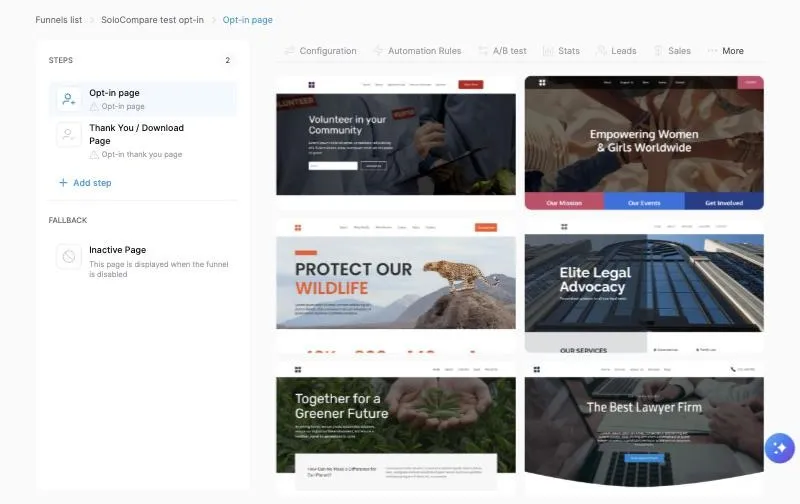
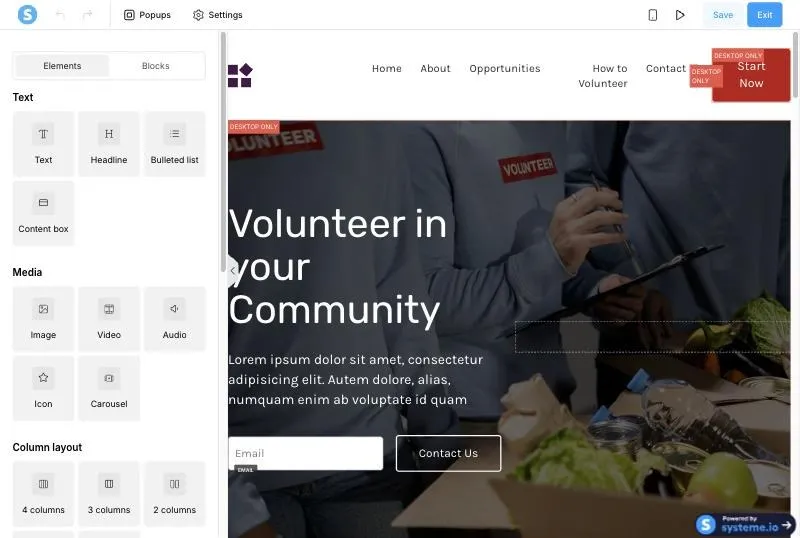
The page editor is drag and drop. An Elements tab on the left lists text blocks, columns, forms, video embeds, countdown timers, FAQ accordions and more. A Blocks tab offers pre-built sections. Mobile preview is one click away. On the free plan every page carries a small “Powered by systeme.io” badge in the corner.
For a course product, we added a module and a lesson. Each lesson has a Delay field in days, so drip release is available on the free plan. The video block takes a YouTube link, a custom embed or an uploaded mp4/ogg/webm file. We did not find a quiz or certificate block in the lesson editor.
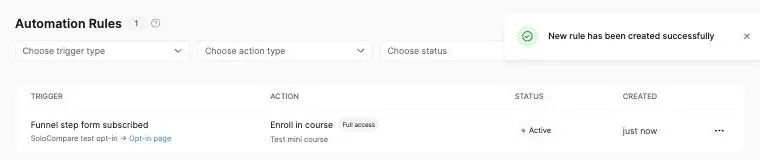
Then we used the free plan’s one automation rule: when someone subscribes through the opt-in page, enroll them in the course with full access. The rule saved and showed as Active.
Where we hit a limit
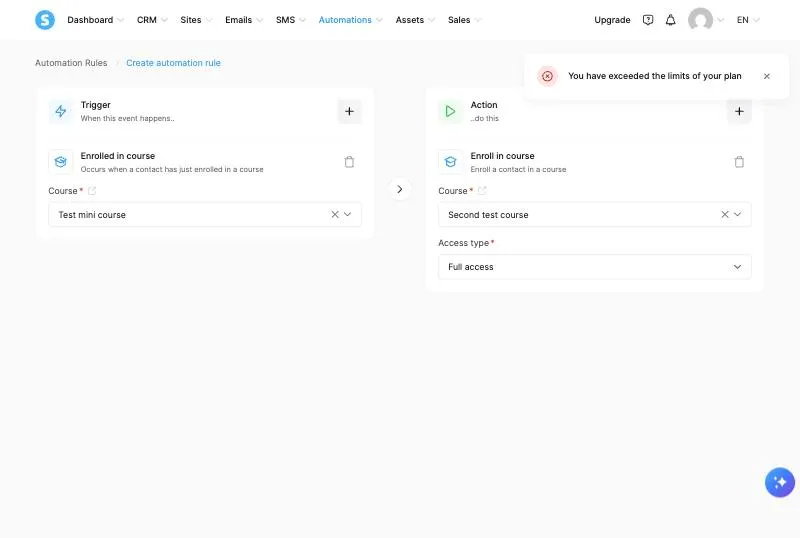
We tried to create a second automation rule, enrolling students from one course into another. Systeme.io refused with a red notice: “You have exceeded the limits of your plan.” The rule was not saved. The message did not say which limit we had reached or link to an upgrade page.
We did not connect a payment account or send live traffic through the funnel. The checkout experience and actual file delivery remain untested.
Open a free Systeme.io account and try it yourself →Set up your first product on Systeme.io
These are the steps we followed on the free plan on October 21, 2026.
- Open Systeme.io's signup page and create a free account with your email. No card is needed.
- Go to Sites, then Sales funnels, and create a funnel. Pick a template and replace the placeholder text. Check the currency. Ours defaulted to the euro, which a US-based seller will want to switch to dollars.
- Go to Assets, then Courses, and add a course. Click Add module, then Add lecture. Upload your video as mp4 or paste a YouTube link. For a downloadable product, add the file in the lesson or send a delivery email with a download link.
- Go to Automations and open Automation rules. Set the trigger to “Funnel step form subscribed” on your opt-in page and the action to “Enroll in course.” This uses your one free automation rule.
- Connect Stripe or PayPal under the payment settings (we did not test this step). Add a price to your funnel step.
- Publish the funnel and sign up with a second email address to check the full path before you share the link anywhere.
The funnel goes live on a systeme.io subdomain built from your account email, so rename the funnel URL before you share it if your email contains your full name.
What the free plan covers and where it stops
Systeme.io’s free plan is generous for a first product. It is tight for a second one.
| Limit | Free plan | Startup ($17/mo) |
|---|---|---|
| Contacts | 2,000 | 5,000 |
| Funnels | 3 | 10 |
| Funnel steps (pages) | 15 | 50 |
| Courses | 1 (500 students) | 5 |
| Automation rules | 1 | 10 |
| Tags | 1 | 10 |
| Email sends | Unlimited | Unlimited |
| Sales fee | 0% | 0% |
| Lifetime sales cap | $10,000, then 3 days to upgrade | None |
| Powered-by badge | Yes | Removed on Webinar and above |
One tag means one way to sort your list. One rule means one automated action. That limits the free plan to one lead magnet feeding one product with one follow-up sequence. It works for a launch. Segmenting buyers from freebie subscribers needs Startup.
Systeme.io deactivates accounts with no login or activity for 6 months, so log in occasionally even if your product runs on its own.
Pricing (verified October 21, 2026)
| Systeme.io plan | Monthly | Annual (per month) | Yearly total |
|---|---|---|---|
| Free | $0 | $0 | $0 |
| Startup | $17 | $14.17 | $170 |
| Webinar | $47 | $39.17 | $470 |
| Unlimited | $97 | $80.83 | $970 |
Annual billing works out to two months free. All plans include unlimited email sends and 0% transaction fees. You pay Stripe or PayPal their standard processing fee, but Systeme.io adds nothing on top.
Our comparison with Kajabi has the full pricing table and feature breakdown: Systeme.io vs Kajabi.
Start on the free plan →When a form is enough
You don’t always need a full funnel platform. If you sell one PDF through your own blog or Etsy shop and want to add a direct checkout, a payment form does the job.
Jotform collects card payments through Stripe, PayPal or Square and can email the buyer a download link on submission. The free plan gives you 5 forms and 100 submissions a month. Beyond that, Bronze costs $34 a month billed yearly.
We tested Jotform’s free plan limits separately and confirmed that payment gateways are not locked on the free plan.
Which tools should you pick
A solopreneur selling a first mini-course for $50 to $200: Systeme.io's free plan. One funnel, one course, one automation rule and unlimited emails cover the launch. You pay nothing until you pass 2,000 contacts or $10,000 in lifetime sales.
A freelancer who already has a site and wants to sell a single template or checklist: Jotform's free plan for a payment form, or just Stripe’s payment links. Skip the all-in-one platform until you have a second product.
Someone selling physical goods alongside digital downloads: Etsy, Shopify or Gumroad are better fits. Systeme.io and Jotform are built for digital delivery and courses.
A creator with an audience over 2,000 who wants quizzes, certificates and a student app: look at Kajabi or Thinkific. Our Systeme.io vs Kajabi comparison covers where Kajabi earns its $143 a month.
FAQ
Can I sell a digital product for free?
Yes. Systeme.io's free plan lets you build a landing page, host a course, send emails and accept payments through Stripe or PayPal, all for $0. You only pay the payment processor’s fee per sale.
What digital products sell best for solopreneurs?
Templates, mini-courses, and how-to guides tied to a skill you already teach or practice. Products that save the buyer 5 to 20 hours of work tend to convert well. Price them between $19 and $197 depending on depth.
Do I need a website to sell a digital product?
No. Systeme.io hosts your landing page on its own subdomain. You can buy a custom domain later, but the free plan includes one custom domain if you have one ready.
How do I deliver the product after someone pays?
Systeme.io can email a download link or grant course access automatically through its automation rules. For a simple PDF, set the automation to send a confirmation email with the file attached or a link to the course lesson where the file is hosted.
Is Systeme.io better than Gumroad for a first product?
Systeme.io includes funnels, email and courses in one free account. Gumroad charges 10% on every sale plus payment processing, and its free tier dropped in 2023. For a solopreneur who wants a full funnel, Systeme.io costs less. For someone who just wants a product listing in a marketplace, Gumroad is simpler to set up.
What if I outgrow the free plan?
Systeme.io’s Startup plan costs $17 a month and raises limits to 5,000 contacts, 10 funnels, 5 courses and 10 automation rules. For most solopreneurs, that covers the first year of growth after a successful launch.
How we tested
On October 21, 2026 we created a funnel, a one-lesson course and an automation rule on Systeme.io’s free plan. We applied a template, used the drag-and-drop editor, set up drip timing and hit the one-rule automation limit. We did not connect Stripe or PayPal, did not process a real payment and did not send traffic. Pricing comes from Systeme.io’s plans page, read the same day. We did not test Jotform’s payment forms or file delivery for this article. More on our test method is on the About page.
Final verdict
Sign up for a free Systeme.io account, build one landing page, upload your product, connect Stripe, and share the link with ten people you already know. The page, the checkout, the delivery and the follow-up email are covered. You will know within a week whether the product idea has a buyer.
Try Systeme.io free →